
 Response Code 415 When Requesting a Web
Service
Response Code 415 When Requesting a Web
Service

Problem Description
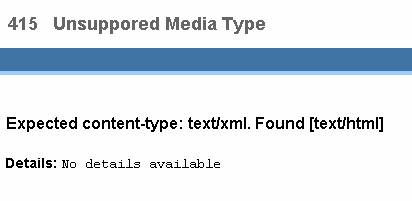
When requesting a Web service, you may receive an HTTP response with code 415 (Unsupported Media Type). If the client is a browser you may receive an HTML page with the following content:
|
Scenario Type: |
Error analysis |
|
NetWeaver Component: |
J2EE Engine |
|
Validity: |
J2EE Engine 6.40 and higher |
Decision Roadmap
Prerequisites
-
Main Tools
Visual Administrator
Analysis
There are two most common reasons that may cause this problem:
● The proxy client did not set the content-type HTTP header in the request.
● The content-type HTTP header value is not text/xml. This value is required according to the BP1.0 specification.
In order to be sure that the problem is caused by one of the reasons mentioned above, you have to examine the request sent by the client, especially the content-type header. Here you find a description of one possible approach to do that, but this is not the only one. For instance, tunneling tools also could be used.
...
1. Log-on to the Visual Administrator (as administrator), and go to the Dispatcher node.
2. Open the Kernel → LogManager view and check that the property ForceSingleTraceFile (if present) is set to NO.

If you have changed this property you need to restart the dispatcher.
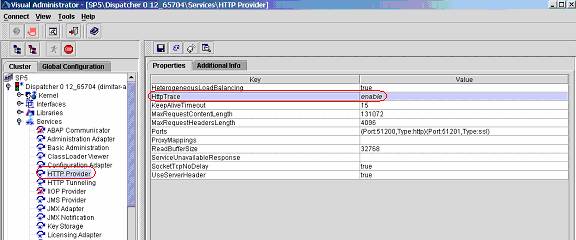
3. Navigate to Dispatcher → Services → HTTP Provider and change the property HttpTrace to enable.
4. Select Save.
5. Send the request again to the server by the proxy client.
6.
Check file req_resp.trc
in
<installation-path> /<InstalName><JCXX>/j2ee/dispatcher/log/services/http/req_resp.trc
This file contains the HTTP requests and responses received/sent by the
server.
You should find log entries similar to the following:
○ Log entry for a client request:
[Mar 22, 2004 4:33:56 PM ] - CLIENT: 512, REQUEST:
{POST /SP5WS/Config1?style=rpc HTTP/1.1
Host: localhost:xxxx
Content-Type: text/html
○ Log entry for a server response:
[Mar 22, 2004 4:33:56 PM ] - CLIENT: 512, REPLY :
{HTTP/1.1 415 Unsupported Media Type
Connection: close
Server: SAP J2EE Engine/6.30
Pragma: no-cache
Content-Type: text/html;charset=ISO-8859-1
Content-Length: 1515
Date: Mon, 22 Mar 2004 14:33:56 GMT
<!DOCTYPE HTML PUBLIC "-//W3C//DTD HTML 4.0 Transitional//EN">
<html>
<head>
<title>Error Report</title>
<style>
td {font-family : Arial, Tahoma, Helvetica, sans-serif; font-size : 14px;}
A:link {color : #0059AA;}
A:visited {color : #999999;}
A:active {color : #999999;}
</style>
</head>
<body marginwidth="0" marginheight="0" leftmargin="0" topmargin="0" rightmargin="0">
<table width="100%" cellspacing="0" cellpadding="0" border="0" align="left" height="75">
<tr bgcolor="#FFFFFF">
<td align="left" colspan="2" height="48"><font face="Arial, Verdana, Helvetica" size="4" color="#666666"><b> 415   Unsuppored Media Type</b></font></td>
</tr>
<tr bgcolor="#3F73A3">
<td height="23" width="84"><img width=1 height=1 border=0 alt=""></td>
<td height="23"><img width=1 height=1 border=0 alt=""></td>
<td align="right" height="23"><font face="Arial, Verdana, Helvetica" size="2" color="#FFFFFF"><b>SAP J2EE Engine/6.30 </b></font></td>
</tr>
<tr bgcolor="#9DCDFD">
<td height="4" colspan="3"><img width=1 height=1 border=0 alt=""></td>
</tr>
</table>
<br><br><br><br><br><br>
<p><font face="Arial, Verdana, Helvetica" size="3" color="#000000"><b> Expected content-type: text/xml. Found [text/html].</b></font></p>
<p><font face="Arial, Verdana, Helvetica" size="2" color="#000000"><table><tr><td valign="top"><b> Details:</b></td><td valign="top"><PRE>No details available</PRE></font></td></tr></table></font></p>
</body>
</html>
}
The text in bold letters shows which content-type is sent by the client and which content type is expected by the server. In the example above, the client sent content-type text/html, whereas the server expects content-type text/xml. For SOAP requests, only content-type text/xml is allowed.
Additional Information
Some Web service clients do not place the header content-type=text/xml in the HTTP request. This header is required by the BP1.0. Try to use clients compliant with this specification to prevent compatibility inconsistencies. The problem should be reported to the Web service client vendor in order to be taken in consideration for future releases of the product.
Related PAS documents from security:
● Security Web Service Proxy Authentication Deployment Problems
● Web Service Authentication Authorization Deployment Problems