
 Configuring the Web Service

Purpose
Adobe document services expose their functionality to the PDF object implementations through a Web service interface. This interface is not directly accessible. Instead, access to Adobe document services is provided using either:
● The PDF object, or
● Web Dynpro and Forms Processing, which in turn use the PDF object at runtime
Adobe document services can perform a number of tasks that require access to sensitive corporate resources. For example, to assign usage rights to a document, Adobe document services require access to credentials. It is therefore important to ensure that only authorized users and processes can access the Adobe document services Web service. Configuring security on your web services connection ensures the security of your documents and credentials.
For more
information about the secure communication links in the Web AS with Adobe
document services, see
 Technical System
Landscape in the Security Guide for SAP Interactive Forms by
Adobe.
Technical System
Landscape in the Security Guide for SAP Interactive Forms by
Adobe.
Configuration Procedure
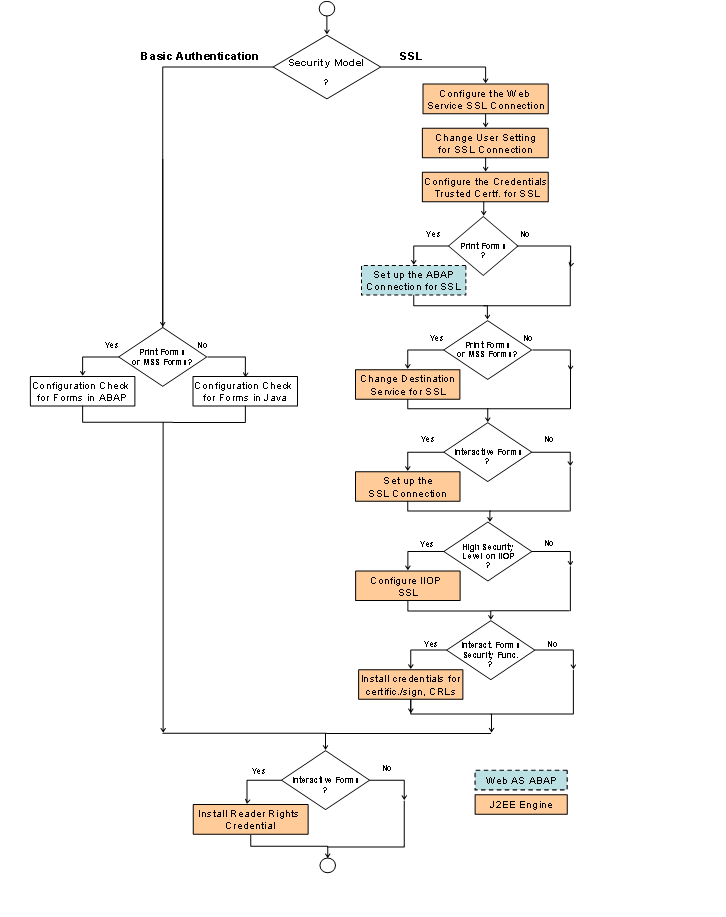

All steps that are necessary for interactive forms also apply to forms in ISR scenarios, for example MSS Forms.
The following checklist gives you a summary of the information shown in the figure above. Some steps depend on your application scenario. Each step provides a link to the appropriate section in this document.
...
1. Select a security model for your web services connection and configure the web service connection appropriate to that model. There are two security configuration options:
○ Basic Authentication – supports all functions including assigning usage rights, but excluding digital signatures. If you use this model, you normally do not need to configure the connection settings, because as of SAP NetWeaver 7.0, these are the default settings in an ABAP+Java system. You should check the configuration settings to verify that they are correct for your system. For example, if you changed the client of the ABAP system, you need to check the settings for the client information. For more information, see Configuration Check.
○ SSL – supports all functions including digital signatures. For detailed information, see Configuration of the Web Service SSL Connection
■ If you are developing or processing forms in ABAP, you must change the Destination Service for SSL, because data is transmitted between ABAP and Java environments. You also must change the setting of the ABAP connection to SSL.
■ You need to configure the IIOP SSL only if you require a high level of security.
■ Install and configure the credentials required by SAP Web ASto assign the credentials and CRLs required for document certification and signing. For detailed information, see Installing and Configuring Credentials .
2. If you use interactive forms, install and configure the credentials required by SAP Web AS to assign usage rights (Reader Rights). For more information, see Installing and Configuring Credentials and Reader Rights Credential.
3. If your system configuration uses the System Landscape Directory (SLD), you must publish the Adobe document services to the SLD. For detailed information, see Publishing Adobe Document Services to the System Landscape Directory.