
 Defining Entity Service Operations

Use
You use the CRUD (create, read, update, and delete) and findBy operations to set queries on the attributive information of entity services. The CRUD methods cannot be modified; however, you can define findBy methods according to which data you want to query.
Prerequisites
You have created the project carpool and the following entity services:
ü Employee
ü Car
ü Travel
ü TravelLocation
Procedure
1. Go to the Operations tab page of the entity service Employee.
2. Choose Add… from the Operations window.
3. In the New Operation wizard:
a. Enter findByLastName in the field Operation name,
b. Enter Find by Last Name as the Description, and
c. Select lastName from the attribute list table.
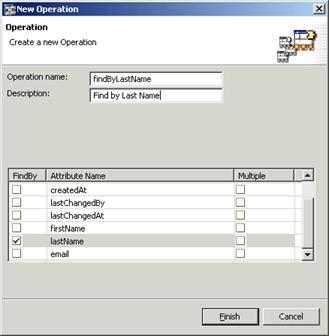
4. Choose Finish.
The operation will appear in the Operations list.

5. Repeat steps 2-4 to create findBy methods for the entity services listed in the table below.

When using the findBy method, the method name should always be prefixed by findBy without any spaces.
Entity Service |
Method |
Description |
Parameters Used |
Employee |
getAll |
Get all |
None |
Car |
getAll |
Get all |
None |
TravelLocation |
findByID |
Find by ID |
ID |
Travel |
getAll |
Get all |
None |
Travel |
findByDateAndCarKey |
Find by date and car |
startDate, Car |
Travel |
findByStartDateAndStartLocationAndTargetLocation |
Find by start date, start and target locations |
startDate, startLocation, targetLocation |
6. In the Permissions tab page for every entity service created, deselect the Permission checks enabled and Permission on instance level boxes.
7.
Choose  with the quick info text Save All Metadata to save the project.
Your findBy operations are finished!
Step 4: