 Creating Value Range Expressions
Procedure
In the Object Manager panel, under Detail section, choose the Assigned Objects tab.
The Assigned Objects tab page opens.
Choose Expression from the Type field and choose Create Object.
In the Object Creation dialog box that appears, enter Gross_Salary_is_low in the Name field.
Choose Value Range in the Type field and choose Create & Navigate To Object.
The value range expression appears in the Object Manager panel.
Define the incoming parameter by choosing
 (Graphical Access).
In the context menu, choose Select Context Data Object.
In the Object Query dialog box that appears, choose the GROSS_SALARY data object and choose Select .
The data object is added as the incoming parameter for the value range expression.
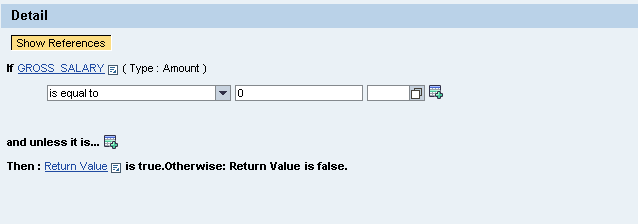
Enter values for the incoming parameter.
Choose is less than or equal to as the value range, enter 25000 as the amount and choose EUR as the currency.
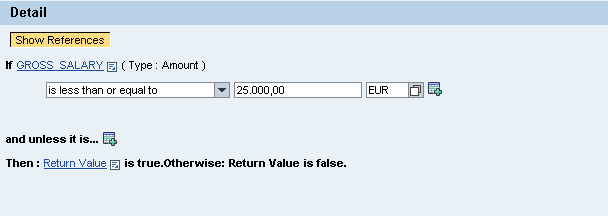
Save the value range expression.
Create the following value range expressions using the above procedure.
Name of the Value Range Expression |
Incoming Parameter |
Values |
|---|---|---|
Gross_Salary_is_Medium |
Choose Gross_Salary data object. |
Choose value range as is less than or equal to Amount 25001 and EUR as the currency. |
Gross_Salary_is_High |
Choose Gross_Salary data object. |
Choose value range as is greater than Amount 100000 and EUR as the currency. |