 Granting and Revoking Object Privileges
Object privileges can be granted/revoked to/from a custom role or user for a specific object. You cannot modify any of the built-in roles:
scheduler-administrator - can perform all actions.
scheduler-event-operator - can raise and clear events.
scheduler-job-administrator - can create/edit/delete event definitions, job definitions, job chains. Can modify jobs.
scheduler-user - has access to SAP CPS only, cannot see any objects.
scheduler-viewer - read only access to all objects.
scheduler-isolation-administrator - can create/edit/delete isolation groups and add users to these.
scheduler-screen-reader - indicates that you are using a screen reader.
Object privileges cannot be granted directly, you grant ranks of privileges. For example, the Job Administrator rank contains View and View Jobs and Submit Onto privileges, this prevents human error, as you need to be able to see the queue, the jobs in that queue and you need to be able to submit a job into the queue to be able to be able to submit a job into the queue and monitor its status. Furthermore, privileges can be granted as Access and Admin, when you grant a privilege as Admin, the grantee can grant the privilege to other users.
Exportable privileges will be exported together with the object, the grantee has to exist in the system where you import the object.
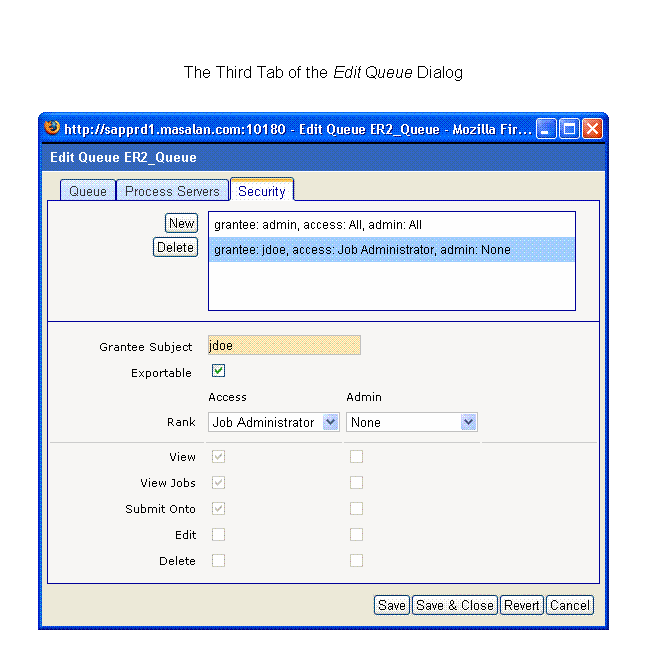
The figure below illustrates the privileges of user jdoe on the queue ER2_Queue.
Procedure
Granting object privileges
Navigate to the object you want to change the security for.
Choose Edit Security from the context menu.
On the Security tab, choose New and select the grantee.
Choose a Rank with the desired privileges. Admin privileges allow the user to perform the action and to grant the privilege to others as well. Access privileges allow the user to perform the actions.
Revoking object privileges
Navigate to the object you want to change the security for.
Choose Edit Security from the context menu.
On the Security tab, choose the grantee.
Choose a Rank with the desired privileges, if you want to revoke all privileges for this object from the grantee, choose Delete. Admin privileges allow the user to perform the action and to grant the privilege to others as well. Access privileges allow the user to perform the actions.
Example
Granting Submit privileges on the job definition ProcessPartnerFile to user jdoe.
{
//Get the job definition and user
JobDefinition myjd = jcsSession.getJobDefinitionByName("ProcessPartnerFile");
Subject myUser = jcsSession.getSubjectByTypeName(SubjectType.User,"jdoe");
//Create an empty grant
SubjectObjectPrivilegeGrant myGrant = myjd.createSubjectObjectPrivilegeGrant();
//Set the grantee and the rank
myGrant.setGranteeSubject(myUser);
myGrant.setGrantedRank(myGrant.getAllRanks()[3]);
//Save the changes to the database
jcsSession.persist();
}