
 Implementing iViews

Implementation of operations is done by the attachment of iViews to operations. Each iView attached to an operation is the implementing iView of the operation.
Role of implementing iViews in OBN
The ability to have specific navigation customizations for different users according to their roles is a key feature of OBN. All portal users are assigned their roles according to their business interests and permissions. Since permissions to iViews are granted only those contained within the role of the user, OBN-specific customizations are achieved using role maintenance for the implementing iViews, and modifying the priorities of the business object operations to which they are attached.
Priorities of implementing iViews in OBN
Access to portal content is role-based, and a user may have more than one role. Additionally, an iView may have multiple operations associated with it, and an operation may be implemented by multiple iViews. In this situation, a user launching an iView may have quite a large pool of implementing iViews, presenting the portal runtime with conflicts as to which iView to implement.
The ability to edit the priority of these operations is provided within the context of implementing iViews. The operation priority defined within from implementing iView takes precedence over the priority assigned to it from the Business Object Editor.
Example
The following example is valid for the iView link scenario in which the default operation is activated.
In the illustration, there are two users with two corresponding roles: Sales Representative and Sales Manager. The Sales Representative role has permissions for iViews 1 and 2, but not to 3 or 4. The Sales Manager Role has permissions for all iViews.
Note the following:
· iView 1 is the source iView containing the OBN call.
· iView 1 is based on the business object Accounts.
· The operations attached to the business object Accounts are Account Details and List of Opportunities; each operation displays the priority it was defined for it in the Business Object Editor.
· The P value represents the operation priority.
· iViews 2, 3, and 4 are implementing iViews, each displaying the modified priority value for the associated operations, in accordance with the role of the user.
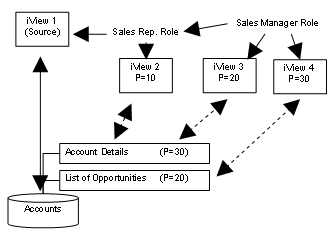
When the Sales Representative role chooses the OBN link in iView 1, only iView 2, implementing Account Details, is displayed, even though the priority of the Account Details operation was modified within the context of the iView, to be lower than the original priority assigned to the operation. This is the only available iView to this role for this operation.
When the Sales Manager Role chooses the OBN link in iView 1, iView 4, implementing List of Opportunities, is displayed. Even though this operation has a lower priority assigned to it originally, the priorities of the operations have been modified within the context of the iViews, so that for this role iView 4 takes precedence over iView 3.

It needs to kept in mind that the search pattern of the object-based navigation service first to look for the operation with the highest priority, and then to look for the implementing iView (if the high-priority operation has associated with it more than one), for which the current operation has the highest priority.