
 Data Extraction in CAF and SAP BW
Integration
Data Extraction in CAF and SAP BW
Integration

CAF and SAP BW integration supports data loading for DataSources created from entity and application service query methods (findByMultipleParameters).
Extraction Types
CAF and SAP BW integration supports data loading for:
● full updates
● delta initialization
● delta load
With delta load, you can prevent long loading times and unnecessary locks on the database by only loading new or modified data records into SAP BW. This is advantageous when working with applications with large data collections.
Of course, at the start of data loading, all records must be loaded at least once into SAP BW and can also be uploaded fully. All data loads thereafter are considered delta loads.
Extraction Process Selection Parameters
The CAF and SAP BW integration process supports the use of selection parameters that were defined at the onset of the extraction process. You, the user, can set needed selections in the InfoPackage to start the extraction process in one of the following modes:
● full update
● delta-initialization
● delta-load mode
The SAP BW system makes an RFC call to the J2EE server, where in return, the BI_SDK framework parses selection parameters and pass them onto the CAF connector. The CAF Connector analyzes the defined parameters (in string format) and creates objects of needed types and passes them to the entity service findByMultipleParameters method or to the application service BW extract method.
This process is highlighted in the figure below.
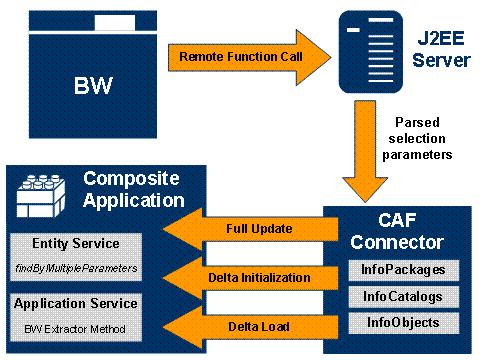
For DataSources created by entity services, all work is done by the CAF and SAP BW integration. For DataSources, such work should be done by the BW extractor method developer.

Selection parameters are not supported for DataSources created for accessing classification assigning information, language-dependent attributes, custom enumeration types and Web Dynpro enumeration types.
If you set selections at onset of the delta initialization process, these selections will be used at each next delta load.
For more information, see Initializing Delta Load → Starting Delta Initialization (step 4).
See also: