 Configuring the Calendar Profile


Configuring the Calendar Profile
Use
A calendar profile summarizes which calendars are to be synchronized, when synchronization is to take place and which time period in the calendar is to be synchronized.
Activities
Create a profile for each calendar combination. See
Maintaining Calendar Profiles. If you only maintain one calendar, you can change the preset standard profile.You make all the settings for calendar integration in Microsoft Outlook. The settings include
The following graphic shows an overview of the settings that are summarized in a profile for each calendar combination:
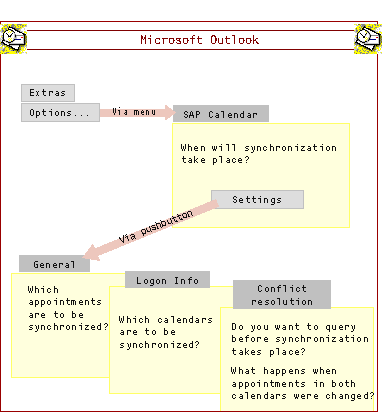

If the dialog box for the synchronization settings does not appear, although you have called the settings using the pushbutton, it could be covered by other windows (for example, the Outlook main window). Check first before calling the function again.