
 XML Data Archiving Configuration Steps for
ABAP Applications
XML Data Archiving Configuration Steps for
ABAP Applications

The following configuration steps are aimed at data archiving administrators who want to use XML archiving objects and run, test and monitor the XML Data Archiving Service and developers of XML archiving objects.
Prerequisites
Before you begin you should be familiar with the concepts of XML-based archiving. For more information see:
●
 Administration of the
XML Data Archiving Service
Administration of the
XML Data Archiving Service
To be able to follow these configuration steps you need to have an SAP Application Server (AS) Java 7.00 installed. A standalone AS Java is sufficient. An SAP NetWeaver ASadd-in installation is possible as well.
Components for XML Archiving
The following components are the principal constituents of the XML data archiving technology:
● XML Data Archiving Service (XML DAS): A AS Java application, which processes the incoming archiving requests and manages the archives.
● XML Archive API for ABAP: An API for accessing the XML DAS from ABAP archiving objects.
● XML Archive API for Java: An API for accessing the XML DAS from within the AS Java. It is provided in the form of a Java EE Library (not discussed in this guide).
● GUIs:
○ The XML DAS Administration is available as a WebDynpro for Java.
○ For the XML DAS Connector for ABAP, the local archiving administration is provided by transaction SARA.
○ For the administration of AS Java archiving applications a central WebDynpro-based user interface is available as of SAP NetWeaver 7.1.
Configuration
The following figure gives an overview of the configuration steps necessary for XML archiving for ABAP applications and which areas of XML data archiving these steps affect or where exactly they are carried out.

This is only an example of a data archiving landscape. It is also possible to have the AS Java running as an add-in of the same SAP NetWeaver ASinstallation, for example, or to have a separate file or WebDAV system, or other configurations.
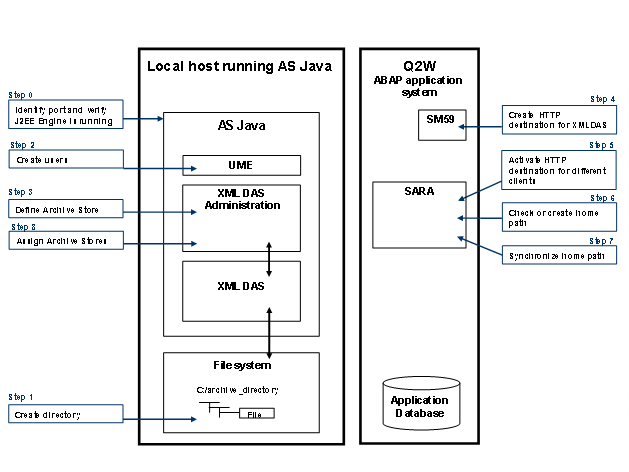
The figure shows the following procedure steps needed to configure the XML data archiving environment for ABAP applications:
● Creating a Directory or Collection (Step 1)
● Defining an Archive Store (Step 3)