Working With Documents
Prerequisites
Before proceeding, you must create the central instance control for managing Office Integration. Refer to Instance for Managing Office Integration .
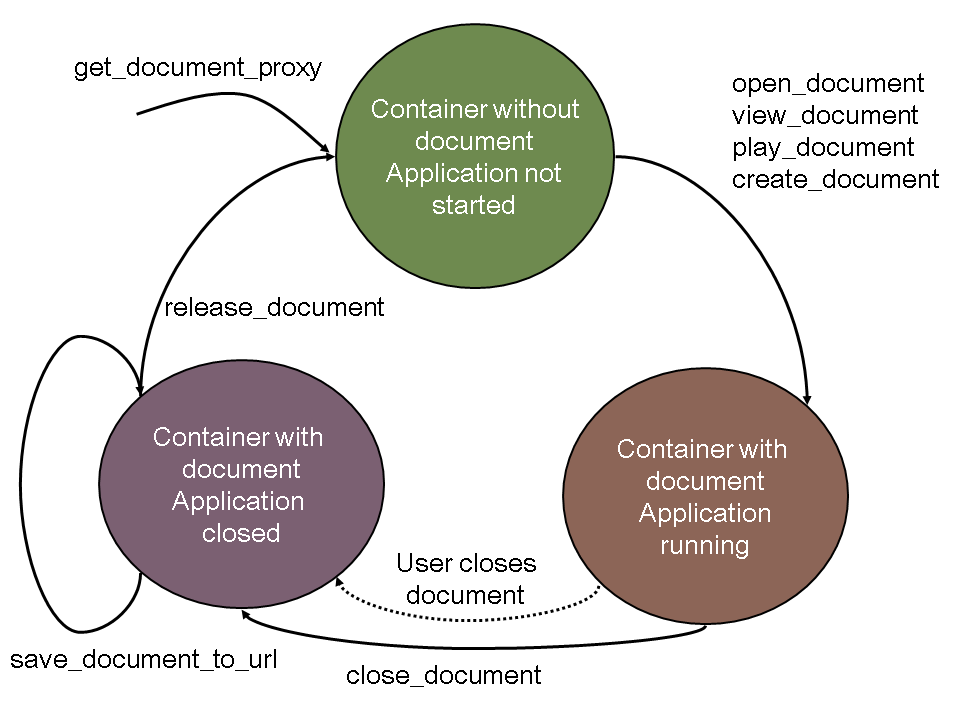
The following diagram shows the process of editing a document:
-
Declaration
Declare an instance with reference to interface i_oi_document_proxy :
DATA: document TYPE REF TO I_OI_DOCUMENT_PROXY.
-
Initialization
Create the instance for the document by using the method get_document_proxy on the central administration instance for Desktop Office Integration control.
-
In your application program, assign a handler method to the events that could be triggered in the document.
-
Open a document. For existing documents, use the open_document (change mode), view_document (display mode for metadata), or play_document methods. To create a new document, use the create_document method.
-
Editing
Edit your document and save any changes. You can use the following methods during the editing phase:
Method
Function
print_document
Prints the document
clear_selection
Deletes marked text
paste_clipboard
Inserts the contents of the clipboard
cut_selection
Cuts marked text
paste_special
Inserts a link
select_all
Marks all text
copy_selection
Copies marked text
execute_macro
Executes a macro
save_as
Saves document locally (on the presentation server)
save_copy_as
Saves the document under another name
page_setup
Determines the page layout
-
You can find out the attributes of the instance document using the following methods:
Method
Function
is_open
Document is open in the office application
is_destroyed
Document is not open (empty container)
get_document_type
Type of document
has_changed
Document has changed
get_document_handle
Determines the handle of a document
has_standard_interface
Determines whether the document has a standard interface
-
Closing
When you have edited the document, use the method close_document to close the document or react to the event on_close_event that is triggered when the office application user closes the document.
-
Save the changes in the document document using the method save_document_to_url . Then release the memory occupied using the method release_document .
When you develop your application, you must bear in mind that the user can always close the office application while the SAP system is busy with other tasks. If this happens, the event on_close_event is lost. Therefore, when you exit the transaction, you should always check whether there are documents that are still open, and whether these have changed.
Make sure that you save the changes in the document before releasing the document with the release_document method. Use the relevant methods on the instance document
. If you want to use special methods of the desktop application, you can use one or more of the following interfaces: The Word Processor Interface
Remember that you should include error handling after each method call.
Any parameters not contained in the individual method descriptions are listed under Generic Parameters .