 Test the Query Operation
Process
For testing the QUERY and the READ operations, you can use your default browser since only the HTTP GET method is used for these operations.
Executing the main Query Operation
To execute the Query operation, insert the string z_user_bor_Collection before the question mark character (?) in the URL. The complete URL would be: <Gateway_host>:<port_number>/sap/opu/odata/sap/ZSH_USER_BOR/?$format=xml
From the Object Navigator, expand the Related GW Consumption Models node, and double-click on the service document, ZSH_USER_BOR_0001.
Click XML.
This launches the default browser and displays the service document in Entity Data Model terms according to OData specifications.
 Note
NoteProvide you Gateway user credentials when prompted.
End of the note.
Take note of the items with the suffix Collection, these are the Data Objects at design time.
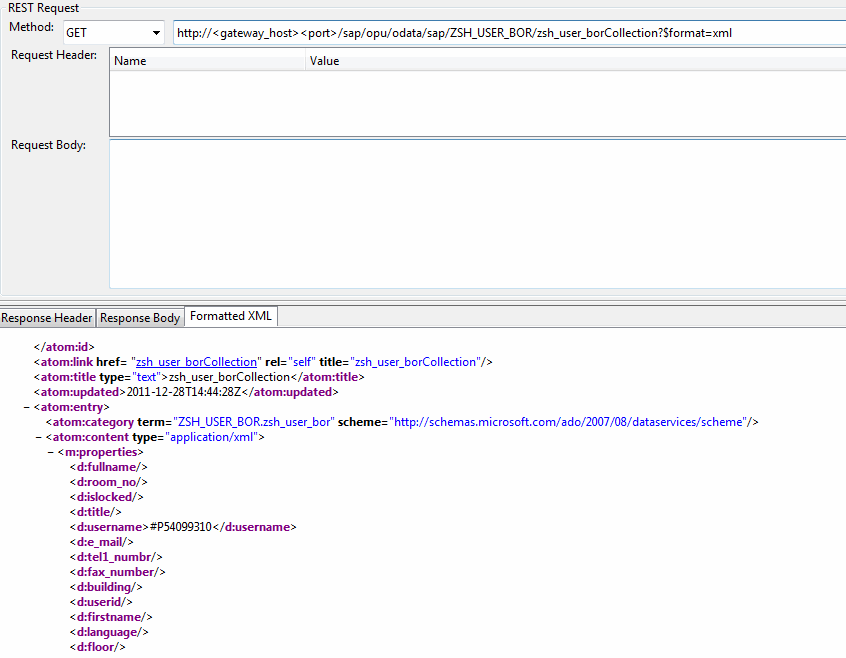 (Results of the query showing one hundred rows)
They contain the key Properties, Data Model name, and system alias respectively. Notice that only the FIRSTNAME, LASTNAME, and FULLNAME properties hold values, mainly because the BOR method GetList is not designed to return detailed user data. That is reserved for GetDetail.
Also, how the service is mapped in the Data Model usually plays a major role in the returned data. Remember, there should be a maximum of 100 user entries returned.
Remember that the property MaxRows was set to a constant value of ‘100’.
Restricting Results with $top
Limit the number of user entries returned by using the $top filter option.
Add $top=5 to the URL, so that it appears as follows:…/z_user_bor_Collection?$top=5
 ($top option)
There should be no more than 5 entries returned:
 (The returned query results)
Remember that $top takes precedence over the constant set for MaxRows. If more than 100 results are needed, $top can be used.
Target Queries using $filter and Mapped Range Tables
Since there is potentially a large user base, it would be helpful to filter the returned data using available selection criteria.
This is where you can take advantage of the range table mapped for the Query operation.
Specific User
To find a specific user, modify the URL as follows:
…/ZSH_USER_BOR/zsh_user_borCollection?$filter=lastname eq 'AVIZOV'
 Example
http://<Gateway_host>:<port_number>/sap/opu/odata/sap/ZSH_USER_BOR/zsh_user_borCollection?$filter=lastname eq 'AVIZOV'
 (Example using $filter)
 This returns one result, an entry for user, AVIZOV.
End of the example.
Locked or Unlocked Users
To look for users that are locked, use the following filter: .../ZSH_USER_BOR/zsh_user_borCollection?$filterislocked NE '0'
For only unlocked users: .../ZSH_USER_BOR/zsh_user_borCollection?$filter=islocked EQ '0'
Other filters
…?$filter=lastname EQ 'SMITH'
Users with LASTNAME equal to ‘SMITH’
…?$filter=substringof(lastname,'SM')…
Users with LASTNAME containing ‘SM’
…?$filter=substringof(lastname,'SM') and islocked NE '0'…
Users with LASTNAME containing ‘SM’ and that are also locked.
Note
Although OData specifications for the $filter option include a large variety of logical and arithmetic operators along with various string functions, currently, Gateway does not support all of them.