Deleting Several Change Statuses (QM-PT-IP)


Deleting Several Change Statuses (QM-PT-IP)
Deleting a Change Status Online
You use this variant to make sure that a
change status cannot be displayed or edited. If in an inspection plan that has several change statuses you delete a change status online, you can no longer display the following objects:You cannot reactivate a change status that you have deleted online. You can still access any other change statuses.
Example:
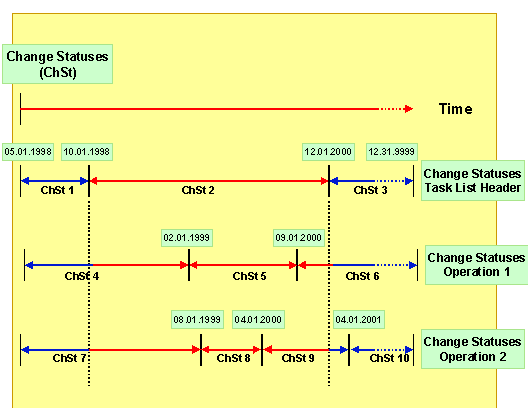
The change statuses of your inspection plan are distributed as shown in this graphic.
You delete change status 2 of the task list header online. The system automatically deletes the change statuses of all subordinate objects, such as operations that are contained in the header change status.
In the example, the change statuses 5 and 8 for the operations can no longer be edited, since they are both completely within the validity period of change status 2.
Change statuses 4, 6, 7 and 9 can, however, be partially edited, for example you can edit the change status 7 for operation 2 before 10/01/1998 and change status 9 after 12/01/2000.
Deleting Over the Entire Effectivity Period
When you set a deletion flag for a change status in an inspection plan with several change statuses, the deletion flag is also set for the entire inspection plan. If you enter deletion flags as a selection criterion for an archiving run, the entire inspection plan with all inspection plan objects is archived and deleted if it has a deletion flag set. If you remove a deletion flag, this also effects the entire inspection plan.

As of release 3.0E, deletion flags always apply to all the change statuses of an inspection plan. When you set a deletion flag for a change status, the deletion flag is also set in the entire inspection plan.
In previous R/3 releases, deletion flags were handled differently. You can use program
Deleting on the Key Date
You use this variant, if you want to delete the
change status of an inspection plan that ends before a key date.Example:
A task list header and some subordinate objects (two operations) were created, valid from 05/01/1997 to 12/31/9999. You can take the change statuses for this inspection plan from the graphic. You have already deleted change status 2 online.

You again delete on key date 01/01/2000.
The system: