
 Architecture

The figure below gives you an overview of the architecture of SAP Interactive Forms by Adobe. It shows the parts that have to be installed and the parts that you have to configure as described in this documentation. You can also see the communication paths between the components used in SAP Web AS.
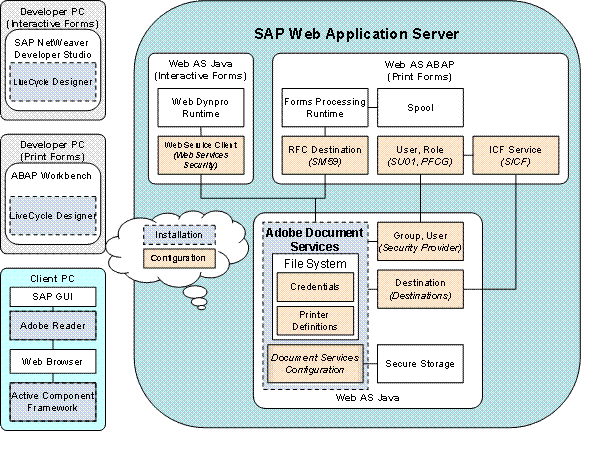
LiveCycle Designer is installed locally on the developer’s PC and integrated into the following development environments:
● ABAP Workbench
● SAP NetWeaver Developer Studio
You install LiveCycle Designer from the separate CD/DVD delivered by SAP.
The installation of Adobe Reader and the Active Component Framework is described in the section Additional Installations on the Client PC.
The configuration steps for SAP Interactive Forms in SAP Web AS are described in the following chapters under Configuring the Web Service. The figure shows you at a glance which transactions in the ABAP system or service nodes in the Visual Administrator in the Java System you need to use.