 InfoCubes in Controlling


InfoCubes in Controlling
Structure of Controlling
Controlling is divided into Overhead Cost Controlling and Product Cost Controlling.
Overhead Cost Controlling
CO-OM-CCA: Cost Center Accounting
CO-OM-OPA: Overhead Orders
CO-OM-WBS: Overhead Projects
CO-OM-ABC: Activity-Based Costing
Product Cost Controlling
CO-PC: Product Cost Planning
CO-PC: Cost Object Controlling
CO-PC: Actual Costing / Material Ledger / Inventory Valuation
Which Cubes Are Available in CM?
Overhead Cost Controlling
CO-OM: Costs and Allocations (Delta Extraction) (0COOM_C02)
This Cube contains information from all areas of Overhead Cost Controlling. This allows integrated analyses across all areas.
The Cube 0COOM_C02 is supplied directly by InfoSources from R/3. You can decide whether you want to use the Cubes for the individual components (Cost Center Accounting, Overhead Orders, Overhead Projects, Activity-Based Costing) (see below), only the overall Cube, or both.
Cost Center Accounting
CO-OM-CCA: Costs and Allocations (0CCA_C11)
CO-OM-CCA: Costs and Allocations (by Activity Type) (0CCA_C02)
CO-OM-CCA: Activity Type Quantities and Prices (0CCA_C04)
CO-OM-CCA: Statistical Key Figures (0CCA_C03)
Overhead Orders
CO-OM-OPA: Costs and Allocations (0OPA_C11)
CO-OM-OPA: Statistical Key Figures (0OPA_C02)
Overhead Projects
CO-OM-WBS: Costs and Allocations (0WBS_C11)
CO-OM-WBS: Statistical Key Figures (0WBS_C02)
Activity-Based Costing
CO-OM-ABC: Costs and Allocations (0ABC_C06)
CO-OM-ABC: Process Quantities and Prices (0ABC_C05)
CO-OM-ABC: Statistical Key Figures (0ABC_C02)
Product Cost Controlling
Product Cost Planning
CO-PC: Product Cost Planning – All Cost Estimates (0COPC_C08)
CO-PC: Product Cost Planning – Released Cost Estimates (0COPC_C09)
Cost Object Controlling
CO-PC: Cost Object Controlling (0PC_C01)
Inventory Valuation
Inventory Valuation: Material Prices and Inventory Values (0COPC_C04)
Actual Costing/Material Ledger
CO-PC: Actual Costing/Material Ledger – Costs (0COPC_C03)
CO-PC: Actual Costing/Material Ledger – Cost Component Split (0COPC_C09)
Loading Data
General Information
You have decided that you want to use particular Cubes. The first questions you have are: How do I get the data into the BW? Which contents do I load and when? How many InfoPackages do I need? When should I schedule them? The following guidelines apply to InfoCubes on R/3 Controlling objects:
Contents |
When loaded |
Plan |
When planning is completed
|
Target |
Monthly, after the period-end close |
Actual |
Monthly, after the period-end close, or (if the delta method is possible for the Cube) as often as desired |
Settlements |
Monthly, after the period-end close |
Variances |
Monthly, after the period-end close |
This results in the following types of InfoPackages:
Contents |
Possible value types (determine which contents can be loaded) |
Time restriction |
1. Plan |
20 = plan |
If the planning rhythm is yearly or quarterly, a request for the periods 1–12, or one for the periods 1–3, 4–6, etc. If the planning changes during the period, for example in Production, only after the period-end close. |
2a. Actual (with delta method) |
10 = actual |
Not necessary |
2b. Actual (without delta method) |
10 = actual |
One request per period, after the period-end close |
3. Target, settlements, variances |
30 = target 40 = commitments 50 = budget 60 = forecast 70 = variance 80 = accrual 90 = control costs |
One request per period, after the period-end close |
Special Information on Loading
CO-PC: Product Cost Planning
First load after installation of BW:
Continuous Loading
CO-PC: Actual Costing / Material Ledger / Inventory Valuation
First load after installation of BW:
Continuous Loading
Controlling Objects (such as Cost Centers, Internal Orders, Business Processes, and Production Orders)
First load after installation of BW:
Continuous Loading
The procedure depends on the data type and extraction method:
Data Type |
Time Point |
Plan |
When planning is completed
|
Target |
Once a period (month), after the period-end close |
Actual |
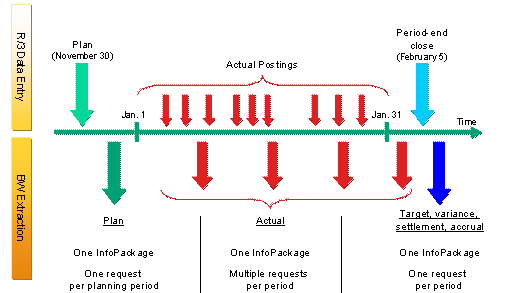
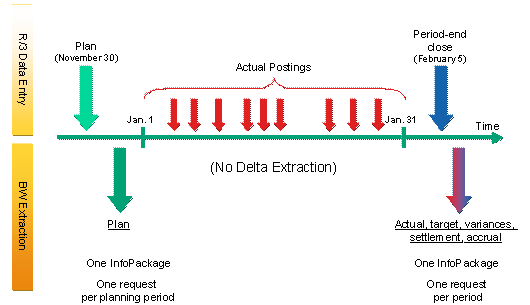
With delta extraction: As often as you want (such as once a week) Without delta extraction: Once a period (month), after the period-end close |
Settlements, variances, reserves (accruals) |
Once a period (month), after the period-end close |
Loading with Delta Extraction
Loading Without Delta Extraction
Adjustments
Navigation Attributes
Navigation attributes are available for many characteristics of the InfoCubes. A standard selection of such attributes are active in the version shipped.
You are not, however, forced to use this standard selection. You can deactivate attributes to improve performance, for example. You can activate additional attributes that you want to use in your reports.
Restricted and Calculated Key Figures
The InfoCubes in Controlling are partially based on R/3 tables. This enables the full flexibility of the tables (such as the R/3 CO object) to be utilized in BW. However, this made the Cubes relatively complex.
This means that the basic key figures cannot be used without restricting some of the characteristics.
A way had to be found to provide good usability despite this limitation. This was achieved by supplying the most important restricted and calculated key figures in the standard shipment. These key figures should cover a large portion of the requirements. They allow the Cubes to be used easily and immediately. For this reason you should use only the supplied restricted key figures in queries you have defined yourself, or analyze the supplied restricted key figures and modify them to suit your requirements.
If the InfoCubes were less complex and all supplied key figures had been defined as columns of the cube, this modification would not have been possible.
New and Replaced InfoCubes
InfoCubes in CO-OM
Do not use this InfoCube: |
Use this InfoCube instead: |
Costs and Allocations 0COOM_C01 |
CO-OM: Costs and Allocations (Delta Extraction) 0COOM_C02 |
InfoCubes in CO-OM-ABC
As announced at Release 2.0B, the following Cubes were deleted:
Changed Cubes:
CO-OM-ABC: Process Quantities and Prices 0ABC_C05 |
Change: Enhanced with cost component data of prices |
CO-OM-ABC: Costs and Allocations 0ABC_C06 |
Change: Enhanced with data on variances |
Replaced Cubes
Do not use this InfoCube: |
Use this InfoCube instead: |
Activity-Based Costing (Costs and Quantities) 0ABC_C01 (deleted) |
CO-OM-ABC: Process Quantities and Prices 0ABC_C05 and CO-OM-ABC: Costs and Allocations 0ABC_C06 |
InfoCube Activity Allocation (Costs and Quantities) 0ABC_C15 (deleted) |
CO-OM-CCA: Costs and Allocations 0CCA_C11 and the InfoCube CO-OM-CCA: Activity Quantities and Prices 0CCA_C04 |
CO-OM-ABC: Primary Cost Component Split (old version) 0ABC_C03 |
CO-OM-ABC: Process Quantities and Prices 0ABC_C05 |
CO-OM-ABC: Variances (old version) 0ABC_C04 |
CO-OM-ABC: Costs and Allocations 0ABC_C06 |
CO-OM-CCA: Primary Cost Component Split (old version) 0ABC_C13 |
CO-OM-CCA: Activity Type Quantities and Prices 0CCA_C04 |
CO-OM-CCA: Variances (old version) 0ABC_C14 |
CO-OM-CCA: Costs and Allocations (Marginal Costs) 0CCA_C02 and CO-OM-CCA: Costs and Allocations 0CCA_C11 |
InfoCubes in CO-OM-CCA
Changed Cubes:
CO-OM-CCA: Costs and Allocations 0CCA_C11 |
Change: Enhanced with data on variances |
CO-OM-CCA: Activity Type Quantities and Prices 0CCA_C04 |
Change: Enhanced with cost component data of prices |
Replaced Cubes
Do not use this InfoCube: |
Use this InfoCube instead: |
CO-OM-CCA: Costs and Allocations (old version) 0CCA_C01 |
CO-OM-CCA: Costs and Allocations 0CCA_C11 |
InfoCubes in CO-OM-OPA
New Cube
CO-OM-OPA: Costs and Allocations 0OPA_C11 |
Contains: Variances, costs and allocations, actual costs with delta extraction, budget, overall/annual planning values |
Replaced Cube
Do not use this InfoCube: |
Use this InfoCube instead: |
Costs and Allocations (Orders) 0OPA_C01 |
CO-OM-OPA: Costs and Allocations 0OPA_C11 |
InfoCubes in CO-OM-WBS
Replaced Cubes
Do not use this InfoCube: |
Use this InfoCube instead: |
Costs and Allocations (WBS Elements) 0WBS_C01 |
CO-OM-WBS: Costs and Allocations 0WBS_C11 (contains: costs, actual costs with delta extraction, budget, overall plan) |
InfoCubes in CO-PC-PCP
New Cubes
CO-PC: Product Cost Planning – All Cost Estimates 0COPC_C08 |
The aggregation behavior of the lot size and planned production quantity was modified. Cost Component Groups 1 and 2 were enabled as navigation attributes, making it possible to have reports on cost component groups. |
CO-PC: Product Cost Planning – Released Cost Estimates 0COPC_C09 |
Replaced Cubes
Do not use this InfoCube: |
Use this InfoCube instead: |
Product Cost Planning: Any Cost Estimates 0COPC_C05 |
CO-PC: Product Cost Planning – All Cost Estimates 0COPC_C08 |
Product Cost Planning: Released Cost Estimates 0COPC_C06 |
CO-PC: Product Cost Planning – Released Cost Estimates 0COPC_C09 |
InfoCubes in CO-PC-ACT
New Cube
CO-PC: Actual Costing/Material Ledger – Cost Component Split 0COPC_C07 |
The aggregation behavior of the quantity was modified. Cost Component Groups 1 and 2 were enabled as navigation attributes, making it possible to have reports on cost component groups. |
Changed Cubes
CO-PC: Actual Costing/Material Ledger – Costs 0COPC_C02 Inventory Valuation: Material Prices and Inventory Values 0COPC_C04 |
Calculated and restricted key figures added Additional characteristics "period" and "fiscal year" added, suitable for drilldowns (such as the current year) by period Structures: Periods and quarters were added to simplify the regular reports. |
Replaced Cubes
Do not use this InfoCube: |
Use this InfoCube instead: |
Actual Cost Component Split 0COPC_C03 |
CO-PC: Actual Costing/Material Ledger – Cost Component Split 0COPC_C07 |
InfoCubes in CO-PC-OBJ
Changed Cubes
CO-PC: Cost Object Controlling 0PC_C01 |
Calculated and restricted key figures added With the report/report interface, it is possible to access additional explanatory reports (such as detailed reports) from the overview reports. |