 Creating Database Tables
In this procedure, you create tables in the back end system to contain example data for the tutorial application.
Procedure
In the DOE, start the ABAP Dictionary (transaction SE11).
Create the table ZTR_ORDER_HDR with the following structure:
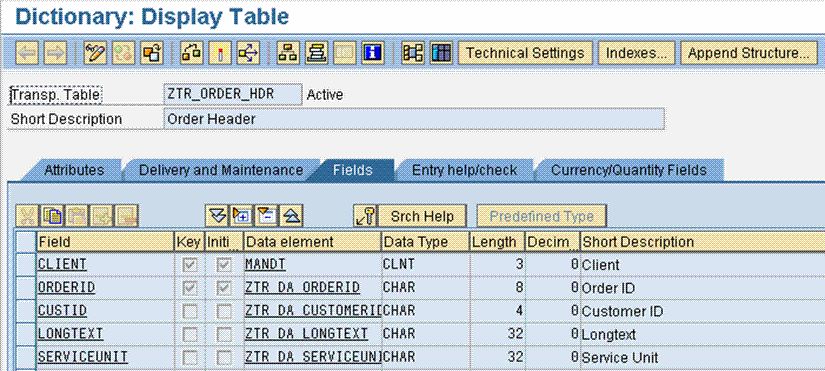
You do not have to use data elements (such as ZTR_DA_ORDERID) since you can use predefined types (such as data type CHAR of length 8) directly.
Save and activate your changes. Choose to create the table only locally with package $tmp.
Create the table ZTR_ORDER_ITM with the following structure:

Like the first table, you do not have to use data elements (such as ZTR_DA_ORDERID) since you can use predefined types (such as data type CHAR of length 8) directly.
Save and activate your changes. Choose to create the table only locally with package $tmp.
In the DOE, start the Data Browser (transaction SE16), and enter example data of your own choice in both tables.