
 Modeling Entity Services

Prerequisites
You have created the DC project carpool in the CAS plug-in to SAP NetWeaver Developer Studio. It is listed in the Service Explorer view.
Procedure
In the following section, you will create entity services and their attributes for:
ü Employee
ü Travel Location
ü Car
ü Travel
Creating Entity Services
...
1. In Service Explorer, expand the node carpool and click the Entity Services node with the secondary mouse button. Choose New.
The New Entity Service wizard appears.

2. For this tutorial, enter the entity service name Employee and choose Finish.

The entity service name must begin with an uppercase letter and not contain any special characters or spaces between names.
3. Repeat steps 1-2 to create entity services for: TravelLocation, Car, and Travel.
The entity services appear under the Entity Services node and the editor view opens with several tab pages.
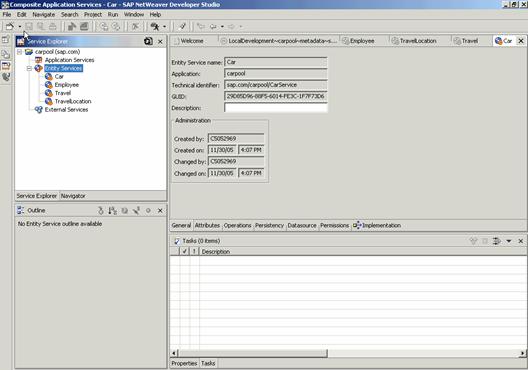
4. Select the Attributes tab page for the entity service Employee.
5. In the Attributes pane on the right-hand side of the screen, click Employee with the secondary mouse button and choose Create Attribute.
6. In the New Attribute wizard:
a. Enter idin the field Attribute name,
b. Enter Employee ID as the Attribute description,
c. Enable Key, and
d. Browse the Data type and select com.sap.caf.core.long.
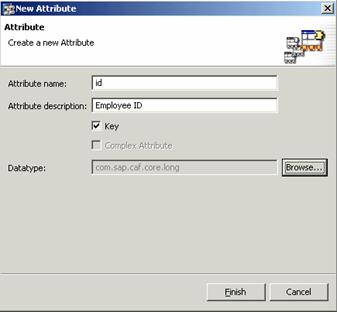
7. Choose Finish.
The attribute id will be added to the Employee node in the Attributes pane. You can see the properties of the attribute you just created in the Properties tab page at the bottom of the screen.
Some or all properties such as Cardinality, DB Field, Description, Language Dependent, Mandatory and Name can be edited if the attribute is not classified as a key attribute.
8. Repeat steps 4-7 to create additional attributes for the entity services Employee, TravelLocation, Car, and Travel. The information you need is listed in the respective tables below.
Entity Service: Employee
Field Name |
Description |
Data Type |
lastName |
Last Name |
com.sap.caf.core.shortText |
firstName |
First Name |
com.sap.caf.core.shortText |
com.sap.caf.core.longText |
Entity Service: TravelLocation
Field Name |
Description |
Data Type |
Key |
Mandatory |
id |
Identification (ID) |
com.sap.caf.core.long |
Yes |
yes |
name |
Location Name |
com.sap.caf.core.shortText |
|
|
Entity Service: Car
Field Name |
Description |
Data Type |
Key |
Mandatory |
id |
Identification (ID) |
com.sap.caf.core.shortText |
Yes |
yes |
numberSeats |
Number of Seats |
com.sap.caf.core.long |
|
|
manufacturer |
Car Manufacturer |
com.sap.caf.core.shortText |
|
|
model |
Car Model |
com.sap.caf.core.shortText |
|
|
Entity Service: Travel
Field Name |
Description |
Data Type |
Key |
Mandatory |
Cardinality |
id |
Identification (ID) |
com.sap.caf.core.long |
Yes |
Yes |
|
startDate |
Start Date |
com.sap.caf.core.date |
|
|
|
keeper |
Keeper |
Reference to employee |
|
|
0..1 |
passenger |
Passenger |
Reference to employee |
|
|
0..n |
car |
Car |
Reference to car |
|
|
0..1 |
startLocation |
Start Location |
Reference to TravelLocation |
|
|
0..1 |
targetLocation |
Destination |
Reference to TravelLocation |
|
|
0..1 |
Entity services can have other entity services as attributes. They are listed as reference data types in the Travel table above.
You can simply
add the entity service from the Entity Catalog to
the Attributes pane of the entity service you are
modeling with  or the
quick info text Add. This results in a foreign-key
relationship.
or the
quick info text Add. This results in a foreign-key
relationship.
Remember, you can change the name and description of the referenced entity.
9.
Choose  to save all metadata.
Congratulations! You have created your first entity services.
Step 3: