
 Exposing Applications as Callable
Objects
Exposing Applications as Callable
Objects

Use
Callable objects are the most fine-grained functional units in the Guided Procedures (GP) framework. They enable you to use external services or application components within the context of a process modeled with GP.
Exposing a service or application as a callable object allows re-use of existing functionality from both SAP and external providers. In addition, you can incorporate multiple backends and technologies, such as Web Dynpro, ABAP programs, interactive forms, and so on. Once imported as callable objects, these components can be used universally in process modeling.
Since callable objects are the components that actually provide the functions executed in a process, their design is fundamental to the overall process model.
Prerequisites
●
To be able to create and modify callable objects,
you must hold the appropriate design time permissions. For more information,
see
 Portal Roles in the GP Security Guide.
● You must have launched the gallery. For more information, see Launching Guided Procedures (GP) Design Time.
Procedure
1. Implement and Register a New Callable Object Type
GP comes with a set of registered callable object types that define which applications you can directly expose as callable objects and enable their handling in the context of GP processes. For a list of predefined callable object types, see Creating Callable Objects in the GP Design Time.
If your application is not supported by the predefined types, you must implement and register your own type. This is required, so that the GP framework can handle your specific application appropriately at runtime. To create a new callable object type, you must implement the design-time and runtime application management, and then register your implementation in GP.
See: Implementing and Registering a Callable Object Type
2. Create a Callable Object in the GP design time
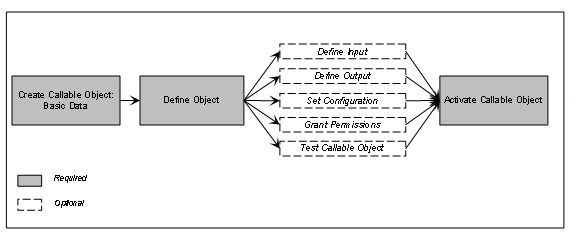
Using the callable object wizard in the GP design time, create a callable object of the appropriate type for each application that you want to use in a process.
...
1. Define its basic data, input and output parameters, and the configuration settings. Finally, you activate the object.
See: Creating Callable Objects in the GP Design Time
2. Test the callable object.
Creating a Callable Object in the GP Design Time