
 Tutorial: Creating an SCF Service
Connector
Tutorial: Creating an SCF Service
Connector

Use
The Synchronous Collaboration Framework (SCF) can be used to connect various synchronous collaboration tools, such as Webex and Netmeeting, with applications such as rooms that can benefit from this integration. To integrate client applications with various synchronous collaboration tools, SCF offers two APIs:
● Client API
The client API is used by SCF client applications (communication framework, various calendars, and other applications that benefit from collaboration features) to access collaboration tools and features integrated with SCF.
● SC Service Provider API
SC Service Provider API is used to develop SC Service Connectors between SCF and synchronous collaboration tools. This section describes the API and the steps required to develop SC Service Connectors. As shown in the graphic below, SCF is positioned between the client applications and the synchronous collaboration tools.
SCF not only allows unified integration of real-time services into the portal environment, it also:
· Synchronizes with groupware clients
· Allows information from the groupware client (for example, attachments in meeting requests) to be automatically pulled into online meetings
· Adds persistence and context to the online session results
· Supports the capturing, distribution, and retrieval of session results by utilizing the KM services of the Knowledge Management platform
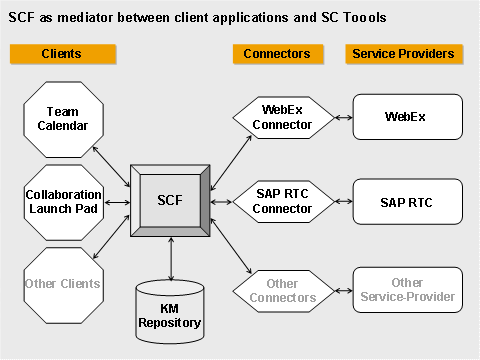
SCF adds persistence and context to online meeting services. What this means is that the meeting content can be not only reviewed and revisited, it also allows users to add context to the meeting results and therefore extends the meeting beyond its ‘real-time’ end.
Prerequisites
● SAP NetWeaver Development Studio and Portal Development Kit are required for the development of the connector. For more information, see http://sdn.sap.com and http://help.sap.com.
● The following .jar files must be added to the class path of the project. The .jar files and the relative directory in the portal installation are mentioned.
○ Coll.appl.sync.scf_api.jar <portal installation directoy>\j2ee\cluster\Server<x>\apps\sap.com\irj\servlet_jsp\irj\root\WEB-INF\portal\portalapps\com.sap.netweaver.coll.appl.sync\lib)
○ Coll.shared.scf_api.jar <portal installation directoy>\j2ee\cluster\Server<x>\apps\sap.com\irj\servlet_jsp\irj\root\WEB-INF\portal\portalapps\com.sap.netweaver.coll.shared\lib
○ kmc.util.core_api.jar <portal installation directoy>\j2ee\cluster\Server<x>\apps\sap.com\irj\servlet_jsp\irj\root\WEB-INF\portal\portalapps\com.sap.netweaver.kmc.util\lib
○ Prtapi.jar <portal installation directoy>\j2ee\cluster\Server<x>\apps\sap.com\irj\servlet_jsp\irj\root\WEB-INF\portal\lib
· You are familiar with the function and structure of the SC Service Provider API.
Procedure
Develop ...
1. Develop the SCF Service Connector.
See:
○ Storing the collaboration session
○ Developing and Implementing an SC Service Connector
○ Example connector for Microsoft Netmeeting
2. Deploy and configure the CCF Service Connector.
See: Deployment and Configuration of SC Service Connector
3. Test the SCF Service Connector.
See: Basic Testing