
 Notification and Subscription
Framework
Notification and Subscription
Framework

Task
You use notifications as runtime processes to send a message to registered users (subscribers) about changes in business objects (for example, entity services) according to application-specific subscription information.
Structure
The notification and subscription process both operate on the CAF level at runtime; however subscriptions are also used at design time to access and change specific subscription information.
Notifications
Notification Sending
The notification dispatcher is responsible for getting proper subscription factory lists instances and for applying the subscription filter. It also evaluates the final recipients list and invokes sending messages. The notification sender and topics operate on the CAF runtime (and SAP NetWeaver AS) and communicate notifications to the SAP NetWeaver Enterprise Portal.
You can see an overview of the notification sending subsystem in the figure below.
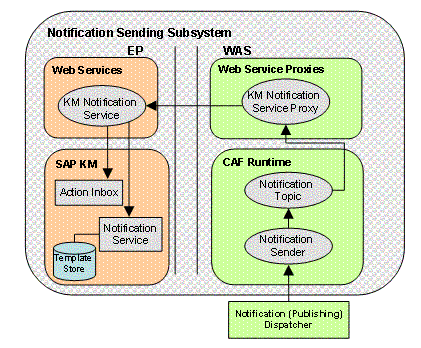
A special notification dispatcher is also used to send notifications when business objects have been changed. It is derived from a group notification dispatcher and it sends a changed event message to all subscriptions that are assigned to a group that has the same name as the object type (for example, sap.com/xapps.pd/Idea).
Subscriptions
Subscription Types
You can have registered and deployed subscription in your application. Subscriptions located inside an application (.ear file) are labeled as deployed, whereas subscriptions that are persisted in the database are labeled registered.

The notification API only works with registered subscriptions. The notification dispatcher (see figure above) can only access deployed subscriptions that have been registered.
An
administrator has to manually register the predefined application
subscriptions on the administration UI. See
 Subscription
Management on the CAF Runtime Configurator for this procedure.
Subscription
Management on the CAF Runtime Configurator for this procedure.
You can access all information needed to manage business object subscriptions from the CAF metadata and with the CAF Metadata API.
You can define general and business object subscriptions in your application. They are prepared at development time and deployed along with the application itself.
Persistency
You can use either SQL databases or XML files to store or load subscription parameters. Registered subscriptions can be loaded from and saved only to the database and deployed subscriptions can be loaded from and saved only to an XML file.
Subscription Templates
The subscription template is presented in two XML files. One contains structured message text containing placeholders and the second file, which together are used to compose the final message based on an XML file.
Normally, templates are not changed at runtime, but they have the same ID as the corresponding subscription. Subscription processing is performed automatically by the KM notification service.