
 “Application Stopped” While Requesting an
Application
“Application Stopped” While Requesting an
Application

Problem Description
While requesting an application in a browser, the user gets the following error message:
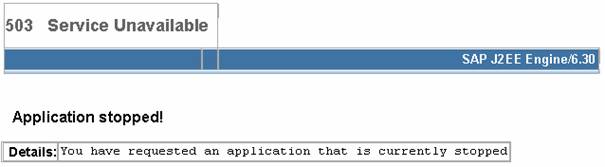
No further details about this application error are available.
Several causes are possible:
● Application is not started
● The application is stopped for maintenance or developer debugging
● Application is not deployed
|
Scenario Type: |
Error analysis |
|
NetWeaver Component: |
J2EE Engine |
|
Validity: |
J2EE Engine 6.40 and higher |
Decision Roadmap
Prerequisites
-
Main Tools
Visual Administrator
Execution
Run the administrator of J2EE Engine, navigate to Deploy service and list all deployed applications.
Analysis
Application is not started
If the application is not started on all nodes, try to start it with right pane button Start Application. A dialog window appears to select nodes where to start application. Check all (if not checked) and press OK.
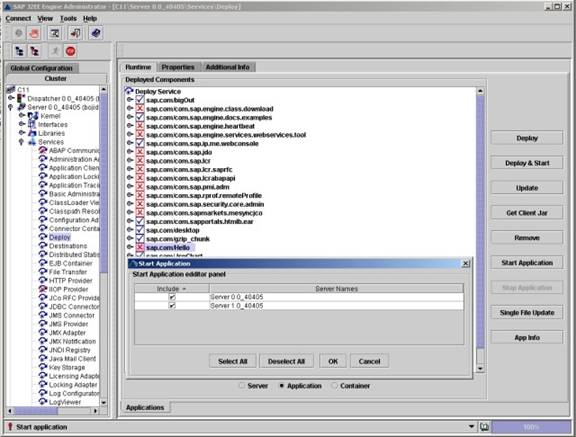
If the application does not start, check the error message and investigate the problem according to it.
If this is an application error you have to contact the application’s developer for more information.
If the error is from the J2EE Engine, try to find the appropriate PAS.
The application is stopped for maintenance or developer debugging
If the application is displayed as started in the deployed componentspanel, it may be stopped only for customers for debugging or maintenance.
You can check this by navigating to the Web Container service and checking that in the tab Properties the property ApplicationStoppedAliases contains the value of the application’s alias.
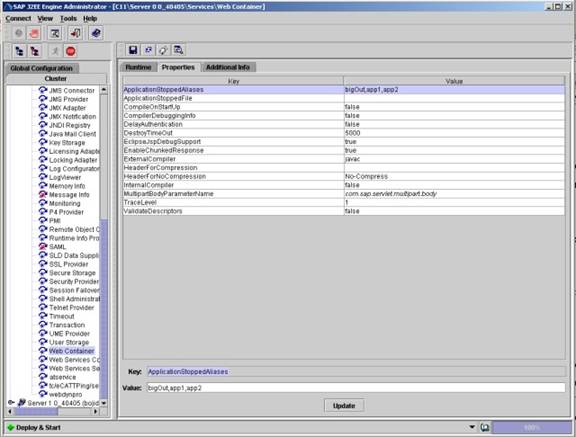
If an alias of the application exists here, this means that the application is stopped by a developer or an administrator.
Application is not deployed
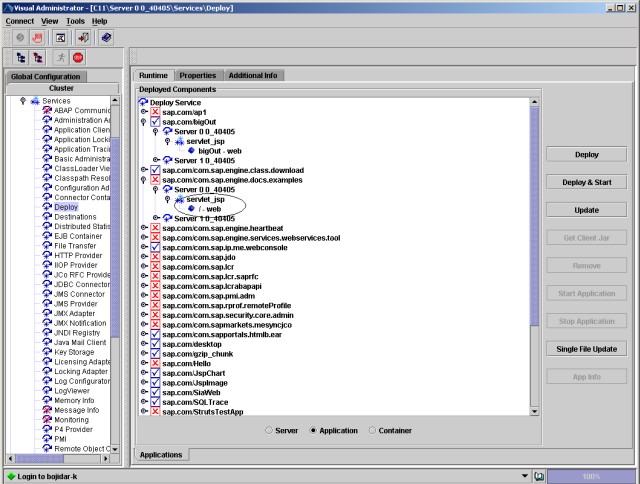
If the application is not listed in the Deployed components panel, the application is not deployed. So the resulting Application stopped response is from the default application (with root alias /) which is not started. In this case you can check if there is a default application and it is stopped. You may try to redeploy the requested application.
Additional Information
 Isolating Running
Web Applications from Productive Client Reques
Isolating Running
Web Applications from Productive Client Reques
Java Technology
in SAP Web Application Server