
 SDM Deployment Fails

Problem Description
Assume a client uses one of the SDM clients (SDM GUI, SDM command line interface and SDM API).
The client is informed that the deployment process fails.
Possible Error Messages
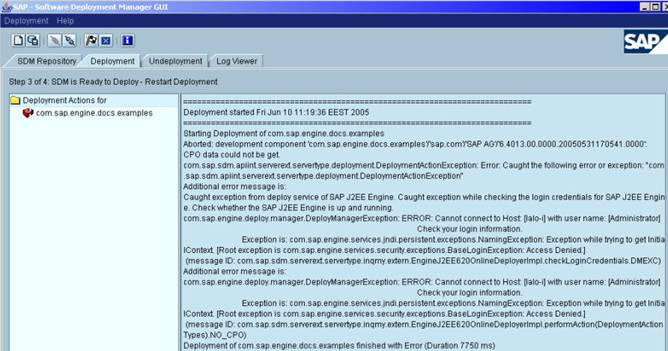
The following error message is received when incorrect J2EE Engine Security credentials are used and an online deployment process has been performed:
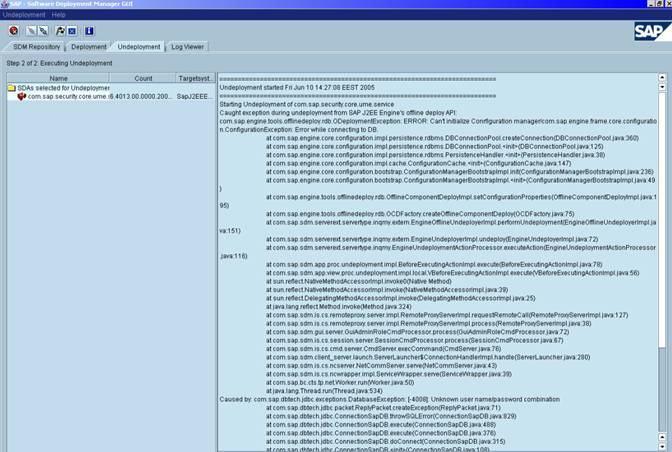
The following error message is received when incorrect database security credentials are used and an offline deployment process has been performed:
|
Scenario Type: |
Error analysis |
|
NetWeaver Component: |
SDM J2EE Engine Database Config Tool |
|
Validity: |
SAP Web AS Java >= 6.30 |
Possible Error Sources
● The J2EE Engine has stopped
● The specified J2EE Engine security credentials in file SecStore.properties are incorrect
● The specified database security credentials in file SecStore.properties are incorrect
Decision Roadmap
Prerequisites
In order to check the specified problem scenarios described in this document, the client has to be authenticated by the SDM. In order to perform a deployment the SDM uses the J2EE Engine credentials which are stored within the SecStore.properties file, they can be changed by using the Config Tool.
Main Tools
Config Tool
Analysis
Case A: The server is not working but an online deployment process has been performed.
...
1. Ensure that host and port to which SDM tries to connect are correct. The used host and the port are specified in the error message.
2. If host and port are correct, check whether the J2EE Engine is up and running. The check could be done by using the J2EE Engine MMC, the J2EE Engine JCMON or Telnet.
a. If the J2EE Engine is not working, you need to start it.
b. If the J2EE Engine is working, the problem is more complicated and could be caused by a network problem.
Send the log files from directory $SDM_HOME/program/log/ to the people in charge.
3. If the host and port are not correct, use the Config Tool in order to change them.
4. After you have performed the steps mentioned above, try to start the deployment process again.
Case B: Incorrect J2EE Engine security credentials are used and an online deployment process has been performed.
Currently there are two places in which the J2EE Engine administrator’s password is stored:
● User store – managed by the J2EE Engine Visual Administrator
● File system secure store (SecStore.properties) – managed by the Config Tool.
If the password is changed in the user store, it has to be changed in the file system secure store as well.
Proceed as follows:
1. Using the Config Tool, set the correct J2EE Engine security credentials.
2. After you have performed the steps mentioned above, try to start the deployment process again.
Case C: Incorrect database security credentials are used and an offline deployment process has been performed.
This problem scenario could arise if the database password has been changed but the new password is not set within the file system secure store (SecStore.properties file).
1. Using the Config Tool, set the correct database security credentials.
2. After you have performed the steps mentioned above, try to start the deployment process again.
Additional Information
● J2EE Engine Visual Administrator:
 Modifying the Default
Administrator User
Modifying the Default
Administrator User
● Config Tool:
SAP note 701654