 Processing Process

Processing Process
The BSP processor always processes a BSP according to a pre-set method (see also
Control Flow of BSPs). The details relevant for this tutorial are explained in the following procedure: The grayed out steps are not relevant in the respective procedure. For our application the most important steps are briefly described in the following:First Page
First the user calls a URL in the browser to start the BSP application. This causes an HTTP-GET request to be sent to the BSP runtime. The BSP runtime determines the relevant BSP application and the relevant BSP. The layout is processed in the BSP
default.htm. The script is evaluated and the rendering is determined and forwarded to the BSP runtime. The BSP runtime generates a response so that the first page is displayed in the browser.
Now the user can enter data. Depending on what the user enters and also on the buttons the user chooses, either the
authors.htm or the results.htm page is opened.User Input
List of Authors
If users wants to display the list of all authors, they choose the button to list of authors. This causes an HTTP-POST request to be sent to the BSP runtime. Then the event handler OnInputProcessing is triggered for processing the user input. The event specifies that when the button to list of authors is chosen, the navigation request
TOAUTHORS is executed. The BSP runtime executes a redirect.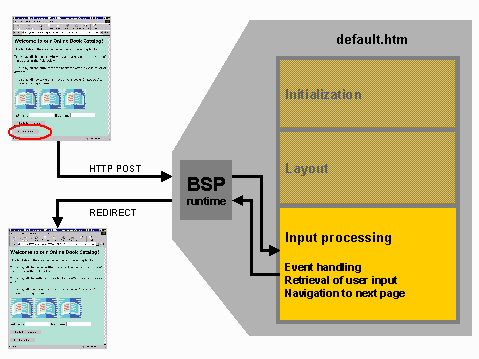
An HTTP-GET request is sent to the BSP runtime. The GET request requests a different page -
authors.htm. So the BSP runtimes calls this page. In authors.htm the event handler for the initialization is first evaluated. In the initialization process the required data is obtained based on the input parameters and written to a table. The table display is specified in the layout and the BSP runtime passes the response, the new page authors.htm, to the browser.
Book List
When the user enters an author’s name in one of the fields on the first page and chooses the books by this author button, the
results.htm page with a list of this author‘s books appears. In this case also, the user input is evaluated by the event handler OnInputProcessing, the difference is that the system navigates to the results.htm page. On the results.htm page the initialization is also first evaluated, in the same way as on the authors.htm page. On this page for the book list of the selected author, the code for the data selection is more complex than the code for the list of authors. The display is also specified in the layout. In this case also the BSP runtime passes the BSP with the correct book/author details to the browser that displays the page.
Now you can get started with creating your BSP application.
