
 Scenario: SSO Between Portal, Web Dynpro, and
ABAP Systems
Scenario: SSO Between Portal, Web Dynpro, and
ABAP Systems 
Description
In our example scenario a portal running on a SAP Web Application Server Java (Web AS Java) integrates a Web Dynpro Java application running on different Web AS Java. The Web Dynpro application reads data from an ABAP system using adaptive remote function call (adaptive RFC). The User Management Engines (UME) of the two Web AS Javas are both configured to authenticate users against an ABAP-based SAP system. The ABAP system from which the Web Dynpro application retrieves data and the ABAP system from which the UMEs read user data do not have to be the same system. However, users must have the same user IDs in both systems.
Example Scenario for Single Sign-On With Logon Tickets

For this type of scenario, the only method of Single Sign-On (SSO) that is supported between all the components is the SAP logon ticket.
The portal system is to be the ticket-issuing system. Users log on to the portal using any supported authentication method, such as client certificates or Windows authentication. Once they are successfully authenticated, they are issued with a logon ticket. This logon ticket is used to authenticate them in all other components of the system landscape.
In this example, the underlying SAP J2EE Engine of the portal issues the logon ticket. All other components must be configured to accept logon tickets from the portal system.
Prerequisites
·
The portal system
is set up to issue SAP logon tickets. In other words, the login module stack
used by the portal authentication scheme should contain the login module
CreateTicketLoginModule. By default the portal is set up to issue logon
tickets, therefore you do not need to make any changes. For more information,
see  Configuring Portal
Server for SSO with SAP Logon Tickets.
Configuring Portal
Server for SSO with SAP Logon Tickets.
·
You have chosen a
Web Dynpro Java application that uses adaptive RFC to connect to an ABAP
system and that is set up to require authentication. For more information on
setting up a Web Dynpro application to require authentication, see Configuring a Web
Dynpro Application.
·
You have integrated
this Web Dynpro application in the portal. For more information on how to do
this, see Portal Integration of Web Dynpro Applications.
· The login module stack for the Web Dynpro application contains the login module EvaluateTicketLoginModule. This login module verifies users’ logon tickets when they access the application.

By default all Web Dynpro applications that are activated for authentication use the ticket login module stack, which contains EvaluateTicketLoginModule.
· The UMEs of the Portal and Web Dynpro systems are set up to authenticate users against the same ABAP system.
Process
...
1.
To make it easier
to test each individual step of configuring SSO, we suggest that you initially
set the Web Dynpro application to connect to the ABAP system with a fixed
user. Use the procedure described in Setting up a Web
Dynpro Application for a Logon Ticket but instead of setting the
authentication method of the JCo destination for application data to Ticket, set it to User/Password.
Result of this step: When users launch the portal and access the Web Dynpro application, they have to authenticate themselves with user ID and password.
2. Configure the Web Dynpro system to accept tickets from the portal system. This involves:
¡ Importing the public-key certificate (or the issuing CA’s root certificate) of the portal system into the keystore view that the Web Dynpro system uses for verifying logon tickets
¡ Entering the identity of the portal system in the login module options on the J2EE Engine
For more information, see Configuring the J2EE Engine to Accept Logon Tickets.
Result of this step: When users launch the portal and access the Web Dynpro application, they do not have to reauthenticate themselves.
3. Test that the Web Dynpro System accepts tickets from the portal system. See Testing That Web Dynpro System Accepts Tickets From Portal.
4. Configure the Web Dynpro application to connect to the ABAP system with logon tickets as follows:
Using the Web
Dynpro Content Administrator, define the connection parameters for the RFC
connection to the ABAP system and set the user authentication method to Ticket. For more information, see Setting up a Web
Dynpro Application for a Logon Ticket.
...
5. Configure the ABAP system to accept tickets from the portal system. This involves:
¡ Setting profile parameters
¡ Adding the public-key certificate (or the issuing CA’s root certificate) of the portal system to the corresponding certificate list on the ABAP system
¡ Adding the portal system’s information to the access control list of the ABAP system
For more information, see Configuring the SAP Web AS ABAP to Accept Logon Tickets from the J2EE Engine.
Result of this step: When users launch the portal and access the Web Dynpro application, they do not have to reauthenticate themselves. When the Web Dynpro application retrieves data from the ABAP system, the user’s logon ticket is sent to the ABAP system and is used to authenticate to the ABAP system.
6. Test that Single Sign-On works between the portal and the ABAP system in the backend. See Testing Single Sign-On Between the Portal and the ABAP System.
Result
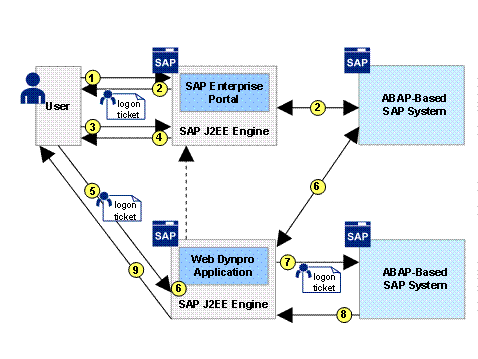
After configuring the example scenario for SSO with logon tickets the following happens when a user accesses the Web Dynpro application in the portal:
...
1. The user launches the portal, and authenticates him or herself using the authentication method defined by the default authentication scheme of the portal.
2. The portal system verifies the user’s credentials. If the authentication is successful, the portal system issues the user with a logon ticket which is stored as a non-persistent cookie in the user’s Web browser.
3. The user accesses a portal page containing the Web Dynpro application integrated as an iView.
4. The iView launches a HTTP request to access the Web Dynpro application on the separate J2EE engine via a URL.
5. The Web browser sends the user’s logon ticket with the request for the URL.
6. The login module stack for the Web Dynpro application contains the login module EvaluateTicketLoginModule therefore the J2EE Engine of the Web Dynpro application verifies the information contained in the user’s logon ticket. If the ticket is valid and has been issued by a trusted server, then the user is granted access to the Web Dynpro application.
7. The Web Dynpro application retrieves data from the ABAP system in the backend using RFC. The user’s logon ticket is sent with the RFC call.
8. The ABAP system in the backend verifies the information contained in the user’s logon ticket. If the ticket is valid and has been issued by a trusted server, and the user has the appropriate authorizations to access the data, then the data is sent to the Web Dynpro application.
9. The Web Dynpro application is displayed with the correct data in the portal. The user did not have to supply user credentials a second time after initially logging on to the portal.