
 Warnings
During Application Deployment
Warnings
During Application Deployment 
Problem Description
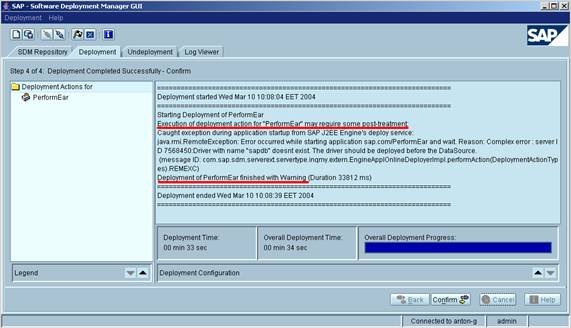
Application deployment finishes with warnings. Warning messages show errors in the application which are not critical for its work. In general, such warnings notify that the application may need some post treatment; otherwise it may work not as expected.
|
Scenario Type: |
Error analysis |
|
NetWeaver Component: |
J2EE Engine |
|
Validity: |
J2EE version >= 6.30 on all supported platforms |
Decision Roadmap
Prerequisites
-
Main Tools
SDM
Visual Administrator
Telnet
Analysis
Noticing the problem
· During a SAPInst installation or a patch of the J2EE Engine
You may find the following error in callSdmViaSapInst.log in the folder from which you have started your installation:
Executed, but manual post processing required. Return code: 102
· In the SDM GUI:
· When using a Telnet session:

Possible reasons
The reasons depend on the deployed application and are described in the warning messages.
Solution
These warnings are important only for application developers. If you are not an application developer, you can ignore them.
Additional Information
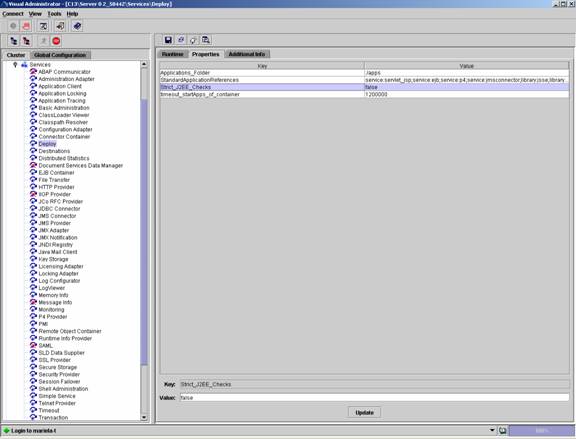
Since 6.40 SP4 the following property has been integrated into the Deploy Service: Strict_J2EE_Checks.
If its value is set to true you can see the warnings generated during the deployment of an application. If the property value is set to false possible warnings are not shown.
The default settings are as follows:
· in production systems Strict_J2EE_Checks=false
· in development systems Strict_J2EE_Checks=true
You can change the property value if necessary:
...
1. Start the Visual Administrator.
2. Log-in and select the Deploy Service.
3. In the Properties tab you can change the Strict_J2EE_Checks property value.
4. Restart the J2EE Engine for the changes to take effect.
For releases before Web AS 6.40 SP4 warnings are always shown. You can ignore them if they are not relevant for your work.