
 Informix High-Availability Data
Replication
Informix High-Availability Data
Replication 
Use
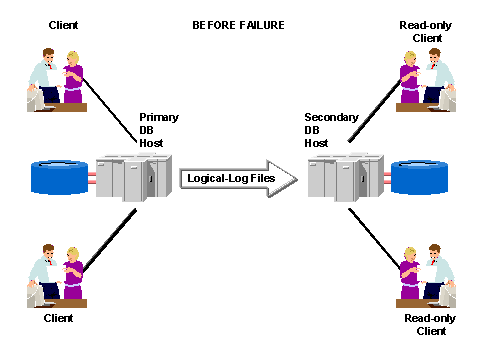
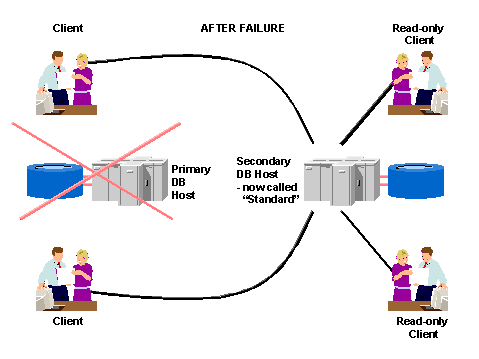
With Informix High-Availability Data Replication (HDR), you set up a secondary database – an identical copy of the entire production database – on a second hardware system. This greatly improves the availability of the database service. The data in HDR is more available for client applications wishing to access it since, if the local copy of the data fails, the remote copy can be accessed. The following diagram shows how it works:
Informix High-Availability Data Replication (HDR)
Features
· Separation of secondary system from primary system
The secondary system is normally located at a remote site, since otherwise it too might be affected by whatever damages the primary system. The two servers must be connected by a TCP/IP network connection.
· Secondary is exact physical copy of primary database
It is essential that the secondary database is an exact copy. Therefore, the physical layout of the secondary database must be identical to the primary database (that is, same disk configuration, same directory structures and filenames). If this is not the case, you can not successfully perform the restore on the secondary server (see below, “Setting up Data Replication”).
· Data-replication buffers store data to be replicated
These buffers (the same size as the logical-log buffers) are used to store logical log data from transactions that are then sent to the secondary server. When used with the SAP system, the updates are passed synchronously to the secondary server. This avoids uncommitted or partially committed transactions on the secondary server if the primary server fails.
· Secondary can operate as read-only server
An added benefit of HDR is that the secondary database server can function as a read-only database server for certain clients, so improving performance by allowing distribution of the overall system workload. Since the secondary server operates in “logical-recovery” mode, it can not accept updates.
· Stress tests indicate no substantial performance decrease
Data replication in an SAP environment does not normally have a significant impact on performance, as indicated by stress tests carried out to measure this.

Use the ON-Bar data recovery tool with Informix HDR.
With ON-Bar, you can perform parallel backup and restore on an Informix HDR
system. For more information about ON-Bar, see  ON-Bar for Data
Recovery.
ON-Bar for Data
Recovery.
Activities
Setting up Data Replication
To start data replication:
...
1. Do the following on the primary server:
...
a. Perform a full level-0 archive (that is, including all dbspaces)
b. Back up the logical log
c. Change the database server mode to “primary”
2. Do the following on the secondary server:
...
a. Perform a physical restore (using level-0 archive taken above)
b. Set the database server mode to “secondary”
c. Perform a logical restore (using logical log backup taken above)
Detection of Data Replication Failures
If data replication fails, this might be either due to a network problem or a failure of one of the servers. Either of the following conditions is interpreted as a data-replication failure by either of the database servers:
· Specified time-out period exceeded
The confirmation from the other database server in a pair does not arrive within the specified time.
· Pinging fails
The periodic reciprocal signaling (pinging) between the servers fails on four consecutive attempts. In this case, the sender assumes failure.
Failure Scenarios
Consider the following two principal scenarios:
· Failure of secondary server
The primary server remains in online mode and no switchover is necessary.
· Failure of primary server
The secondary database server can behave in any of the following three ways, depending on how you configure your system and what decisions you make:
¡ No switchover
The secondary server remains in logical-recovery mode, that is, no action is taken. This is acceptable if the primary server is likely to come online again soon and data-replication can be restored quickly.
¡ Manual switchover
The secondary server remains in logical-recovery mode, awaiting manual switchover. Contact the SAP-Informix Competence Center in Walldorf, Germany for further details since you need additional Informix-specific software and advice in this area.
If your network is not entirely stable, you must use manual switchover.

You need to identify the problem and restart data replication with two servers as soon as possible, since the surviving server is running in standard mode (that is, without data replication on another server) until data replication is fully back in action. Refer to “After Switchover”.
Result
After a successful switchover there are the following possibilities to restore the data replication pair:
· Both database servers revert to their original type
When the original primary database server comes back online, the data replication connection is automatically established. The secondary server, which has meanwhile been acting as a standard server, shuts down gracefully and then switches back to being a secondary database server. The logical logs from the period when the primary server was out of action are then transferred from the secondary server onto the primary
· Both database servers change their original type
After a switchover to the secondary server, which has meanwhile been acting as a standard server, the secondary server switches type directly to become the primary server, without shutting down first. The primary server switches to become a secondary server and can then take part in data replication again.
See also:
For more information on Informix products, see the Internet address:
www.ibm.com/software/data/informix
Contact the SAP-Informix Competence Center in Walldorf, Germany for more information