Web Dynpro Component
The component is the central, reusable unit of the application project. You can create any number of views in a component and arrange them in any number of windows. The Web Dynpro component contains any number of windows and views and their corresponding controllers. Additional Web Dynpro components can also be referenced.
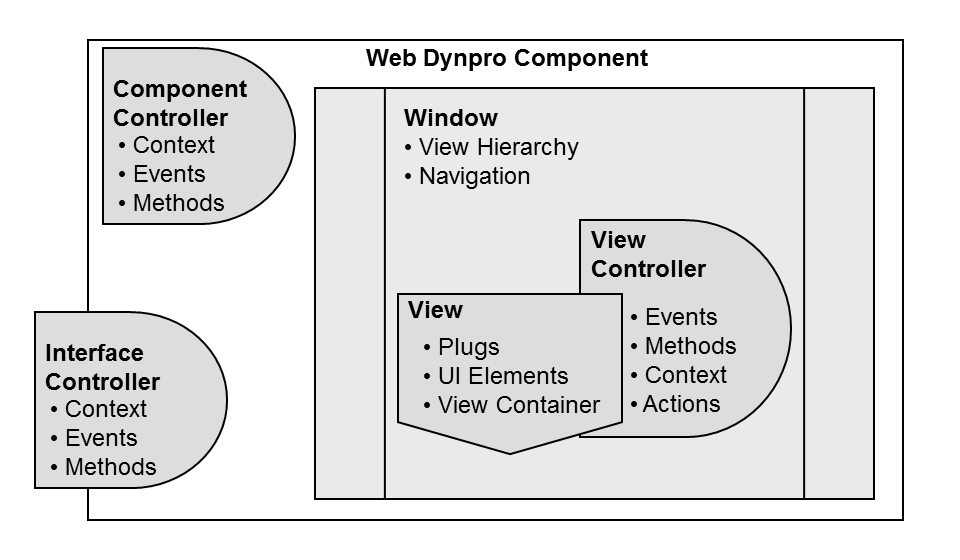
A Web Dynpro component can embed other Web Dynpro components, and correspondingly a Web Dynpro component can be embedded in any other Web Dynpro components. This communication also takes place over the component interfaces.

A Web Dynpro component's lifetime begins the first time it is called at runtime, and ends with the lifetime of the Web Dynpro application that called and thereby instantiated the component. For embedded components this means that during the lifetime of the embedded component, they are not instantiated until the moment when they are required. Their lifetime ends, however, at the same time as the embedded component when the Web Dynpro application that was originally called is ended.
It is also possible for the embedding component to create or destroy the embedded component using an appropriate API and thus control its lifetime.
Advanced Concepts
Accessibility of a Web Dynpro Application
To ensure accessibility, you can perform an additional check when you check and activate a component. This check is activated by selecting the Accessibility Checks Acitve checkbox. For more information, see Accessibility in Web Dynpro ABAP Applications.
Component Usages
Web Dynpro components can be nested. This means that you can integrate any number of other, already existing components into a component. For more information, see Component Usages.
Implementing Interfaces
On the Implemented Interfaces tab, you can enter existing component interface definitions for use in your currently processed component. For more information, see Working with Web Dynpro Component Interfaces.