Reading the Attribute Value of a Context Element
Use
Context nodes hold the data of a Web Dynpro application at runtime. The IF_WD_CONTEXT_NODE and IF_WD_CONTEXT_ELEMENT interfaces provide the relevant methods for working with this data. In particular, both interfaces contain the GET_ATTRIBUTE method.
There are various different ways to read data from an element of a context node. Some of these options are outlined below.
Reading an Attribute Value of the Lead Selection Element
The easiest way to proceed is to read the attribute value of the lead selection element of a node. The two graphics below depict the context at design time and runtime in order to clarify this.


At runtime, there is a sequence of elements, each with a corresponding data set for the Attr1_1 to Attr1_3 attributes for the Node_1 context node. In the UI, each element might be represented by a table row, for example. Normally, on of these elements (1, 2, or 3) is designated using lead selection. The value of the element designated using lead selection is easy to read from the runtime context.
Using method GET_ELEMENT of the interface a local variable of type IF_WD_CONTEXT_ELEMENT is created. This variable represents the relevant element of the node - in this case, the lead selection element. In addition, a variable of the appropriate type must be created. It represents the attribute value in the method.

A reference to the required node element is generated using method GET_ELEMENT of interface IF_WD_CONTEXT_NODE. In the next step, the value of the Attr1_1 attribute of this element is passed to the l_my_string local variable.
Because the names of attributes are unique within a context node, you can achieve the same result without the reference to the node element in question.

In relation to the context schema above, this means the following:
Depending on the current position of the lead selection, the l_my_string variable has value string_11, string_21, or string_31.
Reading an Attribute Value from Any Element
In addition to accessing the attribute value of the lead selection element, you can also access any specific element of the runtime context. For this reason, there is an index for the list of elements (the elements of the context node have a defined order). This sequence is adopted/created when the runtime context is built. For example, if a context node is filled from an internal table, the sequence of the elements in the context matches the sequence in the internal table.
To read from an element other than the lead selection element, the GET_ELEMENT method must be passed a value for the INDEX parameter.

In this case, a reference to the second element of the context node is generated. The value of the read attribute is therefore string_21.
Also with shorter variants that do not use the element reference, the GET_ATTRIBUTE method can be passed a value for the INDEX parameter.
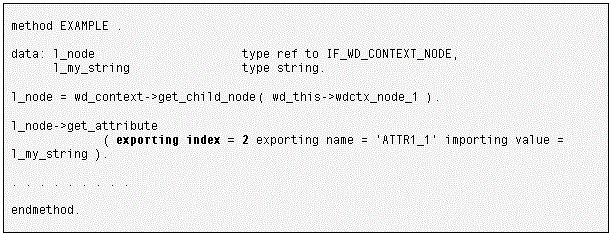
In this case, too, the local variable will have the value of the Attr1_1 attribute of the second element ( string_21).