BIApplicationFrame
Use
In a BIApplicationFrame, Web Templates that are based on BEx Web Applications can be accessed using a URL. Various attributes can be set for a Web template. They are transferred as parameters using the URL. When using the BIApplicationFrame, these parameters can be set as properties of the UI element.
For information on command URLs, see the Help Portal for SAP NetWeaver 2004 at  BI Suite: Business Explorer
  BEx Web Web Application Design: BEx Web Application Designer
  command URLs.
For information on command URLs, see the Help Portal for SAP NetWeaver 2004 at BI Suite: Business Explorer → BEx Web → Web Application Design: BEx Web Application Designer →
For round trips within the Web Dynpro ABAP application, the session and navigation state of the BI application are retained. The BIApplicationFrame UI element can thus also trigger navigation within the existing BI application. The technical prerequisite for this is that the BiApplicationFrame UI element accesses the content of the BI application using JavaScript in the browser. To enable this, the Web Dynpro ABAP application and the BI application must use the same protocol (either HTTP or HTTPS). For different servers, domain relaxing must take place. This means that the WDPROTECTEDAPPLICATION function cannot be used in a scenario with BIApplicationFrame.
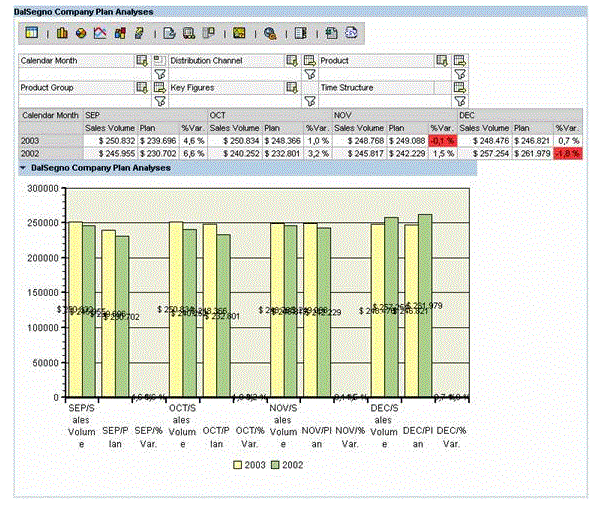
Example of the Visual Display
|
Runtime Class |
CL_WD_BIAPPLICATION_FRAME |
Properties in View Designer
|
Name |
Type |
Initial Value |
Bindable |
|---|---|---|---|
|
STRING |
(automatic) |
No |
|
|
WDUI_CONTEXT_MENU_BEHAVIOUR |
inherit |
No |
|
|
WDY_MD_UI_ELEMENT_REFERENCE |
No |
||
|
WDUI_BI_DATA_MODE |
default |
Yes |
|
|
STRING |
Yes |
||
|
WDUI_BI_STATE_TYPE |
default |
Yes |
|
|
WDY_BOOLEAN |
false |
Yes |
|
|
WDY_BOOLEAN |
true |
Yes |
|
|
STRING |
Yes |
||
|
WDUI_LIFE_TIME |
whenVisible |
Yes |
|
|
WDY_BOOLEAN |
true |
Yes |
|
|
STRING |
Yes |
||
|
WDUI_BI_SERVER_TYPE |
abap |
Yes |
|
|
STRING |
No |
||
|
WDY_BOOLEAN |
false |
Yes |
|
| styleClassName | STRING | Yes | |
|
WDY_BOOLEAN |
true |
Yes |
|
|
WDY_BOOLEAN |
false |
Yes |
|
|
STRING |
Yes |
||
|
Translatable text |
Yes |
||
|
STRING |
No |
||
|
WDY_BOOLEAN |
true |
Yes |
|
|
WDY_BOOLEAN |
true |
Yes |
|
|
WDY_BOOLEAN |
false |
Yes |
|
|
STRING |
Yes |
||
|
WDUI_VISIBILITY |
visible |
Yes |
|
|
STRING |
Yes |
Dynamic Programming
For dynamic programming, the same properties, events, and aggregations as in the View Designer are available. But note that the spelling format and use of upper/lower case is different.
Dynamic Programming of Properties
|
View Designer Name |
Runtime Name |
Type |
|---|---|---|
|
CONTEXT_MENU_BEHAVIOUR |
WDUI_CONTEXT_MENU_BEHAVIOUR |
|
|
contextMenuBehaviour: inherit |
CL_WD_BIAPPLICATION_FRAME=>E_CONTEXT_MENU_BEHAVIOUR-INHERIT |
|
|
contextMenuBehaviour: provide |
CL_WD_BIAPPLICATION_FRAME=>E_CONTEXT_MENU_BEHAVIOUR-PROVIDE |
|
|
contextMenuBehaviour: suppress |
CL_WD_BIAPPLICATION_FRAME=>E_CONTEXT_MENU_BEHAVIOUR-SUPPRESS |
|
|
CONTEXT_MENU_ID |
WDY_MD_UI_ELEMENT_REFERENCE |
|
|
DATA_MODE |
WDUI_BI_DATA_MODE |
|
|
dataMode: default |
CL_WD_BIAPPLICATION_FRAME=>E_DATA_MODE-DEFAULT |
|
|
dataMode: hybrid |
CL_WD_BIAPPLICATION_FRAME=>E_DATA_MODE-HYBRID |
|
|
dataMode: New |
CL_WD_BIAPPLICATION_FRAME=>E_DATA_MODE-NEW |
|
|
dataMode: static |
CL_WD_BIAPPLICATION_FRAME=>E_DATA_MODE-STATIC |
|
|
dataMode: staticHybrid |
CL_WD_BIAPPLICATION_FRAME=>E_DATA_MODE-STATIC_HYBRID |
|
|
dataMode: stored |
CL_WD_BIAPPLICATION_FRAME=>E_DATA_MODE-STORED |
|
|
DATA_PROVIDER_STATE_NAME |
STRING |
|
|
DATA_PROVIDER_STATE_TYPE |
WDUI_BI_STATE_TYPE |
|
|
dataProviderStateType: default |
CL_WD_BIAPPLICATION_FRAME=>E_DATA_PROVIDER_STATE_TYPE-DEFAULT |
|
|
dataProviderStateType: infoprovider |
CL_WD_BIAPPLICATION_FRAME=>E_DATA_PROVIDER_STATE_TYPE-INFOPROVIDER |
|
|
dataProviderStateType: query |
CL_WD_BIAPPLICATION_FRAME=>E_DATA_PROVIDER_STATE_TYPE-QUERY |
|
|
dataProviderStateType: view |
CL_WD_BIAPPLICATION_FRAME=>E_DATA_PROVIDER_STATE_TYPE-VIEW |
|
|
DEBUG |
WDY_BOOLEAN |
|
|
ENABLED |
WDY_BOOLEAN |
|
|
HEIGHT |
STRING |
|
|
LIFE_TIME |
WDUI_LIFE_TIME |
|
|
lifeTime: whenAlive |
CL_WD_BIAPPLICATION_FRAME=>E_LIFE_TIME-WHEN_ALIVE |
|
|
lifeTime: whenVisible |
CL_WD_BIAPPLICATION_FRAME=>E_LIFE_TIME-WHEN_VISIBLE |
|
|
MELT_VARIABLES |
WDY_BOOLEAN |
|
|
SERVER |
STRING |
|
|
SERVER_TYPE |
WDUI_BI_SERVER_TYPE |
|
|
serverType: abap |
CL_WD_BIAPPLICATION_FRAME=>E_SERVER_TYPE-ABAP |
|
|
serverType: java |
CL_WD_BIAPPLICATION_FRAME=>E_SERVER_TYPE-JAVA |
|
|
SESSION_ID |
STRING |
|
|
STATELESS |
WDY_BOOLEAN |
|
| styleClassName | STYLE_CLASS_NAME | STRING |
|
SUPPRESS_SYSTEM_MESSAGES |
WDY_BOOLEAN |
|
|
SUPPRESS_WARNINGS |
WDY_BOOLEAN |
|
|
TEMPLATE_ID |
STRING |
|
|
TOOLTIP |
WDY_MD_TRANSLATABLE_TEXT |
|
|
URL |
STRING |
|
|
USE_PERSONALIZATION |
WDY_BOOLEAN |
|
|
VARIABLES_CLEAR |
WDY_BOOLEAN |
|
|
VARIABLE_SCREEN |
WDY_BOOLEAN |
|
|
VARIANT |
STRING |
|
|
VISIBLE |
WDUI_VISIBILITY |
|
|
visible: none |
CL_WD_BIAPPLICATION_FRAME=>E_VISIBLE-NONE |
|
|
visible: visible |
CL_WD_BIAPPLICATION_FRAME=>E_VISIBLE-VISIBLE |
|
|
WIDTH |
STRING |
More Information
Web Template Parameters
You can find more information about accessing actions in a BEx Web application in the system documentation for IF_WD_BI_APPLFRAME_METHOD_HNDL.