 Weekday-Specific Plant Determination
Use
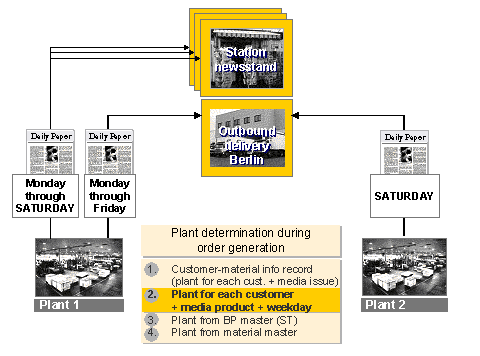
This function allows you to determine the plant from which a customer is supplied with a certain media product or a product kit component of a media product for specific weekdays . This is illustrated by the following example (see diagram):
 Example
The daily newspaper
Daily Paper
contains a larger advertising section on Saturday, which is not published on the other weekdays. The editions on the weekdays Monday through Friday are delivered to the
newsstands
from Plant 1. The Saturday edition containing the advertising section is delivered to the
newsstands
from Plant 1 and to the wholesaler
New York Newspaper Wholesale
from Plant 2.
Prerequisites
To be able to determine the plant for an order item (media issue) in Media Product Sales and Distribution, there must be a one-to-one assignment between each media issue and a media product.
Features
Manual editing of definitions for weekday-specific plant determination in table form. The table contains the following data on each entry:
Business partner
Media product
Plant
Weekdays Monday through Saturday for selection
You can restrict display of the entries in the table on the initial screen. You can do this using the optional selection criteria business partner, media product, and plant.
You can create new entries and change, copy, and delete existing entries.
Automatic control of plant determination for each order item (media issue) during order generation according to the settings for weekday-specific plant determination.
The settings for weekday-specific plant determination are integrated in the process flow for standard plant determination as follows:
a. Plant determination from customer-material info records
b.
Weekday-specific plant determination
c. Plant determination from ship-to party’s business partner master record
d. Plant determination from the media issue master record
Plant determination for order sub-items (product kit components or inserts in a media issue) takes place from the corresponding main item. Please note the following in this context:
If weekday-specific plant determination is defined for the media issue in the sub-item, the plant is not copied from the main item.
You can specify the date relevant for determining the weekday using the BAdI ISM_PLANT and method SET_DATE_FOR_WEEKDAY. In the default implementation of this method, the weekday is determined according to the publication date of the media issue.
Activities
To define the settings for weekday-specific plant determination, choose

Logistics

Media Sales and Distribution
Media Product Sales and Distribution
Master Data
Distribution
Plant Determination for Media Product
Weekday-Specific Plant Determination.
