Session Management
Learn about session management in composable storefront, such as managing user sessions, handling tokens, and performing authorizations.
Session management relates to managing user sessions, handling tokens, and performing authorizations. The following sections are intended to help you understand how session management works under the hood, how can you extend the underlying mechanism, and how you can interact with the auth module from outside of the composable storefront.
Client Authentication and User Authentication
From the beginning, composable storefront has included both client authentication and user authentication. Although this is not typical for web applications, it is necessary for composable storefront to work with the OCC API.
Client authentication relates to the endpoints that work on behalf of logged-out users, such as registering, resetting a password, placing an order as a guest, and verifying an address. These endpoints require an access token to be sent with the request, and this access token needs to be retrieved by following the Client Credentials Flow that is defined by the OAuth specification. In other words, the Client Credentials Flow is needed for certain OCC requests, so you need to enable this flow in your OAuth client.
Caution: When you enable the Client Credentials Flow in your OAuth client, you should always use ROLE_CLIENT with the composable storefront OAuth client. You should never use ROLE_TRUSTED_CLIENT with the composable storefront because it will significantly compromise the security of your application.
Meanwhile, user authentication is used for requests that are sent on behalf of specific user resources. For example, if you want to update your profile, you need to be logged in. When you log in, the server confirms your credentials and returns an access token to the application. This token is then used for all requests on your account, such as updating your profile, making cart modifications, and checking out.
Prior to composable storefront 3.0, the code for both client authentication and user authentication was in the AuthModule, which included interceptors, services, and facade methods all mixed together. In composable storefront 3.0, the AuthModule still contains client and user authentication, but this is now the result of importing two modules, the UserAuthModule and the ClientAuthModule. Each module is responsible for one type of authentication.
This change is important because composable storefront is built to support OCC by default, but composable storefront is not limited to using OCC. The OCC API requires client credentials for some of the requests it receives, but this is not common for other APIs, and accordingly, the client and user authentication has been separated to make it easier to work with other APIs. For example, if you are using a different API that does not need client authentication, instead of using the AuthModule, you can import only the UserAuthModule and reduce the size of your final bundle by not including the ClientAuthModule.
User Authentication
This section takes a detailed look at the UserAuthModule.
The following diagram shows how the UserAuthModule works under the hood:

The UserAuthModule module is responsible for the following:
-
performing authentication flow
-
storing tokens and user identifiers
-
adding access tokens for user calls
-
recovering from API auth errors (for example, refreshing tokens when access tokens expire)
-
persisting the tokens in browser storage
Each of these steps is described in more detail in the following sections.
Authentication Flow
Authenticating users is the main responsibility of this module. Composable storefront relies on the well-tested and certified third party angular-oauth2-oidc library to support the various flows specified by OAuth.
The services that are involved in authenticating users are highlighted in the following diagram:

Authentication starts from the AuthService facade, where you initialize the process by calling one of the following login methods:
-
loginWithCredentials for the Resource Owner Password Flow
-
loginWithRedirect for the Implicit Flow or the Authorization Code Flow
The login method then interacts with the angular-oauth2-oidc library. However, this interaction always goes through the OAuthLibWrapperService, which is a layer for isolating external libraries from composable storefront code.
The OAuthLibWrapperService class is also responsible for configuring the library. It uses the AuthConfigService to access the AuthConfig configuration provided in the application.
It is recommended that you always use the AuthConfigService if you need to read anything from the AuthConfig. This service is able to provide sensible defaults when some parts of the configuration are missing, and it gives you a few utilities out of the box, including one that detects OAuth flow based on your configuration.
The OAuthLibWrapperService is a relatively thin layer that provides a lot of flexibility with the library. Composable storefront also provides the authentication.OAuthLibConfig configuration option, which allows you to pass any configuration option to the library. Client and endpoint configurations are available in the top-level authentication configuration.
You can learn more about advanced configuration of the authentication flow by looking at the angular-oauth2-oidc library source code, as well as the angular-oauth2-oidc documentation .
.
Storing Tokens and User Identifiers
After authentication, the tokens received from the library methods are stored using dedicated services to keep the data.

For authentication, it is normally sufficient to store only tokens and their metadata (such as expiration time and scope). However, with OCC, there is also the tightly-coupled user ID that needs to be set after login or logout, as well as being required for user emulation when working with the Assisted Service Module (ASM). As a result of previous architectural decisions, the user ID is stored in the UserAuthModule. Tokens and their metadata are stored with the AuthStorageService, while user IDs have their own, dedicated UserIdService.
The usual sequence for the authentication data flow is the following:
-
a user invokes login
-
the authentication library perform the OAuth flow and receives tokens
-
the authentication library directly sets the tokens in the AuthStorageService through the setItem and removeItem methods
-
the AuthService is informed about the successful login
-
the AuthService sets the user ID in the UserIdService for the logged-in user
Access Tokens in API Calls and Error Recovery
After logging in a user, and storing their access token and user ID, it is then possible to request some of the user's resources. To do so, it is necessary to pass an access token as a header in the request. In composable storefront, this is achieved with HTTP interceptors, as shown in the following diagram:
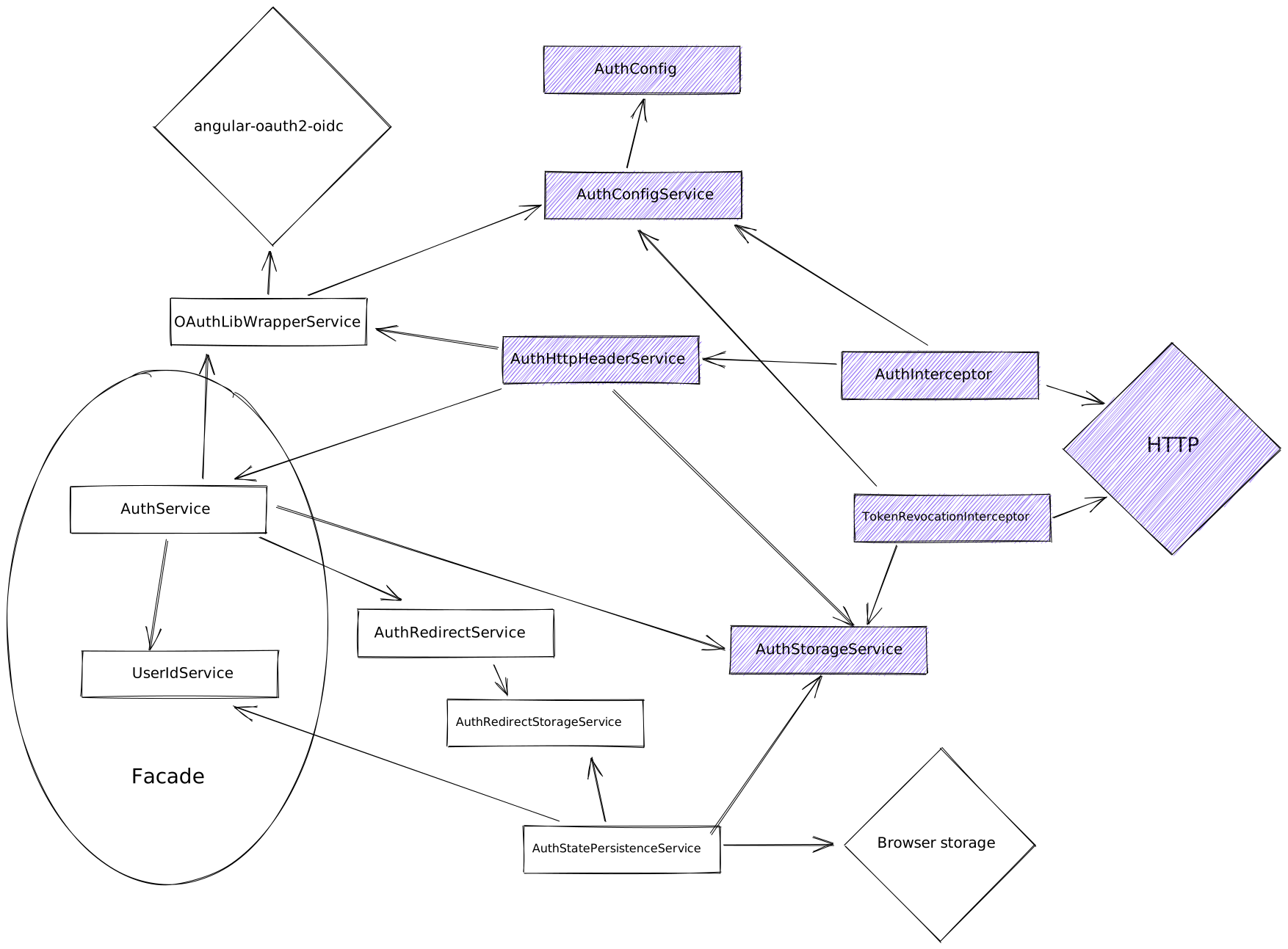
To enrich a request with an access token, you do not need to mark the request in any way. The AuthInterceptor recognizes the request to the API based on the URL. If the request does not have the Authorization header, and does match the API path, the interceptor adds the header to the request. To make it easier to extend the interceptor, the composable storefront has its own AuthHttpHeaderService helper service. In most cases, extending this one service should be enough.
Apart from injecting the token, this interceptor is also responsible for handling errors that are related to authorization. In such cases, it tries to recover first and retry the request, and if that is not possible, it completes the logout process and redirects the user to the login page. When a request fails because the access token has expired, the interceptor uses the refresh token (if it exists) to request a new access token, and then retries the failed request with the new token.
A second TokenRevocationInterceptor interceptor has a very specific role. For calls to revoke tokens on user logout, this interceptor adds an Authorization header. With a different OAuth server, you might not need to provide this header, and you can drop this interceptor from your own UserAuthModule.
Persisting Authentication Data in the Browser Storage
After you log in, and your token has been stored and used for API calls, you refresh the page and suddenly you are no longer logged in. To avoid this problem, the AuthStatePersistenceService synchronizes the authentication data (such as tokens and user ID) in the browser storage, as shown in the following diagram.
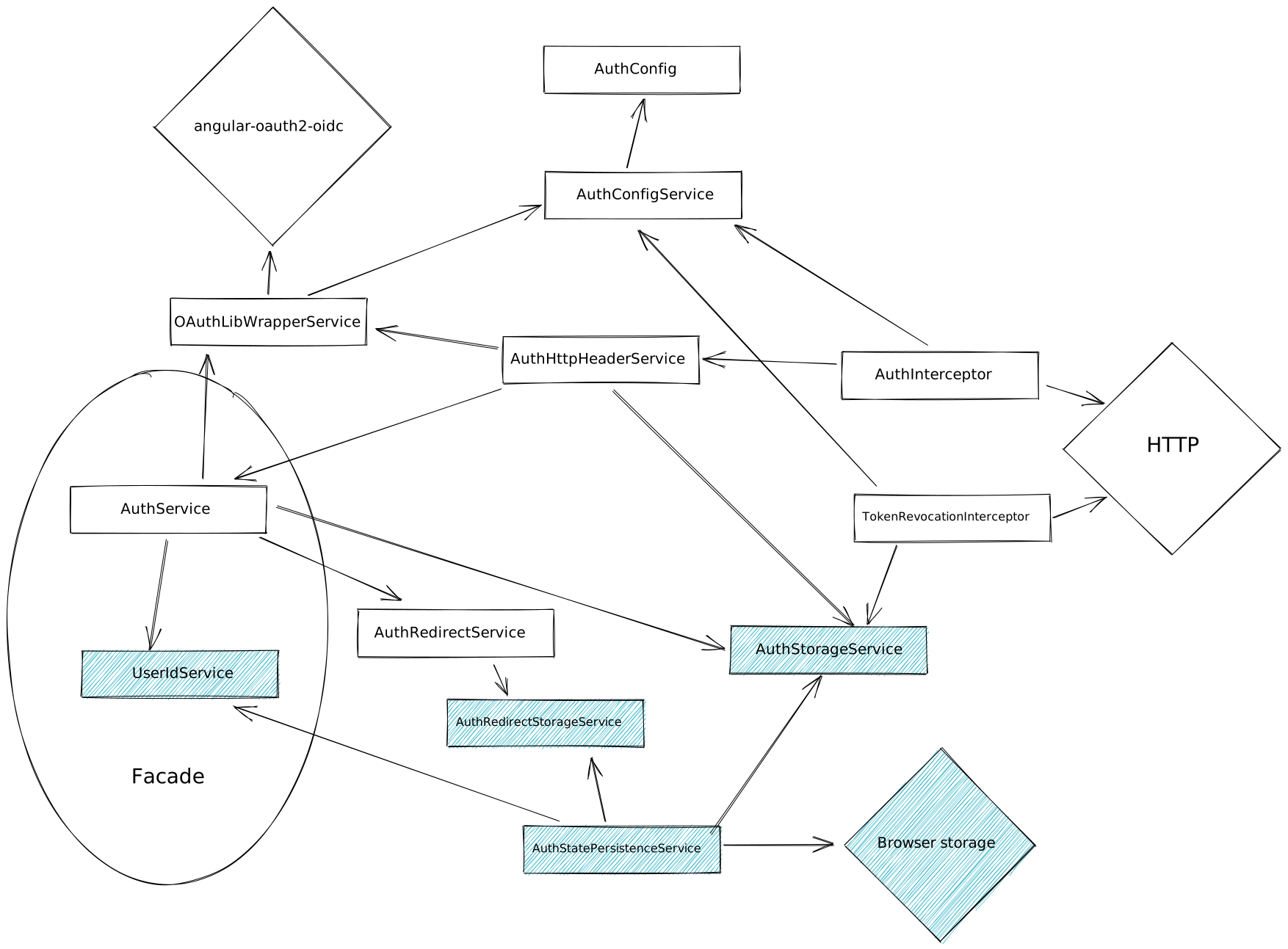
The AuthStatePersistenceService uses the StatePersistenceService to synchronize data to and from the browser storage. The user ID from the UserIdService, the tokens from the AuthStorageService, and the redirect URL from the AuthRedirectStorageService are all synchronized to the localStorage. Every time data changes, it is saved in the browser storage, and when the application starts, it is read from the storage into services.
Assisted Service Module
Since version 1.3, composable storefront supports the Assisted Service Module (ASM), which allows customer support agents to emulate users and help them accomplish their goals. This feature is tightly coupled with the AuthModule because agents need to log in with OAuth flow and make updates using the customer's user ID. In previous versions of composable storefront, some parts of the implementation of this feature were placed in the AuthModule logic.
One of the goals of the Session Management refactor was to make the AuthModule not aware of ASM at all. As a result, removing ASM from your application should be as simple as not including the AsmModule. No code should be left in different modules. With the new AuthModule structure, the ASM feature is now isolated.
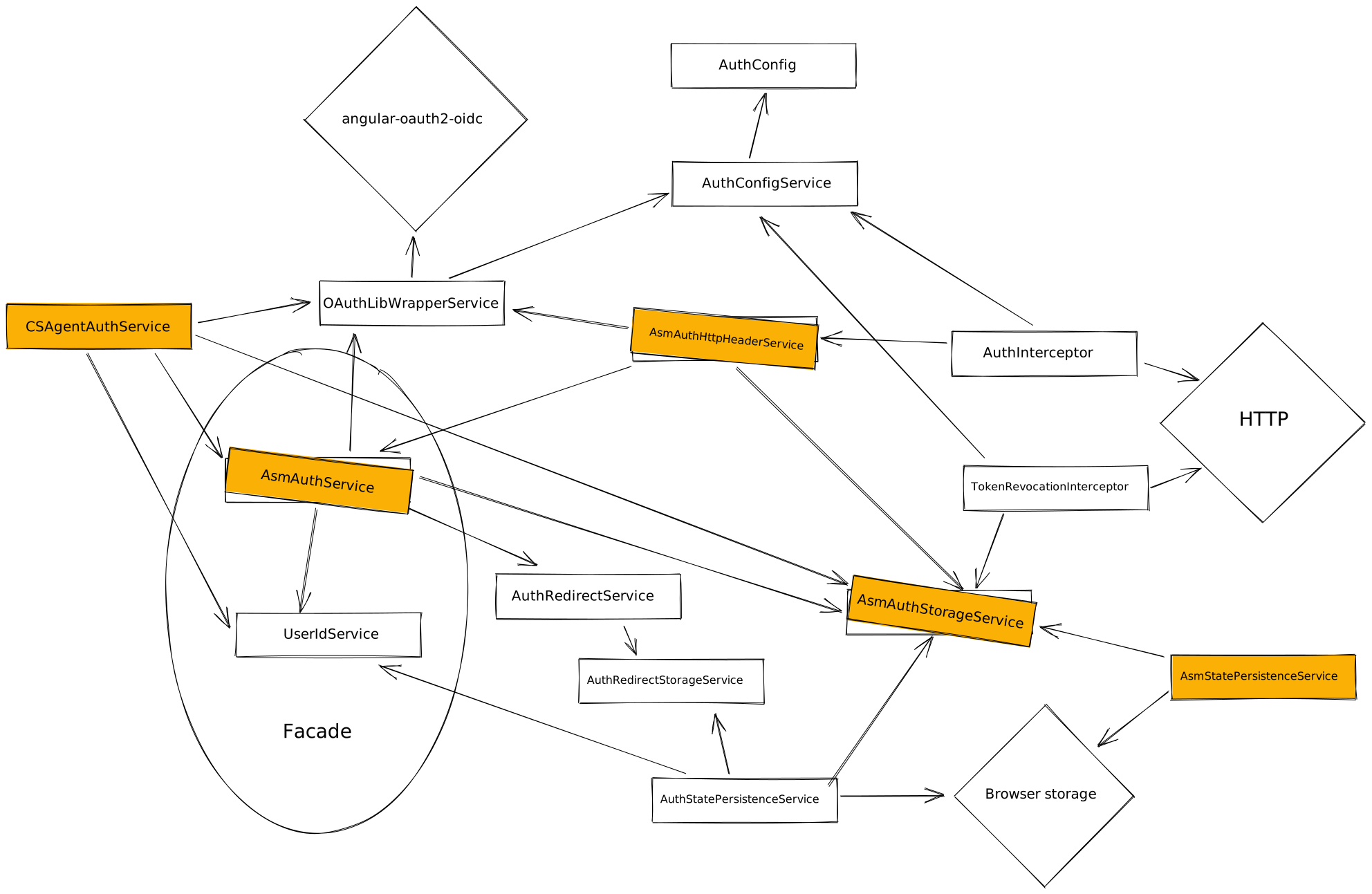
To integrate ASM with the UserAuthModule, the mechanism for providing your own services was used, along with inheritance.
The AuthService, AuthHttpHeaderService, and AuthStorageService were extended, and then provided in the AsmModule, as shown in the following example:
{
  provide: AuthStorageService,
  useExisting: AsmAuthStorageService,
},
{
  provide: AuthService,
  useExisting: AsmAuthService,
},
{
  provide: AuthHttpHeaderService,
  useExisting: AsmAuthHttpHeaderService,
},
Along with these services, the composable storefront now has a CSAgentAuthService that is responsible for the CS agent login and logout process. The AsmAuthStorageService stores a bit more information than the original AuthStorageService, and this information must be persisted in browser as well, so the AsmStatePersistenceService was created to work alongside the AuthStatePersistenceService. Part of the data in AsmAuthStorageService is initialized by the AuthStatePersistenceService, and the rest is resolved by the AsmStatePersistenceService.
The AuthHttpHeaderService also had to be overridden because composable storefront needs to not only add the token to OCC calls, but also to ASM calls (for example, listing users that are available for emulation). The error handling for authentication errors also needed to be improved because composable storefront needs to handle agent requests differently than normal user requests (for example, logging out an agent instead of a regular user).
The AsmModule from @spartacus/core is a good example of how the new UserAuthModule can be modified and extended from the outside. Most of the patterns that are used in the AsmModule are the same patterns you would use if you wish to extend the UserAuthModule (for example, to provide services and inheritance, to build new services, or to assemble a few existing services).
Complementary Components to the AuthModule
There are a few complementary components across the codebase to make authentication work as you would expect in a web application.
Composable storefront still relies on AuthGuard to protect pages that should only be available to logged in users, and NotAuthGuard for pages that are only for anonymous users. Using these guards consistently for all pages ensures correct redirects after successful login. The AuthRedirectService is called from these guards with information about the accessed page. As a result, when you log in, you are redirected to the page you were on (or tried to access) before logging in.
Another established pattern in composable storefront is the use of the logout route as the main mechanism for initializing the logout process for the user. The AuthService exposes the method to log out the user (coreLogout), but you need to be careful with the logout process, especially if you use protected routes. Instead, it is recommended that you redirect to the logout page every time you want to log out. This flow allows you to avoid typical logout problems, including redirect issues, as well as having users log out but still remain on a page that is only for authenticated users.
Configuring OpenId
The KymaModule has been removed, but the functionality can be replicated by providing an appropriate authentication configuration. The KymaModule was responsible only for fetching a JWT token alongside the other tokens that are fetched during user login. This was accomplished by using a separate OAuth client and by calling the login endpoint two times with different clients.
This can be done in one login call by using an OpenID-capable client and setting the proper response type and scope. The following is an example configuration to get both the access token and the id_token with the Resource Owner Password Flow:
authentication: {
  client_id: 'client4kyma',
  client_secret: 'secret',
  OAuthLibConfig: {
    responseType: 'id_token',
    scope: 'openid',
    customTokenParameters: ['id_token'],
  },
},
When you complete the login, you can then access the id_token with the OAuthLibWrapperService.getIdToken method.
Configuring Authorization Code Flow or Implicit Flow
Now that composable storefront uses the angular-oauth2-oidc library, it is possible to support the Authorization Code Flow and the Implicit Flow. These flows are very different from the Resource Owner Password Flow because the authentication part happens on the OAuth server login page rather than in composable storefront. When composable storefront redirects you to this page, you provide login and password information there, and if the credentials match, you are redirected back to the composable storefront application with the token (Implicit Flow) or code (Authorization Code Flow) as part of the URL. Then the composable storefront obtains the data from the URL and continues the login process (requests a token in the case of Authorization Code Flow, sets the user ID, dispatches the Login action, and redirects to the previously visited page).
You can configure this as follows:
authentication: {
  OAuthLibConfig: {
    responseType: 'token', // 'code' for Authorization Code Flow
  },
},
Apart from this configuration, you may need to update a few details for your OAuth client in Backoffice (such as allowing Implicit Flow or Authorization Code Flow, and setting the redirect URL of the application).
Once these settings are in place, composable storefront will use the defined flow out of the box. The login route is configured in a way that detects the OAuth flow based on the configuration (LoginGuard and LoginRouteModule). When it detects a flow other than the Resource Owner Password Flow, composable storefront saves the previous URL (to redirect to after login), and redirects you to the OAuth server login page.
Composable storefront runs AuthService.checkOAuthParamsInUrl with APP_INITIALIZER on any route, so you can redirect to any composable storefront page from the OAuth server. It does not have to be a callback page, as it is usually done.