Composable Storefront API
The composable storefront API is the collection of modules, components, interfaces, classes, and so on, that you use to develop your composable storefront application.
Generating Composable Storefront API Documentation
You can generate the API documentation for any version of composable storefront.
Prerequisites
The API documentation is generated using a tool called Compodoc. To view the generated documentation, you need to serve it on a webserver. The following procedure provides an example of how to serve the documentation to a local webserver using Python, but any webserver, either local or remote, will work.
It is also necessary to have a clone (that is, a local copy) of the "project Spartacus" GitHub repository on your computer. For more information on how to clone a repository, see Cloning a repository in the official GitHub documentation.
Procedure
- Open a shell app on your computer.
If you are on Windows, you can use the PowerShell or Command Prompt. If you on MacOS, you can use the Terminal. If you work with Visual Studio Code, you can use the integrated terminal in VS Code. For more information on using the VS Code integrated terminal, see the VS Code documentation
. - To generate the API documentation for a specific version of composable storefront, check out the relevant release branch.
For example, if you intend to generate the API documentation for composable storefront 5.0.x, then switch to the release/5.0.x branch with the following command:
git checkout release/5.0.x
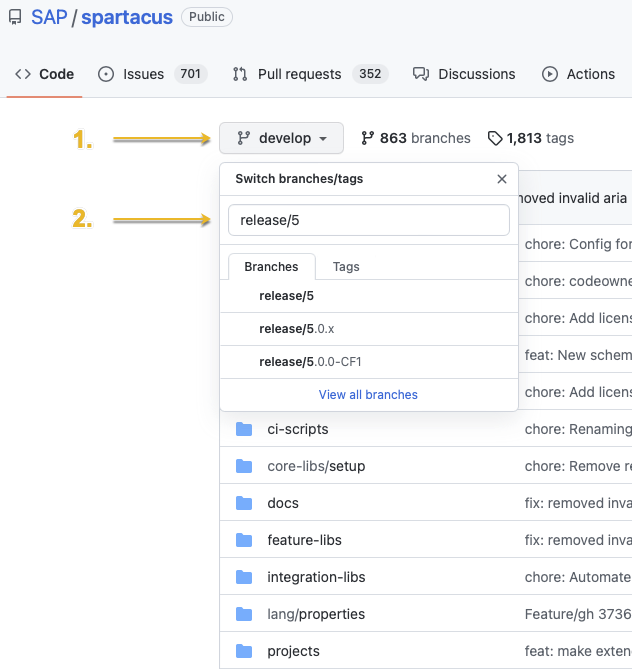
You can see which releases are available by using the dropdown menu for switching branches in the top left of the main page of the "project Spartacus" GitHub repository
. Click on the currently selected branch (which may be develop, for example), enter the name of a release branch (such as release/5, for example) in the search field that appears in the dropdown menu, and you will see all of the available releases for version 5.0.0 and newer, as shown in the following example: