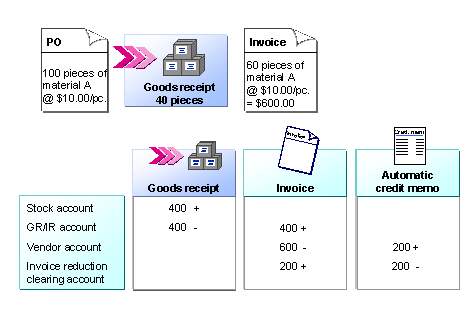
Example: Invoice Reduction due to Quantity Variance
Purchase order: |
100 pieces of
|
Goods receipt: |
40 pieces |
Invoice: |
60 pieces of
|
When you enter the invoice, the system suggests the following values:
Order quantity |
Order amount |
Invoiced quantity |
Invoiced amount |
40 |
400 |
So that the system reduces the invoice, you leave the default system data, the purchase order quantity, and the purchase order amount as they are. Select the correction indicator
Vendor error: Reduce invoice
in the list field. Enter the quantity and amount stated in the invoice in the fields
Invoice quantity acc. vendor
and
Invoice amount acc. vendor
.
Order quantity |
Order amount |
Invoiced quantity |
Invoiced amount |
40 |
400 |
60 |
600 |
When you post the invoice, the purchase order history for the item is as follows:
Quantity |
Value |
|
Total delivered |
40 |
400 |
Total invoiced |
40 |
400 |
 Example
When you post, the system carries out the following account movements: