 Example: Total-Based Acceptance
You want to post an invoice. The vendor-dependant tolerances are set in the Implementation Guide (IMG) in Logistics Invoice Verification for each company code and tolerance group. The tolerance group is assigned to the invoicing party in the vendor master record.
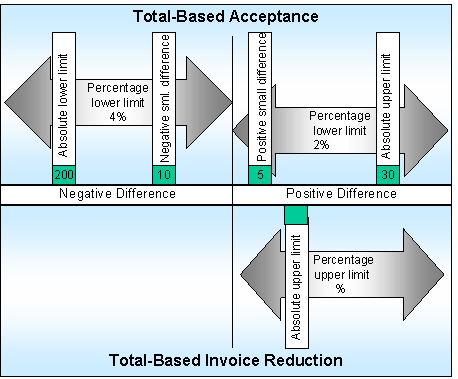
Set the tolerance check for either total-based acceptance or total-based invoice reduction. In the example the following limits are checked:
Total-based acceptance of negative differences
Check absolute lower limit: 200
Check percentage lower limit: 4%
Check negative minor difference: 10 -
Total-based acceptance of positive differences
Check positive minor difference: 5
Check absolute upper limit: 30
Check percentage upper limit: 2%
Total-based invoice reduction
Do not check absolute upper limit and percentage upper limit
Defined Tolerance Limits
Posting Variances
The system expects an invoice value of $ 4000 .
Net invoice amount in USD in USD |
Differences |
Balance |
Explanation |
3992 |
-8 |
0 |
-8 < (-10) negative minor difference
|
3925 |
-75 |
0 |
-75 < (-200) absolute lower limit
|
3820 |
-180 |
-180 |
-180 < (-160) percentage lower limit
|
4004 |
+4 |
0 |
+4 < (+5) positive small difference
|
4025 |
+25 |
0 |
+25 < (+30) absolute upper limit
|
4035 |
+35 |
+35 |
+35 > (+30) absolute upper limit
|

