 Invoice Verification in Differential Invoicing
Invoice verification is based on purchase orders for Commodities that are relevant for differential invoicing.
The invoice verification clerk must first decide which invoice type he or she wants to post. The system ensures the correct sequence for the document flow.
Provisional invoice
You start the invoicing procedure with a provisional invoice, which is based on provisional calculation data that comes from, for example, a calculation rule and an initial qualitative analysis. You can create only one provisional invoice per purchasing process.
Differential invoice
You create a differential invoice to record the difference in amount compared to the previous invoice, for example if you have to adjust the quality and quantity of the purchased commodity following further test analyses. You must already have created a provisional invoice, and you can create several differential invoices during the purchasing process.
Final Invoice
The customer receives the final invoice from the vendor when the invoicing procedure is complete. The final invoice is a differential invoice that marks this completion. You can create the final invoice following a provisional invoice, following a differential invoice, or as the first and only invoice. After that, you cannot create any further differential invoices.
In addition, the system supports parking and holding of documents.
If you want to post the invoice items of a differential or final invoice, you must have first made an entry in the Difference Posting
field. Enter the value As Invoice
for a positive difference or As Credit Memo
for a negative difference.
Prerequisites
For further information, see Differential Invoicing in the Commodity Procurement Process.
Features
Reference to Purchase Order
In invoice verification, differential invoicing takes place at item level. Depending on the value in the relevance field Differential Invoicing
in the purchase order item, logistics invoice verification decides whether differential invoicing applies for the invoice item. The system also supports purchase order items with account assignments.
Non-Posted Predecessor Invoice
You can only post a differential invoice or a final invoice if you have already posted the corresponding predecessor invoice. The system ensures this, in order to avoid inconsistencies arising from retrospective changes to an item in a predecessor invoice, since each invoice refers to the predecessor invoice.
If a predecessor invoice has not been posted, for example if it has the status Held
, the system also ensures that you cannot post a provisional invoice, differential invoice, or final invoice for the same purchase order item either.

Taking Predecessor Invoice into Account Within an Invoicing Procedure
Sequence of Invoice Types
Provisional invoices, differential invoices, and final invoices can contain both items relevant to differential invoicing and items that are not relevant. The system supports invoices with reference to different goods receipts and with reference to different relevant purchase order items.
In the invoice verification transactions (Enter Incoming Invoice
(MIRO
) and Park Incoming Invoice
(MIR7
)), you can, in addition to the standard procedures (Invoice
, Credit Memo
, Subsequent Credit
, or Subsequent Debit
), choose one of the differential invoicing procedures (Provisional Invoice
, Differential Invoice
, or Final Invoice
).
The invoice type you can choose as the procedure for differential invoicing depends on the following conditions:
At least one item must be flagged as relevant for differential invoicing in the invoice document.
If several invoice items are relevant for differential invoicing, all invoice items must belong to the same invoice type within the document flow.
The following table shows the allowed combinations of different invoice types in differential invoicing.

Dependencies Between Previous and Following Invoice Type
Examples of dependencies from the table above:
If you have not yet posted an invoice (previous invoice type = no invoice), you can post a provisional or a final invoice. You cannot post a differential invoice.
If you have posted a provisional invoice (previous invoice type = provisional invoice), you can post a differential or a final invoice. You cannot post a standard invoice type (for example credit memo).
After you have posted a final invoice, you can post a subsequent credit or a subsequent debit.
 Note
Note
Provisional invoices, differential invoices, and final invoices always refer to the whole goods receipt quantity. In other words the system does not support the creation of partial invoices based on a goods receipt.
You can use the Business Add-In
BAdI: Invoice Validation
(MRM_DINV_VALIDATION
) to define criteria according to which a final invoice is allowed to be created for a goods receipt item or purchase order item. You can do this for each invoice item that is relevant for differential invoicing. For more information, see Customizing forMaterials Management
, under
Logistics Invoice Verification

Maintain Customer Exits and Business Add-Ins
BAdI: Invoice Validation
 .
.
Cancellations
In differential invoicing you can only ever cancel the last invoice in the document flow (transaction MR8M
). The system does not allow you to cancel an invoice document for which a follow-on invoice document exists. This ensures that a valid sequence is maintained.
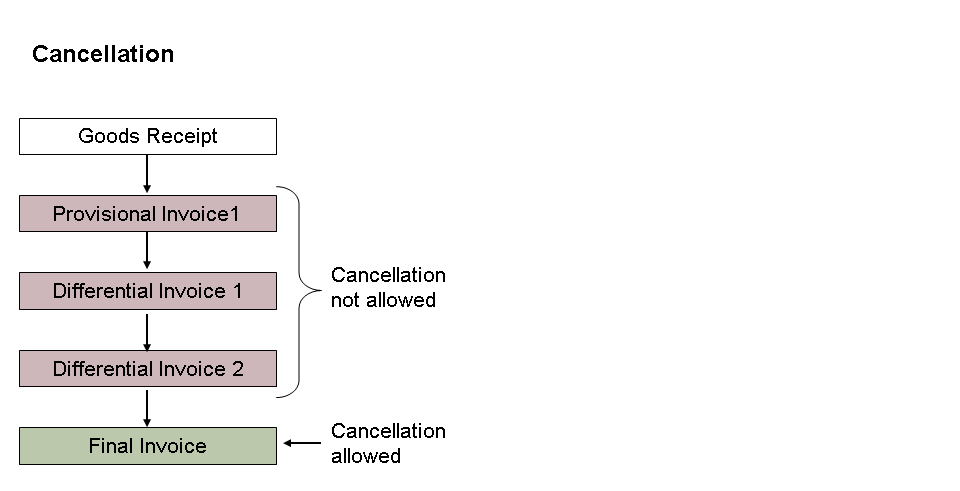
Cancellation Steps
Two-Line Concept
In a differential invoice and a final invoice, assuming the latter has a predecessor invoice document, the system displays both the current item and the item in the predecessor invoice document (two-line display for each purchase order item that an invoice refers to). The first line displays the current amount of the item (invoice item); the second line displays the previously invoiced amount (credit memo item). In addition, the system displays the different in amount between the current invoice and the predecessor document.
When calculating quantities, the system takes into account a possible account maintenance document: If, for example, you have posted a provisional invoice with an invoice quantity that differs from the goods receipt quantity, you can subsequently balance out the quantity difference using the Maintain GR/IR Clearing Account
transaction (MR11
). If you post a follow-on invoice (differential invoice or final invoice), the system calculates the quantity in the credit memo item as the sum of the quantity from the predecessor invoice and the partial quantity of the account maintenance document.
The posting of the items follows the same posting logic as the Financial Accounting
component for invoice or credit memo items.
Display Variant for Differential Invoicing
The Differential Invoicing
layout variant offers an overview of invoice procedures in Differential Invoicing.
Invoice Block
At invoice item level there are tolerance checks that you can define in Customizing for Materials Management
, under Logistics Invoice Verification
Invoice Block
Set Tolerance Limits
. If a check fails, for example because a price difference occurs that is too high due to a manual change, the system sets a payment block for the invoice. For Differential Invoicing, the standard tolerance checks are used:
Price variance (tolerance key
PP
)In Logistics Invoice Verification, the tolerance check for price variance (tolerance key
PP
) is typically run on the price stored in the purchase order or the price determined at goods receipt. In a provisional invoice, a differential invoice, or a final invoice, the tolerance check for items relevant to differential invoicing is run on the price determined at invoice verification. If you enter subsequent credits or subsequent debits after posting a final invoice, the system does not run a tolerance check with tolerance keyPP
on invoice items relevant for differential invoicing.V-Price variance (tolerance key
VP
)If a stock posting is generated by an invoice item, the system determines the new moving average price that results. The system compares the percentage variance of the new moving average price from the previous one using the percentage limits defined. The check against tolerance key
VP
is not supported for items relevant to differential invoicing in a provisional invoice, a differential invoice, or a final invoice.Amount for item with order reference (tolerance key
AP
)If you have activated the item amount check, the system checks specific line items in an invoice with order reference against the absolute upper limit defined. In a differential invoice or final invoice (with predecessor document), the check is not performed against the item amount of the invoice or credit memo item, but against the difference between the two items, as determined by the system.
Release of blocked documents
With the Release Blocked Invoices
transaction (MRBR
), invoice items that were blocked due to a tolerance check against the price (tolerance key PP
) can be automatically re-checked with regard to a price variance, and then released if appropriate (see also Releasing Invoices). This function is not available for invoice items that are relevant to differential invoicing in a provisional invoice, a differential invoice, or a final invoice. You must remove the blocking reason manually.
Invoice Verification in the Background
The transaction Enter Incoming Invoice for Invoice Verification in Background
(MIRA
) and the program RMBABG00
support processing of provisional invoices, differential invoices, and final invoices.
Clearing Account Maintenance
As in the standard, you can start the transaction Maintain GR/IR Clearing Account
(MR11
) after posting a goods receipt, a provisional invoice, a differential invoice, or a final invoice (see Maintaining the GR/IR Clearing Account).
If you select the Differential Invoice
checkbox, under Restrictions
in the Selection
group box, the system selects only procedures that are relevant to differential invoicing. For these procedures there are still quantity differences between goods receipt and invoice receipt postings, which you can balance out using account maintenance. If you do not select the checkbox, procedures relevant for differential invoicing are excluded from the hit list.
More Information
For more information, see Differential Invoicing in Procurement and Invoice Verification.