 Editing Restraints on Disposal
Use
You can use this function to create restraints on disposal and lock positions or partial positions. In the case of a sale, the system checks whether a restraint on disposal exists for the affected position. If a restraint on disposal has been created, the system then checks whether it is affected by the sale. If the locked position is affected by the sale, an error message is displayed.
 Note
Note
You block an entire securities account in the securities account master data.
See also: Editing Securities Accounts
Example
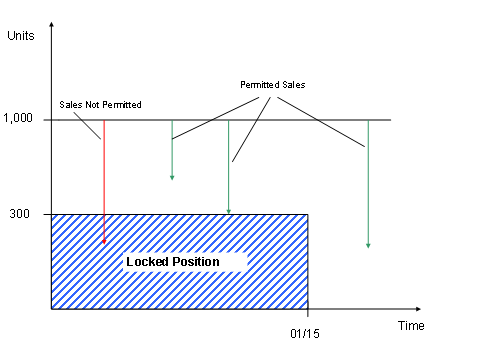
On 12/06, you have 1000 units of stock A in securities account XY. You plan to sell 300 of these stocks on 01/15. To ensure that 300 units are available for sale on this day, you define the following restraint on disposal in the system:
Company code: ABC
ID number: Stock A
Securities account: XY
Units: 300
Locked Until: 01/15/08
Reason for Lock: B
If a sale or another reduction in stock is entered, the system checks whether there are still at least 300 units of stock A remaining in securities account XY. Therefore, up until 01/15, the system only permits sales totaling 700 units.
Impact of the Restraint on Disposal
Integration
Forward Securities Transactions
Position locks can be generated automatically when forward securities are sold, and also deleted automatically when the security is delivered.
Position locks differ from restraints on disposal by their valid from date.Restraints on disposal are always valid to a specific date.
You can also use the
Editing Restraints on Disposal
function to display position locks.
See also:
Procedure
Choose

Back Office

Securities Account Management
Editing Restraints on Disposal.

Enter the
company code
.
You can also specify the
ID number
or a securities account. Enter a date for which you wish to see the available positions and restraints on disposal.
The list contains all the selected positions including their nominal amounts or units. If a valid restraint on disposal or position lock already exists for a position key date, this is displayed in a second row.
You can use the list to do the following:
Branch to the existing restraints on disposal and change them
Delete the existing restraints on disposal
Create new restraints on disposal
To create a restraint on disposal, select the relevant position. Choose
Create
. Define the number of units or the nominal amount to be locked as well as the date until which the lock should be valid. Save your entries.
View existing positions locked using forward securities transactions.
Select a position and the
position trend
pushbutton. You can use this function to branch to a list that displays chronological changes made to the position quantity (position increase/decrease) as well as restraints on disposal and positions locked after the key date.-

Initial Values
of the total locks (restraints on disposal and position locks) on the key date (first list item); The key date is defined using the selected flow for which the position trend was called. The position date of the flow is the first day.-

Position Increase
(due to a purchase, for example)-

Position Decrease
(due to asale
or (scheduled)final repayment
)-

Start of Lock
(from a Position Lock by the sale of forward securities.)-

End of Lock
(from a Restraint on Disposal )In the following columns you can see the position increase and decrease, the nominal value and currency or the units in the quantity change, as well as the total quantity (nominal amount, currency, or units) on the position date.
For the locks (restraints on disposal/position locks), the following columns contain the nominal amount or units for the lock as well as the total nominal amount, total number of units, and the remaining nominal amount and units.