Configure and Deploy Integration Flows
Configure and deploy integration flows (iFlows) for SAP SuccessFactors Employee Central.
Prerequisites
You have deployed the required user credentials for the SAP SuccessFactors Employee Central system.
Procedure
- Configure the Timer event.

This decides how often the integration flow runs to fetch the data from the Employee Central system.
- To configure the receiver systems for CNS, enter the host and the user credential name of SAP Sales Cloud and SAP Service Cloud Version 2.

- Select the EC_CE_API_QUERY receiver channel from the Receiver dropdown for SAP SuccessFactors Employee Central and enter the address and the credential information in Address, Authentication and Credential Name respectively.

- Configure the following external parameters:
-
maxRows: The maximum number of employees to be fetched from Employee Central in each query.
-
Receiver System ID: The default communication system of the SAP Sales Cloud and SAP Service Cloud Version 2 tenant.
-
Sender System ID: The communication system name maintained in SAP Sales Cloud and SAP Service Cloud Version 2.
-
Include Contingent Worker: Indicator to replicate contingent workforce.

-
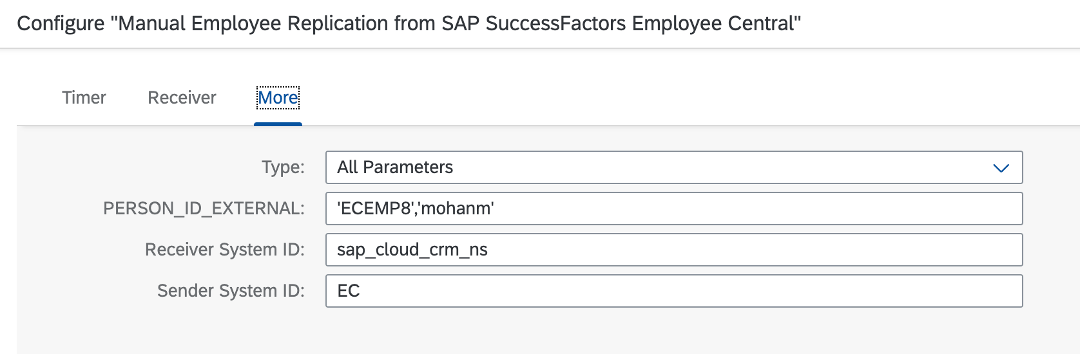
- Optional: To configure and deploy the Manual Employee Replication from SAP SuccessFactors Employee Central iflow, do the following:
- Execute step 4 as the following:

- Provide a comma-separated list of IDs in PERSON_ID_EXTERNAL as shown in the following screenshot:
- Execute step 4 as the following: