 Scenarios for Generating Foreign Trade Data for AES
The sales cycle in the SAP System includes three primary documents:
The sales order
The delivery document
The billing document
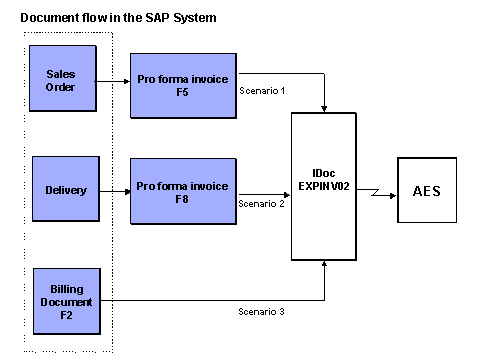
Each of these three documents represents a different scenario for exporters to submit commodity data to the Automated Export System (AES). From each document, the SAP System creates the Intermediate Document (IDoc) EXPINV02, which includes the commodity data AES requires.
The graphic below illustrates these three scenarios. As the graphic shows, EXPINV02 is always based on an invoice (either a pro forma invoice or a commercial invoice).
Scenario 1:EXPINV02 Based on the Sales Order
After processing a sales order, the exporter can create the pro forma invoice F5 based on the sales order. The exporter can then create EXPINV02 based on this pro forma invoice.
The pro forma invoice is not the actual billing document (invoice) the exporter sends to the customer, but it contains the same data. Exporters need to create a pro forma invoice to provide the same messaging capabilities for the document’s data as an actual billing document provides. These capabilities are printing, exporting to a partner system, and sending the document using Electronic Document Interchange (EDI).
The main disadvantage of this scenario is that the pro forma invoice is created early in the sales cycle. It may be several months between when the exporter takes the sales order and when the exporter actually ships the goods. During that time, US Customs’ legislation may have changed. For example, a country that was not under an embargo when the exporter created the sales order may be under an embargo when the exporter is ready to ship the goods. In this case, AES would have approved the commodity data sent early in the sales cycle. But now that the customer’s country is under an embargo, US Customs will not allow the exporter to ship the goods.
Exporters should not submit EXPINV02 based on the pro forma invoice F5 unless they are certain that changing export legislation will not affect the export transaction.
Scenario 2:EXPINV02 Based on the Delivery Document
After completing all shipping activities, the exporter can create the pro forma invoice F8 based on the delivery document. The exporter can then create EXPINV02 based on this pro forma invoice.
This scenario has three main advantages over the other scenarios:
By delivery phase, the exporter usually has correct and complete export data available. The exporter knows, for example, the number of the boxes in the order and the number of the truck that will transport the boxes.
Because the order is ready to leave the shipping point, AES checks the commodity data against the US Customs requirements most current for this delivery.
Because the delivery has not yet left the exporter’s plant, the exporter can change the delivery, if necessary, to meet US Customs requirements.
Scenario 3:EXPINV02 Based on the Commercial Invoice
The exporter can also create EXPINV02 based on the billing document F2. In this case, no
pro forma
invoice is required.
The primary disadvantage of this scenario is that after the exporter posts the billing document to the
Financial Accounting
(FI) component, the document cannot be changed directly. Suppose the exporter sends AES EXPINV02 based on the billing document F2, posts the billing document to FI, and then receives a fatal error message from AES. The exporter needs to edit the billing document and recreate EXPINV02. However, the SAP System does not allow users to edit a billing document after it is posted to FI. Also, because the goods have already left the exporter’s plant, the exporter cannot change the delivery, if necessary, to comply with US Customs requirements.
If exporters want to use this scenario, they should not post the billing document to FI until AES approves the export information in EXPINV02. If the exporter must make corrections to the posted invoice, the exporter must first cancel it and then create a new invoice.