Purchasing Limits
Create purchasing limits for your users so that approvers must authorize any order that exceeds the specified limits.
Purchasing limits are assigned to individual users or to user groups. When an order that is placed by a buyer is below a limit, the order is automatically allowed to proceed through the seller's purchase flow. If the order surpasses any of the limits, the order is placed, but held until approval is given. If the order is rejected, the order is cancelled.
Types of Purchasing Limits
The following kinds of purchasing limits are provided out-of-the-box with SAP Commerce Cloud:
-
order-based limits
-
time span-based limits (day, week, month, quarter, year)
-
budget exceeded limits (when a purchase surpasses the allocated budget, but not necessarily the order or time span limit)
A normal scenario might be that a standard approver can approve based on order and time span limits, but perhaps "budget exceeded" is reserved for a higher-level purchasing manager.
Creating a Purchase Limit
Procedure
- Click Add, and then fill in the following fields:
-
Code allows you to create an ID for the purchase limit
-
Type is per order, per time span, or budget exceeded
-
Period (if per time span is selected) is day, week, month, quarter, or year
-
Currency (if per order or per time span is selected)
-
Threshold (if per order or per time span is selected) is the amount after which approval is required
-
Parent unit does not have any effect on the use of the purchase limit
The following is an example:

-
Creating Various Purchase Limits
For the purposes of this tutorial, create the following purchase limits:
-
$500 per order
-
$2000 per order
-
$1500 per month
-
$6000 per month
-
Budget exceeded
Assign them all to your root unit. The following is an example:
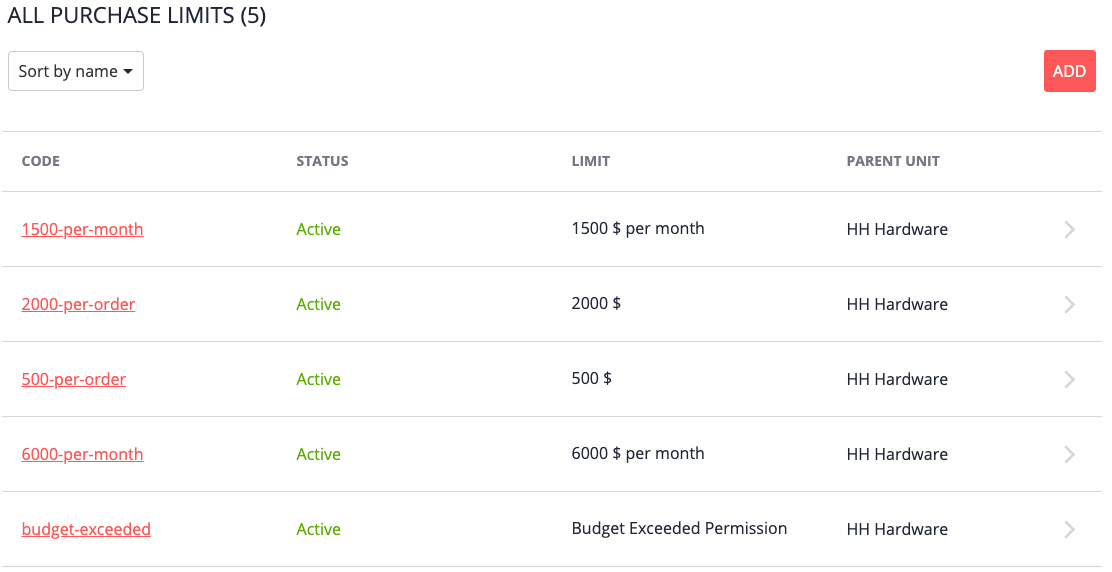
Assigning Purchase Limits
To take effect, purchase limits must be assigned to users.
For this example, we'll assign the following:
-
the two lower limits to the buyer
-
the two higher limits to the approver
-
the budget exceeded limit to the administrator (although this is redundant because the administrator would get the approval request anyway)
Assigning Purchase Limits to the Buyer
Procedure
- To the right of the limits you want to assign, click Assign, and then click Done.
In the following example, our buyer, John Doe (Customer role) has been assigned both a per-month and a per-order limit:

Repeat this process as follows:
-
For the approver, assign the two larger per order and per time span limits.
-
For the administrator, assign the "budget exceeded" limit.
-
Assigning the Same Purchase Limit to Multiple Users
The User Groups feature is designed for grouping multiple users into one collection, so that you can assign specific spending limits to multiple users all at once.
In the Absence of Per Order or Per Time Span Limits
Buyers and approvers do not necessarily require both per order and per time span purchase limits. For example, the following scenario is legitimate, though but perhaps somewhat unexpected:
-
The buyer is assigned an order-based limit of $500, but no time span-based limit.
-
The approver is assigned an order-based limit of $2000 and a time span-based limit of $6000.
-
The buyer makes a purchase of $200.
-
The order is held for approval based on the time span limit rule, because the absence of a time span limit for the buyer is equal to a $0 limit (meaning all orders are subject to approval).
This logic is controlled by SAP Commerce Cloud.