Class 3 Chart Types
Chart Types
The chart type portfolio belongs to class 3.
Portfolio
A portfolio displays the position of an object (enterprise, product, and so on) in a four-field matrix. The position of the object is defined using two dimensions.
Portfolios are used mainly in enterprise and product comparisons. For example, a portfolio can be sorted like the products of an enterprise by their dimensions economics and strategic significance.
Data provider
You build the underlying table for a portfolio as follows:
- The first data column contains the values to be entered on the X axis.
- The second data column contains the values to be entered on the Y axis.
- The third data column is relevant for the bubble size.
- You can add further pairs of data columns to the table. The first data column of a pair always contains the Y values and the second data column the bubble size.
The X value of a data point is always defined from the first data column. The Y value of a data point is defined from the second, fourth, ... data column, depending on the data column to which the data point belongs. The X and Y values together give you the center of the bubble.

Chart

Special features
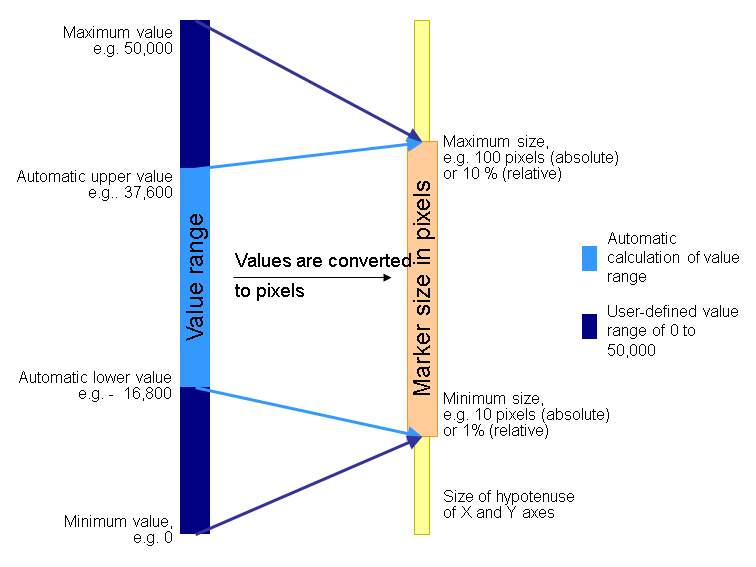
You can change the form of the markers for a bubble or hexagon by choosing Data Series Format → Default Data Series → Area Properties → MarkerShape. The field MarkerSize has no function for this chart type. You can change the marker size as follows:
- If Portfolio → Size in Percent is not checked, the pixel size is calculated from the minimum and maximum values in pixels.
- If Portfolio → Size in Percent is checked, the pixel value is calculated as a percentage of the hypotenuse of the x and y axes in the drawing area.
- Entries in the properties Portfolio → Minimum Value and Maximum Value.
- Checking the property Portfolio → Minimum Automatic or Maximum Automatic.
The graphic below clarifies the link between the value range and the marker size.
You can also use the property Portfolio → Minimum Value to ensure that small markers remain visible.