Exchange Object Configuration
The exchange object defines what in the exchange table is updated in the exchange persistent layer, what class handler is called to update the exchange table, and what fields are related to the change detection.
Use the Configuration Panel to specify which changes are relevant to the mobile application and what conditions to satisfy for so that an update action is triggered. The Exchange Object Configuration panel has the following tabs:
-
Technical Settings
-
Change Detection Field Selection
-
Change Detection Condition Filter
-
Data Segment Settings
-
Linkage Settings
-
Push Settings
Technical Settings Tab
Use the Technical Settings tab to configure basic settings for an exchange object.
Use the <Exchange Object> field for the ID of the exchange object, limited to 40 characters. Type in a description in the <Exchange Object Description> field, limited to 60 characters. The <Mobile Application> field contains a dropdown where you can select your mobile application. The <Application Area> classifies the exchange object based on standard SAP application areas using a dropdown selection field.
The <Reference Business Object> is the standard SAP business object. The <Exchange Table Name> is the name of the table stored in SAP that contains the technical data. The <Exchange Table Description> is a brief description of the exchange table. The <Exchange Lock Object> field is used when updating the exchange table. Type in how many days you want to keep historical data in the <Days to Keep History> field. Check the <No Exchange Table Update> checkbox to not write the record to the exchange table in SAP when the record is changed.
-
Handler Setting: Type in the name of the class handler from the repository that is responsible for updating the exchange table in the <Exchange Object Handler> field.
-
Collective Run Settings: Define the condition where xChange processing is executed asynchronously as a V3 run by selecting one of the following mode options:
-
Dynamic: The collective run mode is determined at runtime by the xChange handler method DETERMINE_EXEC_MODE
-
Not Allowed: Not allowed to switch to collective run mode
-
Activated: Always execute asynchronously in V3 collective run mode
-
By User Parameter ID: Switch to V3 collective run mode for runtime user with the specified user parameter value set in the user profile
-
-
Activation Setting: Check the <Active Flag> checkbox to ensure that the exchange object is in an active state. If unchecked, the exchange object performs no actions. When the <Use in Linkage Processing Only> checkbox is checked, the xChange object is only allowed during linkage processing and not if the original EFI was triggered during the xChange process.
The following screenshot shows an exchange process enabled for MATERIAL. Any changes for the MATERIAL leading data are recorded in the exchange table and are transmitted to the client during the next transmit.

Change Detection Field Selection Tab
The Change Detection Field Selection tab lets you optimize the change detection process for a mobile application. If a value change is detected for any fields within the group, the object identifier is written to the exchange table, indicating that a change was made. If the <Active Flag> is not checked for a field, any value changes made to that field are not detected and recorded to SAP during the exchange process. By default, all fields are initially checked.
The Exchange Object by Application tree lists all application areas and the exchange objects linked to each application area. Expand the tree by clicking on the arrows to the right of the application area to display the exchange objects associated with it.
-
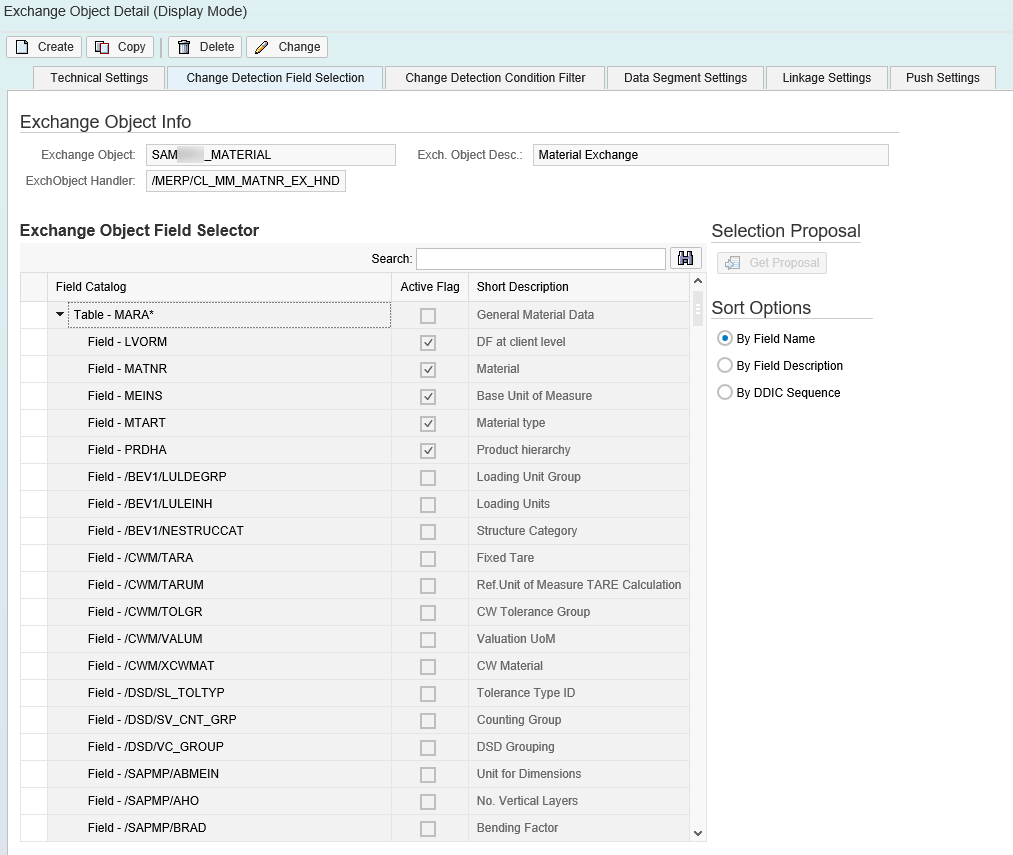
Exchange Object Info: The <Exchange Object> field is read only and is the ID of the exchange object. The <Exchange Object Description> is read only and is a brief description of the exchange object. The <Exchange Object Handler> field is read only and is the name of the class handler from the repository that is responsible for updating the exchange table.
-
Exchange Object Field Selector: The <Field Catalog> column is comprised of non-editable rows of all fields that are detected by the class handler when changes are made. These fields are grouped by the technical table name of the SAP business object.
When the <Active Flag> checkbox is checked, either the table or a field within the table is active. Any value change to the selected field is detected by the class handler. Note that if you check the Active Flag checkbox on a table row, it selects all the rows within the table.
The <Short Description> is a read only field that contains a brief description of the table or of a field withint the table.
-
Selection Proposal: In a typical mobile application installation, you do not want to have all fields marked as active for change detection. Rather, only the fields that are active on the odata mobile data object that are brought down to the mobile device will also be active in the exchange object. Based on odata mobile data object usage in the application, the selection proposal examines the active flags that are checked for an exchange object's table fields and provides recommendations to the administrator on which fields should be checked or unchecked.
See the following screenshot for an example of the enabled exchange object MATERIAL, where the properties of the object are captured and recorded in the exchange table. The properties that trigger the exchange are defined on this Change Detection Condition Filter tab, as seen in the checked <Active Flags>:
Change Detection Condition Filter Tab
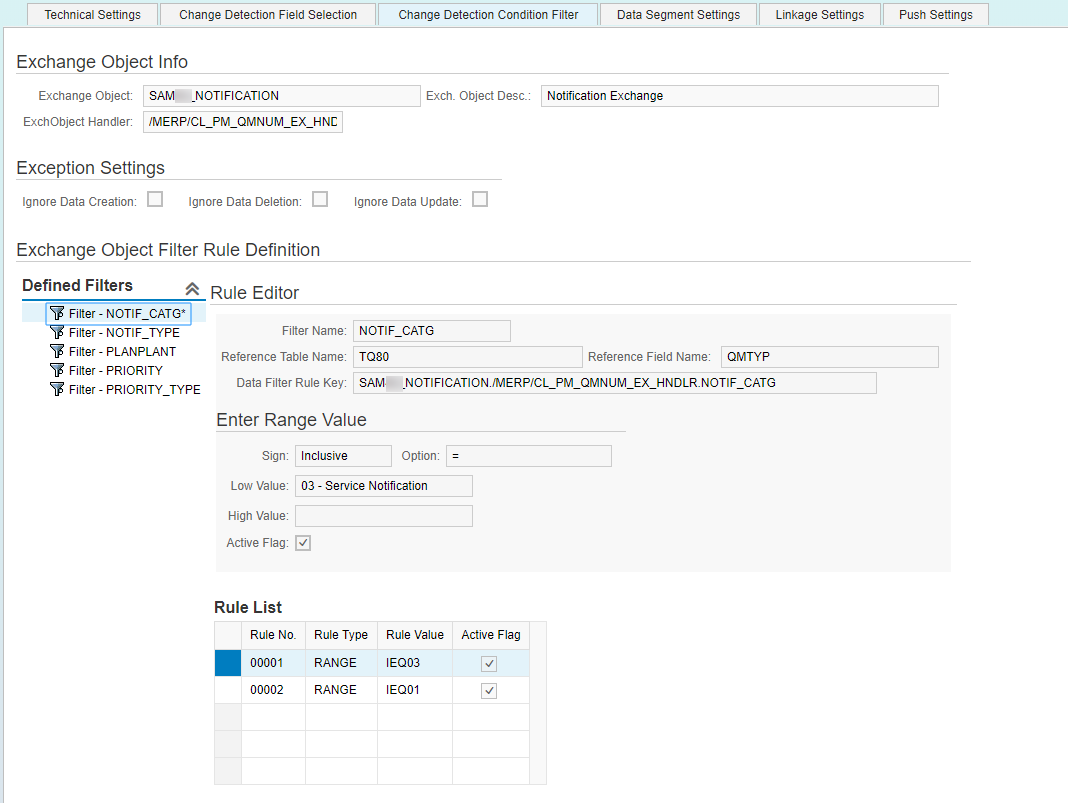
The Change Detection Condition Filter tab lets you restrict change detection based on data content. For exchange handlers to support this feature, define data filter conditions for which the underlying SAP business object must qualify before the change detection process is triggered. The condition is defined at the table field level and is in the SAP range table format.
-
Exchange Object Info: The <Exchange Object> field is read only and is the ID of the exchange object. The <Exchange Object Description> is read only and is a brief description of the exchange object. The <Exchange Object Handler> field is read only and is the name of the class handler from the repository that is responsible for updating the exchange table.
-
Exception Settings: When the <Ignore Data Creation> checkbox is checked, newly created records and data are not processed to the exchange table. When the <Ignore Data Deletion> checkbox is checked, deleted records and data are not processed to the exchange table. When the <Ignore Data Update> checkbox is checked, updated records and data are not processed to the exchange table.
-
Defined Filters: Lists all the data filters supported by the class handlers.
-
Rule Editor: The <Filter Name> is read only and is the name of the filter as defined by the class handler developer in the class handler method. The <Reference Table Name> is read only and is the technical name of the SAP database table field where the filter is applied as defined by the class handler developer. The <Reference Field Name> is read only and is the technical name of the SAP database table field where the filter is applied as defined by the class handler developer. The <Data Filter Rule Key> is an internal technical key used by the framework at runtime.
Use the values in the Enter Range Value section to set the range. The <Sign> field is the value for the SAP range table column SIGN. The <Option> field is the value for the SAP range table column OPTION. The <Low Value> field is the value for the SAP range table column LOW. The <High Value> field is the value for the SAP range table column HIGH. When the <Active Flag> checkbox is checked, the rule is active.
The Rule List is a table that displays a list of rules that are defined using the values in the Rule Editor and the Range Value sections.
The following screen shows that any exchange detected for the exchange object NOTIFICATION will be considered only if the notification is maintained in one of the roles defined in the NOTIF_CATG criteria.