Services Procurement with SAP Ariba Material POs
Describes the end-to-end flow of information between SAP Fieldglass, SAP Ariba Buying solutions, and SAP Business Network.
The workflow begins with creating an assignment in SAP Fieldglass, and ends with passing the payment request data from the SAP Ariba solution to the ERP system.
The following graphic illustrates the integration workflow.
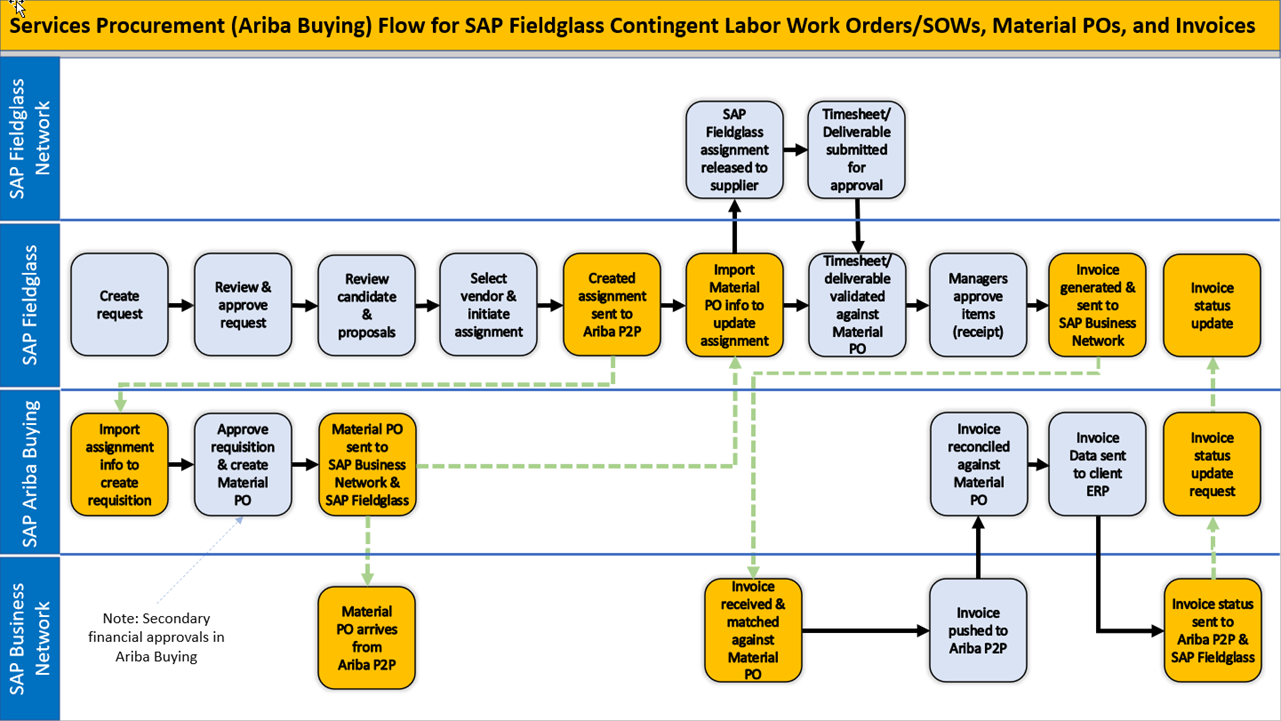
The following steps explain the workflow in detail:
-
In SAP Fieldglass, the requester (for example, a hiring manager) creates and submits a work order or SOW in SAP Fieldglass.
When a SOW/WO is closed (or re-opened) in SAP Fieldglass, a PO close CIG message is sent to SAP Ariba. The PO will be updated to closed (or re-opened) in SAP Ariba.
-
The work order or SOW progresses through the approval flow, eventually being routed to the SAP Ariba solution. At this point, information from the submitted work order or SOW is passed from SAP Fieldglass to the SAP Ariba solution, via a web services integration task, for financial approval.
-
The SAP Ariba solution uses the work order or SOW information to create a high-level, noncatalog requisition, marks the requisition as a services requisition from SAP Fieldglass, and submits it for approval. The requisition requester is the user who created the work order or SOW in SAP Fieldglass.
-
The SAP Ariba solution sends a requisition ID back to SAP Fieldglass in the form of a URL. In SAP Fieldglass, users can choose Actions > View External Approval to view the requisition in the SAP Ariba solution.
-
The requisition is routed through the approval flow. SAP Ariba purchasing administrators can add an approval rule specifically for SAP Fieldglass requisitions, if desired.
-
In the SAP Ariba solution, approvers either approve or deny the requisition. The Summary tab of the requisition displays the SAP Fieldglass work order or SOW ID. If single sign-on is configured, the ID is a link that leads directly to the corresponding SAP Fieldglass work order or SOW.
-
If the requisition is fully approved, the SAP Ariba solution creates a material purchase order (PO) and sends it to the supplier’s SAP Business Network account. SAP Business Network sends an acknowledgment back to the SAP Ariba solution, and the status of the requisition and Material PO change to Ordered.
-
If the requisition is denied, its status changes to Denied, and no PO is created.
-
-
When the status of the requisition is either Ordered or Denied, the SAP Ariba solution sends a status update (and the Material PO ID, if there’s one) to SAP Fieldglass.
-
Depending on whether SAP Fieldglass receives a status of Ordered or Denied from the SAP Ariba solution, one of the following actions occurs:
-
When SAP Fieldglass receives a requisition status of Ordered, the Material PO ID is displayed in the Posting Information section of the work order or SOW Details tab, and a new comment states Ordered. The work order or SOW continues through the SAP Fieldglass approval flow. When fully approved, the status of the work order or SOW changes to Created, and SAP Fieldglass sends it to the supplier.
-
When SAP Fieldglass receives a requisition status of Denied, the work order or SOW status changes to Rejected, and a new comment states Denied. The user can edit the work order or SOW and resubmit it, if desired.
-
-
The supplier accepts the work order or SOW.
-
The worker or contractor submits/ revises timesheets, expense receipts, fees, schedules, and any other documents to SAP Fieldglass, as applicable.
-
In SAP Fieldglass, the submitted documents are matched to the work order or SOW and submitted for approval.
-
When the timesheets and receipts are approved, SAP Fieldglass creates an invoice.
-
SAP Fieldglass sends the invoice to SAP Business Network as an ERP copy invoice, which isn’t editable.
-
SAP Business Network matches the invoice to the Material PO using the Material PO ID and sends the invoice to the SAP Ariba solution.
-
The SAP Ariba solution receives the ERP invoice copy, which is automatically approved with no approval workflow and isn't editable. The status of the invoice is Reconciled.
-
The SAP Ariba solution creates an information-only invoice reconciliation and creates a payment request. The status of the invoice reconciliation document is Paying.
-
If the SAP Ariba solution is configured to send payment information to the ERP system, the ERP invoice copy is included in the payment request export in OK-to-pay invoice format.
-
When the ERP system notifies the SAP Ariba solution that the invoice is paid, the status of the invoice becomes Paid.