 Information System with Summarization
Use
The Information System for investment programs consists of two parts. There are the drilldown reports for the “normal” database of your system or client. Along with these, there are also drilldown reports that access a summarization database. The summarization database makes it possible for you to update and report on a summarized dataset for an investment program and its dependent appropriation requests and measures. This offers several advantages:
The drilldown reports that access the summarized dataset have better performance than unsummarized reports.
Data from several local systems can be imported into the summarization database. These local systems can be SAP systems or non‑SAP systems.
You can manage different versions of the summarization database. You can thereby manage “snapshots” of the investment data of your enterprise. Using versions, you can create a sequence showing the data on the investments in your enterprise over time.
You can still generate reports on data from the past, even if the objects to be reported on have themselves already been deleted from the system.
Features
The central part of summarized reporting is the summarization database. In the summarization database, you store summarized characteristics and key figures on investment programs and the appropriation requests and measures assigned to them. You store these on a periodic basis. The characteristics and key figures contain three types of data:
Values
Master data
Investment program hierarchy
The summarization database is client-dependent. You can define only one summarization database in each client for investment programs. But you can still define any number of summarization versions in a given client.
Data Transfer
Depending on the source of the summarization data, there are different system functions for transferring the data to the summarization database (
Investment
Programs
→
Periodic processing
→
Summarization
).
The summarization data comes from the same client or SAP system as the client or system in which the summarization database is managed. In this case, you can select summarization data immediately (
Copy program
) and write it to the summarization database (
Summarize values
).
The summarization database is supplied with values from other SAP systems. Then you have to first export the data to a file (
Output to file
). Then you can import the data to the central system and summarize it there (
Import from file
).
When you export data to a file, you can select either already summarized data, or unsummarized data. Selecting summarized data makes sense when the system providing the data has its own summarization database that is supplied with data from other local systems (such as, other subsidiaries).
The data comes from an SAP R/2 RK-P System. In this case, there is a data procurement program you can use to select the relevant projects. It then writes them to the summarization database in the ERP System. You can also assign a project in SAP R/2 RK-P to an investment program position in the reporting system. You can either assign the project directly, or by means of the appropriation request.
The data comes from an external, non‑SAP system. There is an interface for updating the summarization database from external systems. For more information, see Special Considerations for Summarizing from Local Systems
Entities
Along with the investment program structure and the values, you can also store the following entities in the summarization database with their keys and short texts:
Measures
Appropriation requests
Profit center
Cost centers
Plants
Functional locations
Storing the key and short text of the entities in the summarization database is necessary in order to be able to display the entities in report. The same applies when the summarization takes place within one system or client. There is a function for this in the menu. Choose
Programs
→
Periodic
processing
→
Summarization
Storing in the summarization database also has another advantage. The entities are still available, even if they are changed or reorganized in their original database.
Characteristics that Can Be Summarized
The system achieves the summarization by summarizing using specific characteristics, rather than storing all characteristics and all characteristic values of the investment program. For example, if you want to create reports using the summarization database that only have to do with organizational units, you do not have to store investment data at the object level. Instead, you summarize using the
appropriation request
and
measure
characteristics. In this way, you can considerably reduce the number of data records in the summarization database.
In Customizing, you specify which characteristics the system should summarize, and which should not be summarized (
Information System Using Summarization
).

You cannot summarize using the
fiscal year
,
plan version
, or
value type
characteristics. Otherwise the information about the type of key figure is lost.
Summarizing using the
investment program
or
approval year
characteristics is also not possible, because the summarization data always has to be stored in relation to an investment program.
Since most standard reports use investment program positions as drilldown characteristics, it generally does not make sense to use
investment program position
as a characteristic for summarization.
Summarization by Scale
If you manage the
appropriation request
or
measure
characteristics in the summarization database in detail display form (meaning that the data is not summarized), then you can specify in Customizing that objects that have a certain scale are summarized anyway. To do this, remove the
Detail display
indicator from the definition of the scale you want to use (
Appropriation Requests
→
Master Data
→
Define Allowed Values for Certain Master Data Fields
→
Define Scale
)
Using this method, you can exclude measures and appropriation requests that have an insignificant value from summarization reporting. At the same time you benefit from a detail display of more important measures and appropriation requests.
You enter scales in the master data of investment program positions, appropriation requests and measures. For objects that are not managed in an SAP system, the system determines the scale from the appropriation request or investment program position to which they are assigned.
Summarization Versions
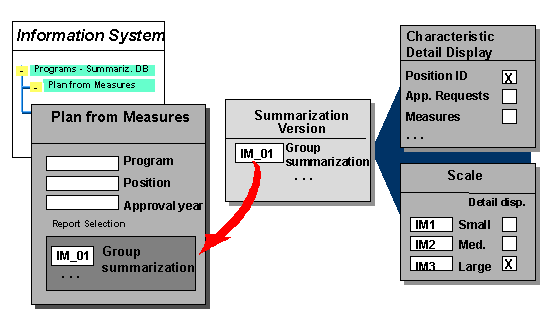
In order for you to have multiple “snapshots” of your investment programs at different times, the system saves the data in the summarization database in summarization versions. The summarization versions allow you to “preserve” the investment program in different phases. You have to enter a summarization version for the procurement of data for the summarization, as well as when you run summarization reports. If you request data collection for a summarization version that already has data in the summarization database, the system overwrites the existing data.
Summarization Versions
You can define any number of summarization versions in Customizing for
Investment Management
(
Information System
→
Information System Using Summarization
). A summarization version consists solely of a key and a text.
Activities
You create a summarization database in the following steps (
Periodic processing
→
Summarization
)
Copy the investment program to the summarization database (
Summarization
→
In own client
→
Copy program
).
Export the investment program values from the original system to a file (
Summarization
→
Output to file
)
Export the entities from the original system, each to its own file.
Import the investment program values and entities (
Summarization
→
Import from file
).
Exporting and importing are not necessary if the data does not come from other clients or systems (that is, all the data is in the same system or client as the summarization database). In that case, you have to use the functions
Summarize values
and
Copy entities
(choose
Summarization
→
In own client
).

Summarization reports relate to only one investment program. You can use summarization versions to create summarization reports that give a “snapshot” of your investment program, but the program hierarchy has to be exactly the same in all the versions.