 Assignment of WBS Elements
Use
In most cases, an entire project is clearly assigned to one investment program position. In this case, the assignment to an investment program is made at the level of the top WBS element. Some projects, however, have a much broader scope within an enterprise. The WBS elements belonging to such a project receive their budgets from various sources. Therefore it is also possible to assign non-top WBS elements to different investment program positions.
Features
You can make assignments to the investment program from all levels of the work breakdown structure. The individual WBS elements in a work breakdown structure can be assigned to different investment program positions.
The following graphic shows an example of possible assignments. The WBS elements for
Hardware
and
Application
are each assigned to one investment program position, respectively. None of the other WBS elements are assigned to an investment program position.
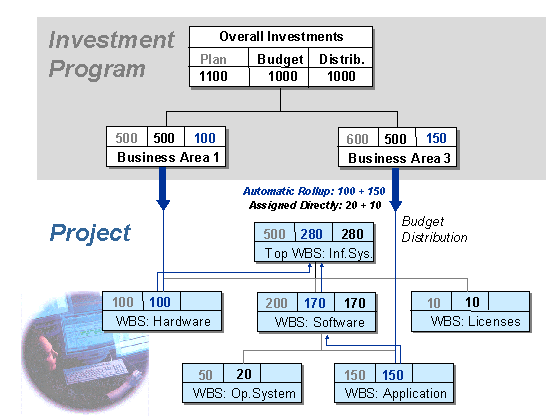
Assignment to Different Program Positions
WBS elements that are assigned to program positions
do not
have to be at the same level in the work breakdown structure. It is also permissible for subtrees of the work breakdown structure not to have any assignment at all to an investment program position (in the graphic, the
Licenses
subtree has no assignment).
The system guarantees the consistency of budget values within a work breakdown structure as follows:
You can assign a WBS element to a program position only if the WBS elements directly above and below it in the hierarchy are not assigned to a program position.
If the WBS element receives its budget from budget distribution from a program position, then the system automatically rolls up the budget received to the superior WBS elements in the work breakdown structure. If there are already budget values on the superior WBS elements, the system adds the rolled up budget to the existing budget.