Creating Transformations
The transformation process allows you to consolidate, cleanse, and integrate data.
Context
You can semantically integrate data from various sources.
You create a transformation between a source and a target. When data is loaded from a BW object or virtual object to a target BW object, the data passes through a transformation. A transformation converts the fields of the source into the format of the target.
A transformation consists of at least one transformation rule. Various rule types, transformation types, and routine types are available. These allow you to create very simple and highly complex transformations.
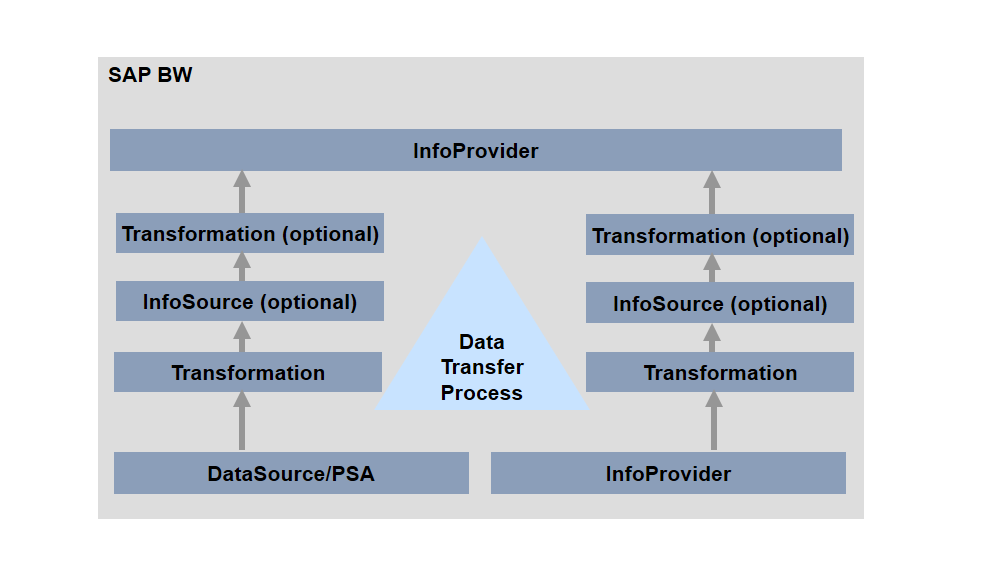
The following figure illustrates how the transformation is integrated in the data flow:
Procedure
- Choose the source for your transformation and choose Create Transformation.
The system proposes a transformation. The proposal is generated on the basis of a comparison with existing transformations. The system also checks for Basis InfoObjects that can be assigned (UNIT to 0UNIT for example) or whether the DataSource can be assigned to InfoObjects while editing the DataSource.
You can accept the proposed transformation or modify it. On the left side of the screen, you see the source. On the right side of the screen, you see the rule group. To show the target as well, choose
 Switch Detail View On/Off.
 - To create additional rule groups, choose
 Rule Group
  New Rule Group
 .
More information: Rule Group
.
More information: Rule Group - Choose
 Start Routine and End Routine to create the corresponding routines for your transformation.
More information: Routines in Transformations
Start Routine and End Routine to create the corresponding routines for your transformation.
More information: Routines in TransformationsFor transformations that are executed in SAP HANA, you can create ABAP Managed Database Procedures (AMDP) in SAP HANA. To do this, choose
Edit Routines Create SAP HANA Expert Script. - You can select source fields for the semantic grouping by choosing
 Define Semantic Groups for Packages. Data records with the same values in the selected fields form a logical key and are processed together in a package.
More information: Semantic Grouping
Define Semantic Groups for Packages. Data records with the same values in the selected fields form a logical key and are processed together in a package.
More information: Semantic Grouping - If you want to follow changes to your InfoProvider over a given period, you can create a manual version. To do this, choose Goto Version Management in the main menu.
More information: Version Management
- By choosing Extras Table View, you can display the metadata from the transformation as a table (in HTML format), for documentation purposes for example. You can use the context menu to print the Table View.
Results
The transformation is executed with the corresponding data transfer process when the data is loaded.
To check whether the transofrmation provides the required results, you can simulate it to begin with. To do this, execute the simulation of the DTP request. The transformation is also simulated when the data update is simulated.
More information: Simulating and Debugging DTP Requests.