 Milestone Technique
Use
You use this measurement technique if particular targets or events (called milestones) are defined.
The milestone technique is typically used in:
Development work
Design and engineering
Production and assembly
Cases where the ordering party prescribes milestones - for example, as the basis for payments
The milestone technique is date-related and is preferred on projects which last longer than three months.
Prerequisite
You must maintain milestones relevant to progress analysis in the project. You maintain planned dates in the WBS, network, project planning board, or structure planning.
You must maintain the following data in the milestone detail screen for the system to take account of the milestone in progress analysis:
If the milestone is maintained for a WBS element, the following must apply in the
Change Project: Milestone Overview
screen:Set the indicator
EV
for progress analysisThis flags the milestone as relevant for progress analysis.
A POC in percent
The percentage is a cumulative value. That is, when the milestone is reached, the percentage of completion of the activity/WBS element takes on the POC that you specify here.
If the milestone is maintained for a network activity, the following applies in the detail screen for the respective milestone:
Set the indicator for progress analysis
This flags the milestone as relevant for progress analysis.
A POC in percent
The percentage is a cumulative value. That is, when the milestone is reached, the percentage of completion of the activity/WBS element takes on the POC that you specify here.
Features
Each milestone represents a portion of the work completed or the work to be completed in an activity or WBS element. You can enter milestones for WBS elements and activities.
In the case of the planned POC; the system takes account of the following milestones:
Schedule dates for milestones in the activity/activity element.
In milestones for an activity or activity element, you can reference the milestone dates to the activity. You can enter a time interval - say, 10 hours - or a percentage of the activity duration. In network scheduling, the system determines the milestone dates in relation to the dates from the activity or activity element. If you have maintained a fixed date for the activity/activity element, the system likewise includes the fixed date in the scheduled dates for the milestone during scheduling. Fixed dates are not included if activity dates are shifted.
Fixed date (basic or forecast date) for milestones in the WBS element
In progress version customizing, you stipulate which set of dates the system should use to determine the POC:
For the actual POC, the system takes account of the actual milestone dates. You maintain actual dates manually when the milestone is reached, or the system takes them from the completion confirmation.
If you set the automatic milestone indicator in the completion confirmation, the system automatically adopts the actual dates from the confirmation as the actual milestone dates. Otherwise, when you save, the system asks for confirmation when you save the confirmation to the milestone dates.
The system determines the POC as follows:
If the basic or forecast date for the milestone is reached, the planned POC for the activity or WBS element is updated to reflect the POC defined in the milestone.
When the actual date for the milestone is reached, the actual POC is updated to reflect the POC defined in the milestone. The actual date for the milestone may be reached, for example, when an activity is confirmed.
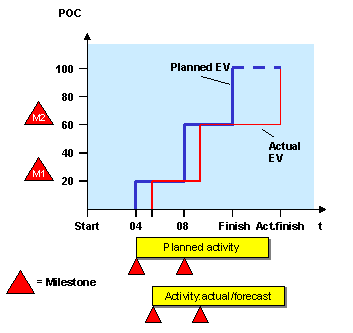
Example
You have maintained the following milestones for an activity:
Milestones |
Scheduled Date |
Actual Date |
POC |
M1 |
April 01, 1999 |
May 01, 1999 |
25 % |
M2 |
June 01, 1999 |
July 01, 1999 |
60 % |
Finish date |
August 01, 1999 |
September 01, 1999 |
100 % |
The system determines the POC as follows:
Period |
Planned POC |
Actual POC |
04/99 |
25% |
|
05/99 |
25% |
25% |
06/99 |
60% |
25% |
07/99 |
60% |
60% |
08/99 |
100% |
60% |
09/99 |
100% |
100% |