Concept
The following general functions for the use of the standard table maintenance dialog in user applications, are already in the system:
-
A central program module, which contains the entire maintenance functionality, including flagging functions for repeated processing oe entries, the selection of all processed entries, retrieve deleted entries, and more.
-
The maintenance transaction which uses the table or view-specific components and the central program modules.
Internal Processing
The flow is shown in views in the following illustration:
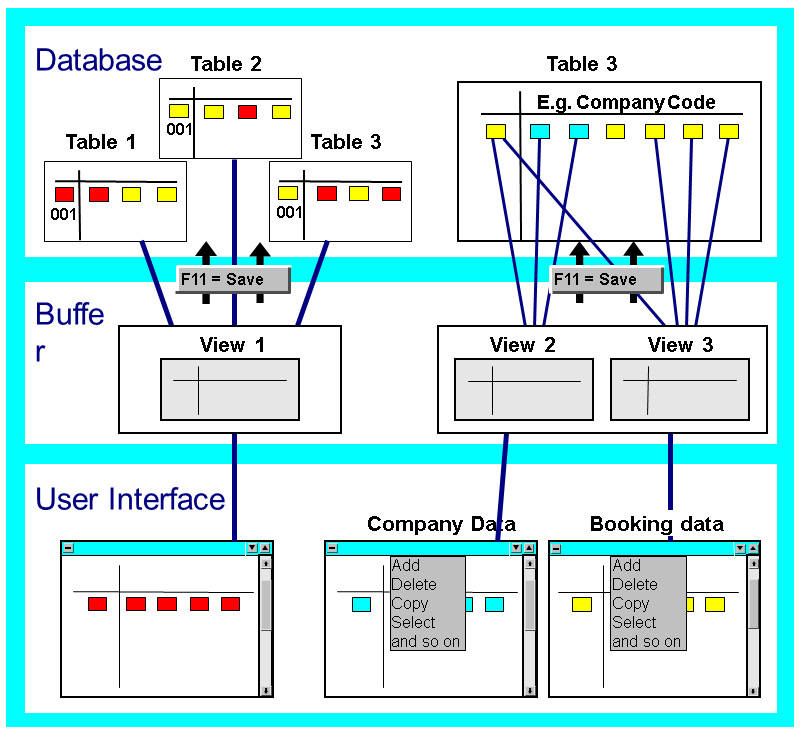
A work area for processing in the screen, which either contains all existing view entries, or can be restricted by a selection, is fetched from the database. This work area is loaded into internal tables. A further selection for processing by field contents, can be made here.
The field contents are maintained in the internal tables. So the database is not accessed after the maintenance of each view entry. The changes are transferred from the internal buffer to the database only when the user saves. This buffering makes the maintenance procedure transaction-oriented. This allows the user to discard changes before database access (user-controlled "Rollback"), and allows the calling main program to check the consistency of entries in the overall context.
Including the Maintenance Dialog
The maintenance dialog can be included as follows:
-
Put the maintenance transaction in a menu or application.
-
Put the maintenance dialog by passing parameters to function modules in an application.
There are three levels of entry, according to the control capability of the maintenance procedure.
-
Highest level:
This interface calls the complete maintenance dialog for a table or view. You can restrict the table entries to be read from the database, with selection conditions.
-
Middle level
This level contains the actual maintenance dialog, with the steps "Read, Edit, Save", in that order. You must program preparatory actions, such as locking data, reading the Dictionary, etc. yourself.
-
Lowest level:
Your program controls all maintenance procedures individually, with this interface. You pass the actions to be performed, to the function module, as parameters. This lets you put individual maintenance procedure steps ("Read, Edit, Save"), into your program.
-