Window Editor
Use
The window editor is the tool for creating and editing Web Dynpro windows.
The Window Editor comes in the following variants, where they usually each contain the same functionality:
-
Classic Window Editor
Window Editor in the classic tree view (standard setting).
-
Graphic Window Editor
Window Editor with graphical user guide.
The JNet ActiveX Control is a prerequisite for the graphical Window Editor which can be isntalled directly as part of the SAP GUI installation.
Graphic Window Editor
Every element of the classic tree display of the Window Editor is represented in the graphical Window Editor.
|
Element |
Equivalent in the Graphical Window Editor |
|---|---|
|
window |
Representation through entire background of the graphic. |
|
Window Plugs |
Positioning on the Background of the Graphic |
|
Views |
Positioning on the Background of the Graphic |
|
Container |
Positioning in the Related Views |
|
Assigned Views |
Positioning in the Related Containers |
|
Inbound plugs |
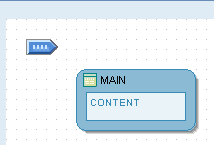
Blue Display with Horizontal Orientation |
|
Outbound plugs |
Red Display with Vertical Orientation |
|
Default Views |
Dark Blue Display |
|
Normal Views |
Light Blue Display |
|
Obsolete Elements |
Red Lines or Outlines |
|
Elements in Enhancement Mode |
Blue Lines or Outlines |
The color of the background of the graphic depends on the current mode:
|
Mode |
Example of the Visual Display |
Description |
|---|---|---|
|
Display Mode |
|
Objects on Light Background |
|
Change Mode |
|
Objects on White Background |
|
Enhancement Mode |
|
Objects on Yellow Background. |



Context menus
In the graphic Window Editor, the context menus for individual elements (views, containers, plugs, navigation links) correspond to the context menus of these elements in the classic Window Editor.
Some exceptions for this are the context menus for entries that are disabled. These are not displayed in the graphical Window Editor.
Navigation Links
In the graphic Window Editor you can use drag and drop for the following actions for navigation links:
-
Delete
-
Select
-
Change
You can also change the assignment using drag and drop.
Window Components
Just like a Web Dynpro view, a Web Dynpro window consists of a graphic part, a controller part and inbound and outbound plugs. The layout of the window is maintained in the graphics part, that is, the embedded views as well as the navigation between the views. The window controller on the other hand contains a context, methods and attributes.
You can create windows on a component-local basis. In this case, the system does not generate an interface view. This means that you cannot use the window in question in another component.
Properties
The technical properties of a Web Dynpro window controller are the same as those of a Web Dynpro view. You can therefore declare a controller usage for a window, so you can exchange context data or use methods.
More information: Controller Properties