 Example: Evaluating Alternative Commitment Item Hierarchies
Use
Evaluating commitment items in different hierarchies
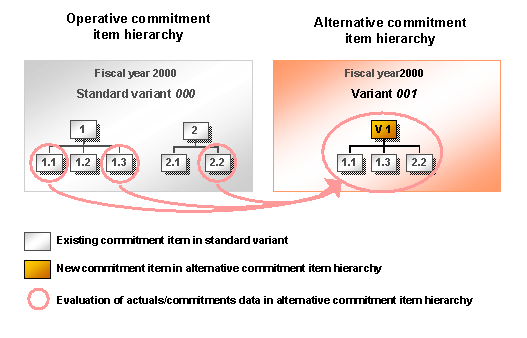
In the example described here, you want to jointly evaluate the actuals/commitments data for commitment items 1.1, 1.3 and 2.2 in standard variant 000 . To do this, you create an alternative commitment item hierarchy in variant 001 . In the alternative commitment item hierarchy, the actuals/commitments data for operative commitment items 1.1 , 1.3 and 2.2 is totaled up using the bottom-up principle in alternative commitment item V1 .
Procedure
Customizing
You create new variant
001
for fiscal year
2000
in Customizing by choosing the
Create Variants in FM Area/Fiscal Year
IMG activity.
Individual Maintenance
You create the master record for alternative commitment item
V1
, flag it as
Not directly postable
and unflag the
Standard variant
indicator in the
Individual Maintenance
function. You enter variant
001
on the
Alternative Hierarchy
tab page.
Hierarchy Maintenance
In the
Change Alternative Hierarchy
function, you enter variant
001
for fiscal year
2000
for maintenance and choose standard variant
000
as a template.
In hierarchy maintenance, you select commitment items 1.1, 1.3 and 2.2 from the standard variant and assign them to commitment item V1 in variant in variant 001. .
Evaluation in the Information System
To evaluate the actuals/commitments data for commitment item V1 , execute a relevant line item/totals record report in the information system.