 Reconstructing Budget Values
Use
Use this program if you have changed the budget structure(BS): You have created/deleted a new level or have created, reassigned or deleted individual budget objects. So that the budget values after the above changes are consistent again you must either manually adjust the budget data or start this program. You must always reconstruct the assigned values again afterwards.
 Caution
You should not make any changes to the budget structure if budget has already been assigned to the budget objects.
For more information on this, see Changing the Budget Structure .
Prerequisites
The budget consistency test should be active in order to avoid saving any inconsistent budget values in the system. This is normally the case, unless you have deactivated the budget consistency for the specific FM area, fiscal year and budget version in the Customizing of the Funds Management Government.
Features
For more information on how the program works, choose
 on the program’s selection screen.
Caution
If you have saved the budget in an inconsistent condition and have then changed the budget structure, the budget will remain inconsistent. TheReconstruct Budget Values programdoes not overwrite any budget values but adjusts them so that the assignable value remains the same.
After this, an example demonstrates how the program reconstructs the budget values after a budget structure change.
Budget Structure Change
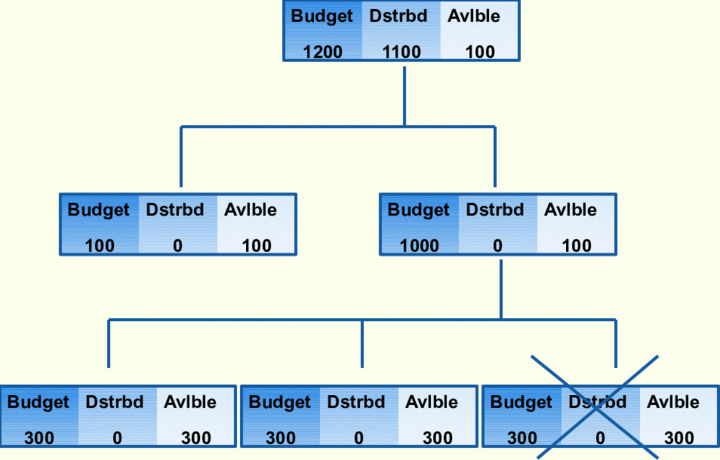
The next graphic shows how the program changes the budget values. The example suggests that only the original budget was assigned and that no budget subtype was specified.
Reconstruct Budget Values without a Budget Subtype
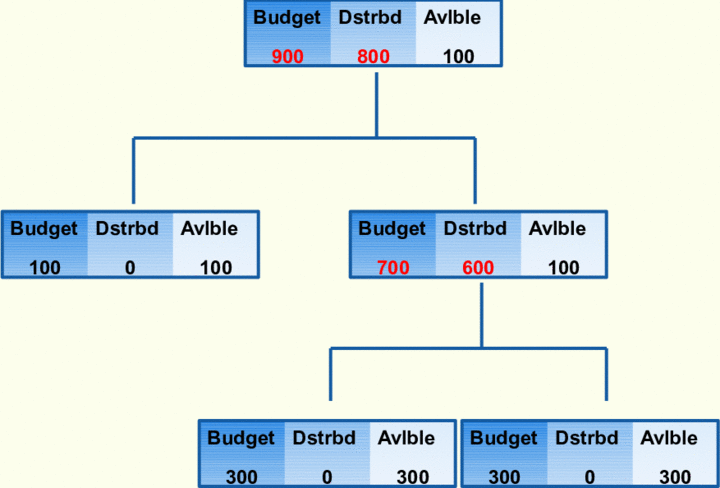
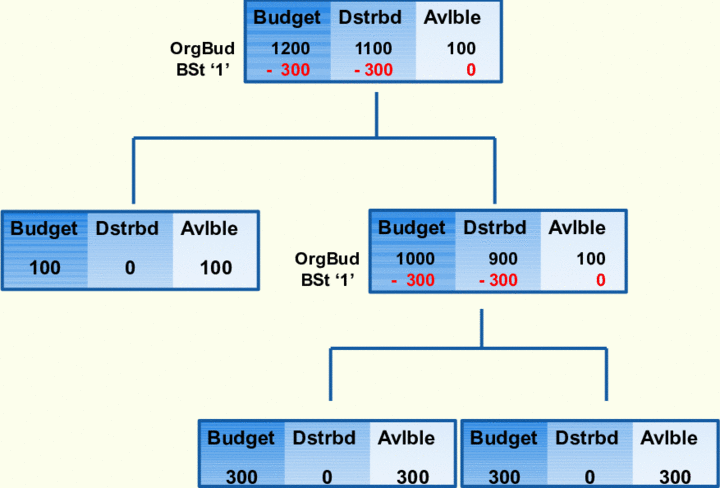
If a budget subtype were used for the reconstruction of the budget values, the example would change as follows:
Reconstruct budget values with the budget subtype ‘1’
Activities
To reconstruct budget values, in SAP menu choose

Accounting

Public Sector Management
Funds Management
Budgeting
Former Budgeting
Tools
Reconstruct Budget
 .
.