AddOn Concept
AddOns extend the functionality of the SAP Commerce Accelerator. They are a type of extension that allow you to add front-end files such JSP, HTML, CSS, and JavaScript files, and images without modifying the storefront front-end files directly.
The overall extensibility of SAP Commerce Accelerator is improved in the following ways:
-
You can generate your facade Data Transfer Objects (DTOs) and extend them, even if they are not defined in your own AddOn.
-
You can plug populators into existing converters without having to redefine them.
-
Some facades and services have been refactored so that they can be easily plugged in and their behavior can be easily modified.
For more information on extensions, see Extension Concept.
Overview
SAP Commerce Accelerator is built on an extensive framework that includes a template for storefront implementation. AddOns and extensions provide a well-defined infrastructure for third party developers to plug in their own functionality.
Using AddOns, you can extend the functionality of SAP Commerce Accelerator without editing the core code base. The core code base in this context means the Platform, and all additional extensions delivered with SAP Commerce Accelerator. An AddOn is a regular extension that may, or may not, provide additional front-end components to SAP Commerce Accelerator.
Creating Extensions
When creating extensions (including AddOns), it is a good idea to keep the logic and storefront-related features in separate extensions. That is why extensions are organized into the following groups:
-
Accelerator project extensions
-
Accelerator cockpit extensions
-
Accelerator sample and test data
-
SAP Commerce storefront API extensions
AddOn Architecture
An AddOn is a regular SAP Commerce extension that is configured using the extensioninfo.xml file, located in the root folder of the AddOn. Additionally, the storefront extension that is extended by an AddOn has to reference this AddOn in the extensioninfo.xml file. The structure of this file is exactly the same as any regular extension. For more information about this file, see extensioninfo.xml.
Extensibility of the Framework
The diagram below illustrates the three-layer model of the extensible framework of SAP Commerce Accelerator:

At the bottom is the Service layer, which includes fine-grained business methods, such as the ones responsible for adding promotions to a cart, or for calculating the total value of the cart. These services expose the data model, which persists in the database.
On top of the Service layer, there are facades, which implement specific business use-cases, such as adding a product to a cart, placing an order, or searching for a product. The facades expose the Data Transfer Objects (DTOs), which are completely independent from the underlying storage technology. There may be a one-to-one mapping of the model (such as store products), but there may also be a subset of the model, or aggregated models. The DTOs are not always stored in the database. An example of this is the Solr objects, which are stored in the Solr index.
The converters delegate to populators to convert the DTOs back and forth to models. For example, a product that has basic attributes, such as name, title, and description, can also have classification attributes. Therefore, you might have two populators, one for the basic attributes, and one for the classification attributes.
The facade layer, including the DTOs, represents the SAP Commerce OmniCommerce Connect. This is a business API, and the foundation for the web services.
On the top layer, the Controllers take the DTOs and expose them to the view. This is done using the Spring Model View Controller (MVC), which replaces all the facades, services, and controllers.
Extensibility of the Front-End
One example of extending the front-end is to enable customer feedback on your storefront. In this scenario, when a customer provides feedback, or rates a certain product, the system would automatically create a Customer Service Cockpit ticket for a customer service representative to review.
The AddOn Approach
The AddOn concept aims at extending the Accelerator storefront without touching its core code base. For example, you could implement customer feedback functionality on your storefront without editing the source code. Instead, you would plug in all the functionality from within your AddOn.
Continuing with this example, the AddOn would have an additional folder called acceleratoraddon, and the structure of the folders within it mirrors the structure of the folders containing the front-end components of a regular extension, as follows:

Figure: acceleratoraddon folder structure
In this example, the web folder contains both the src and the webroot subdirectories. After putting all the components you want to add into the proper folders, you need to run the following command on your system: ant build<Enter>.
The system automatically copies the files to the target storefront extension during the build phase, and creates two additional folders containing the imported content:
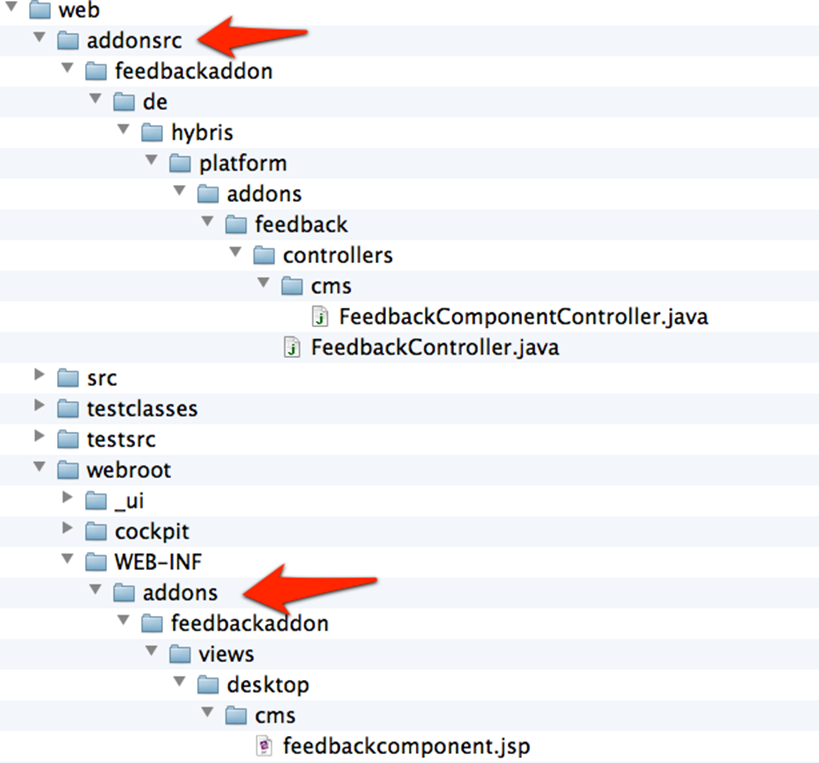
After the build phase finishes, the target extension contains the following new folders:
-
web/addonsrc, which contains the source code for each installed AddOn. This gets compiled automatically.
-
web/webroot/WEB-INF/addons, which contains all the front-end components, such as images, JSP files, HTML files, and TAG files.
All the contents of these folders are processed automatically during the development phase. By default, this mechanism is disabled on the production systems so as not to impact the performance of the system. This is because the process continuously checks if the contents of the folders have changed.
Benefits of the AddOn Approach
The benefits of the AddOn Concept approach are as follows:
-
AddOn files are kept separate from the rest of the front-end files.
-
When you upgrade the Accelerator, it will not overwrite your files.
-
You can easily remove your AddOns without refactoring the code of your whole extension.
Improved Overall Extensibility
The AddOn approach makes it easier to modify the exposed data model. For example, if you want to add a new attribute to a product , you do not have to subclass the DTO. Instead, you can plug in a new populator, which is responsible for adding the new attribute:

Additionally, you can modify multiple extensions at once. Previously, due to Java restrictions, you could only modify the subclass once. Now, you can plug in new data from every extension using a new XML descriptor to generate the DTOs. Each extension can provide such a descriptor. All definitions are merged, so you can add attributes to existing DTOs and fill your attributes with pluggable populators. As a result, you can extend an existing API without needing to replace anything.
The following is an example of an XML descriptor:
<beans xmlns:xsi="http://www.w3.org/2001/XMLSchema-instance"
	xsi:noNamespaceSchemaLocation="beans.xsd">

	<bean class="de.hybris.platform.commercefacades.product.data.ProductData">
		<property name="weight" type="int" />
		<property name="instruction" type="String" />
		<property name="additionalImage"
						 type="de.hybris.platform.commercefacades.product.data.ImageData" />
	</bean>

	<enum class="de.hybris.platform.commercefacades.product.ProductOption">
		<value>DIMENSIONS</value>
		<value>MINIMAL</value>
	</enum>
</beans>
Similarly to the item.xml file, the definitions in the beans.xml file are merged automatically. In the example above, the ProductData file is not part of our example extension, but it is extended from the commerceservices extension. That means that during this process, you extended the API because you modified the data model. You do not need to replace the facade in this instance. All you need to do is plug in the populator from your extension, and it can be done multiple times.
AddOns Best Practices
We recommend that you put as much logic into your AddOns as possible. The advantage of this is that whenever you need to upgrade your Accelerator code base, you do not need to merge the changes manually. By having the logic put into the AddOns, you can build a library of self-contained, reusable components that you can use for your future projects.